ASUS F2A85-V PRO 2-39
Chapter 2
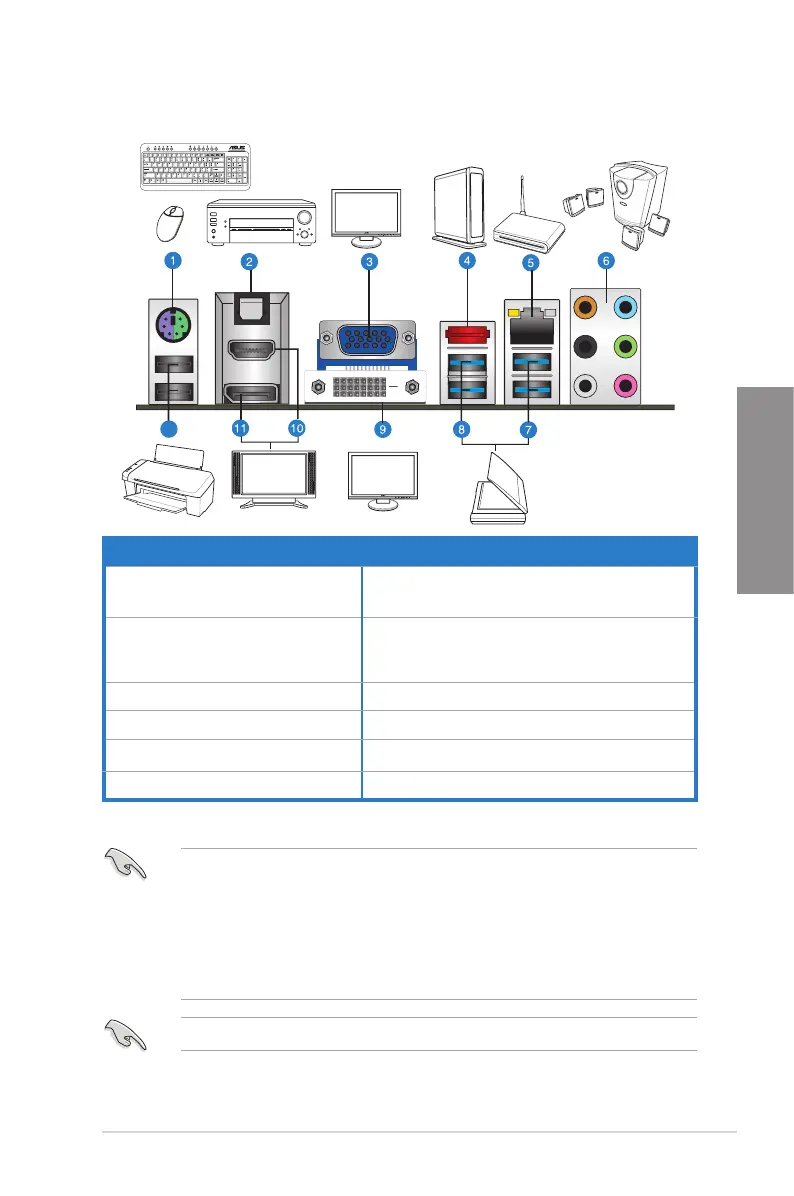
2.3.10 Rear panel connection
• Due to USB 3.0 controller limitation, USB 3.0 devices can only be used under Windows
®
OS environment and after the USB 3.0 driver is installed.
• USB 3.0 devices can be used as data storage only.
• The USB3_2 port supports USB Charger+ and USB BIOS Flashback.
• We strongly recommend that you connect USB 3.0 devices to USB 3.0 ports for faster
and better performance for your USB 3.0 devices.
* and **: Refer to the tables on the next page for LAN port LED and audio port denitions.
Rear panel connectors
1. PS/2 keyboard/mouse combo port
7. ASMedia USB 3.0 ports 1 and 2,
support ASUS USB 3.0 Boost UASP Mode
2. Optical S/PDIF Out port
8. AMD USB 3.0 ports 1 and 2, support ASUS USB
3.0 Boost UASP Mode. Bottom port supports USB
BIOS Flashback and USB Charger+
3. Video Graphics Adapter (VGA) port 9. DVI-D port
4. External SATA 6.0Gb/s port 10. HDMI port
5. Realtek
®
LAN (RJ-45) port* 11. DisplayPort
6. Audio I/O ports** 12. USB 2.0 ports 1 and 2
DO NOT insert a different connector to the external SATA port.


 To Next Page