40
IMPORTANT! DO NOT use any objects
in place of your nger to operate the
touchpad or else damage may occur to
the touchpad’s surface.
Pointing Device
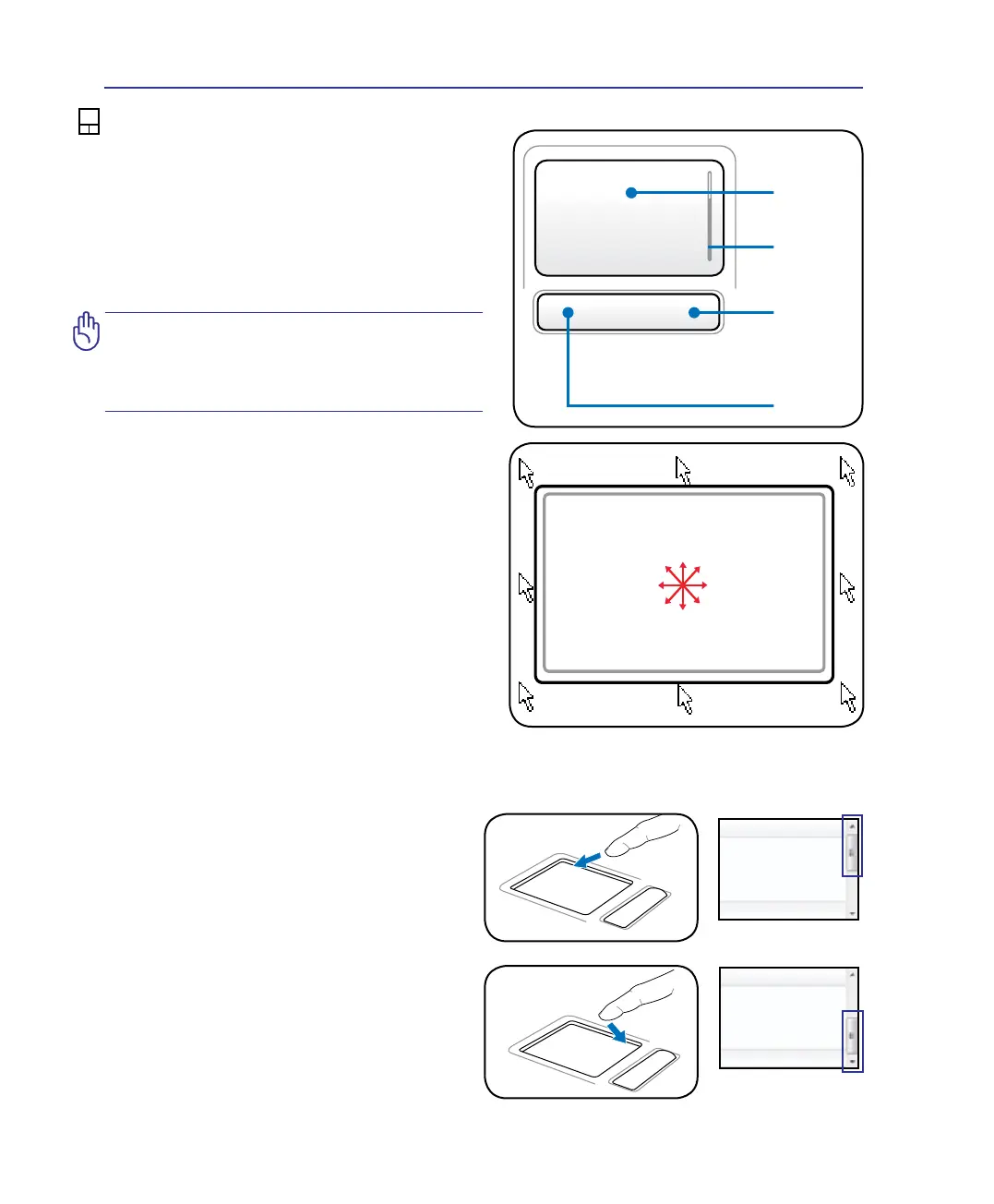
The Notebook PC’s integrated touchpad pointing
device is fully compatible with all two/three-but-
ton and scrolling knob PS/2 mice. The touchpad is
pressure sensitive and contains no moving parts;
therefore, mechanical failures can be avoided. A
device driver is still required for working with
some application software.
Using the Touchpad
Light pressure with the tip of your nger is all that
is required to operate the touchpad. Because the
touchpad is electrostatic sensitive, objects cannot
be used in place of your ngers. The touchpad’s
primary function is to move the pointer around or
select items displayed on the screen with the use of
your ngertip instead of a standard desktop mouse.
The following illustrations demonstrate proper use
of the touchpad.
Moving The Pointer
Place your nger in the center of the touchpad and
slide in a direction to move the pointer.
Slide nger
forward
Slide nger
left
Slide nger
backward
Slide nger
right
Scrolling (on selected models)
Slide your nger up or down on the right side to
scroll a window up or down.
Scroll Up
Scroll Down
4 Using the Notebook PC
Pointer
Movement
Right Click
Left Click
Scroll



 To Next Page