47
Hard Disk Drive
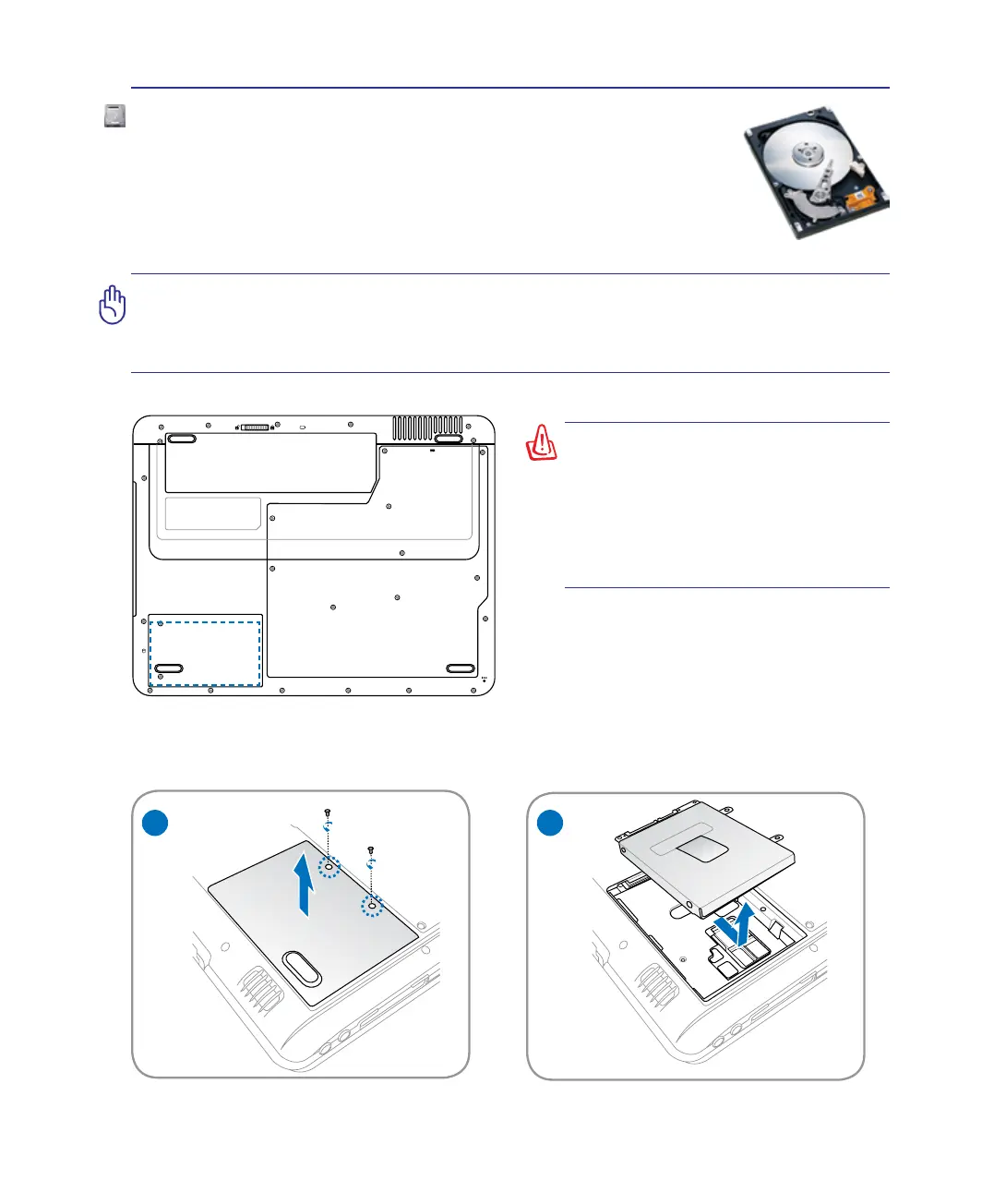
Hard disk drives have higher capacities and operate at much faster speeds than
oppy disk drives and optical drives. The Notebook PC comes with a replace-
able hard disk drive. Current hard drives support S.M.A.R.T. (Self Monitoring and
Reporting Technology) to detect hard disk errors or failures before they happen.
When replacing or upgrading the hard drive, always visit an authorized service center
or retailer for this Notebook PC.
IMPORTANT! Poor handling of the Notebook PC may damage the hard disk drive.
Handle the Notebook PC gently and keep it away from static electricity and strong
vibrations or impact. The hard disk drive is the most delicate component and will
likely be the rst or only component that is damaged if the Notebook PC is dropped.
Removing the hard disk drive:
1
WARNING! Disconnect all the con-
nected peripherals, any telephone
or telecommunication lines and
power connector (such as exter-
nal power supply, battery pack,
etc.) before removing the hard
disk cover.
2
Using the Notebook PC 4



 To Next Page