Appendix A
A-9
System BIOS Settings (cont.)
RAID Function Support (on selected model)
For models support RAID function, you must set the RAID item in the BIOS Setup before you can
create a RAID set from the built-in hard disk drives.
WARNING! Building a RAID set will clear all your data on both the primary disk
drive and the secondary disk drive. Ensure that you’ve made a backup before creat-
ing a RAID set.
The recovery partition will be deleted after you create a RAID set. You can only
install the system OS with the recovery DVD or a retail OS disc.
Only models with two disk drives may support this RAID function.
To enable the RAID function
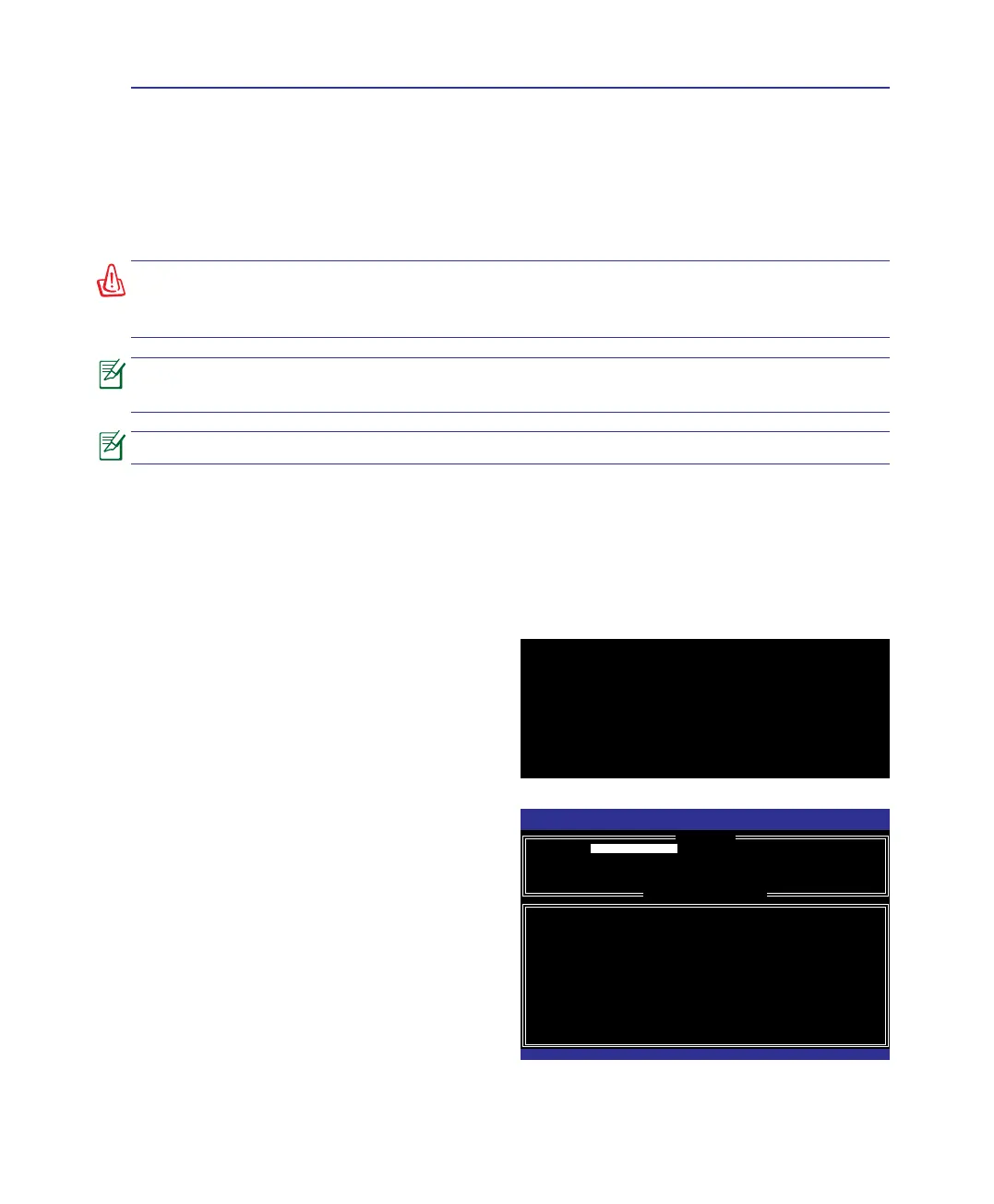
1. Press <F2> to enter the BIOS Setup during POST.
2� Go to the Advanced menu.
Intel(R) Matrix Storage Manager option ROM v7.0.0.1020 ICH8M-E
Copyright(C) 2003-07 Intel Corporation. All Rights Reserved.
RAID Volumes:
None dened.
Physical Disks:
Port Drive Model Serial # Size Type/Status(Vol ID)
0 Hitachi HTS72202 02DP0410DTG564WP 186.3GB Non-RAID Disk
1 Hitachi HTS72202 02DP1400DEG1XRGN 186.3GB Non-RAID Disk
Press <Ctrl-I> or Enter to Conguration Utility..
3� Set SATA Operation Mode to [RAID].
4. Press <F10> to save the conguration and exit the
BIOS setup.
To build a RAID set
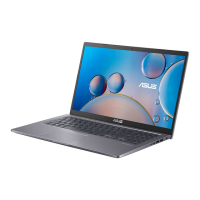
1. Restart the system and press <ESC> on bootup.
2. Press <Ctrl> + <I> to start the RAID utitliy.
Intel(R) Matrix Storage Manager option ROM v7.0.0.1020 ICH8M-E
Copyright(C) 2003-07 Intel Corporation. All Rights Reserved.
[ MAIN MENU ]
1. Create RAID Volume 3. Reset Disks to Non-RAID
[ DISK/VOLUME INFORMATION ]
RAID Volumes:
None dened.
Physical Disks:
Port Drive Model Serial # Size Type/Status(Vol ID)
0 Hitachi HTS72202 02DP0410DTG564WP 186.3GB Non-RAID Disk
1 Hitachi HTS72202 02DP1400DEG1XRGN 186.3GB Non-RAID Disk
[↑↓]-Select [ESC]-Exit [ENTER]-Select Menu
2. Delete RAID Volume 4. Recovery Volume Options
5. Exit
3. Select a desired RAID set to create.
4. Restart the system and reinstall the system OS.



 To Next Page