16
2 Knowing the Parts
Left Side
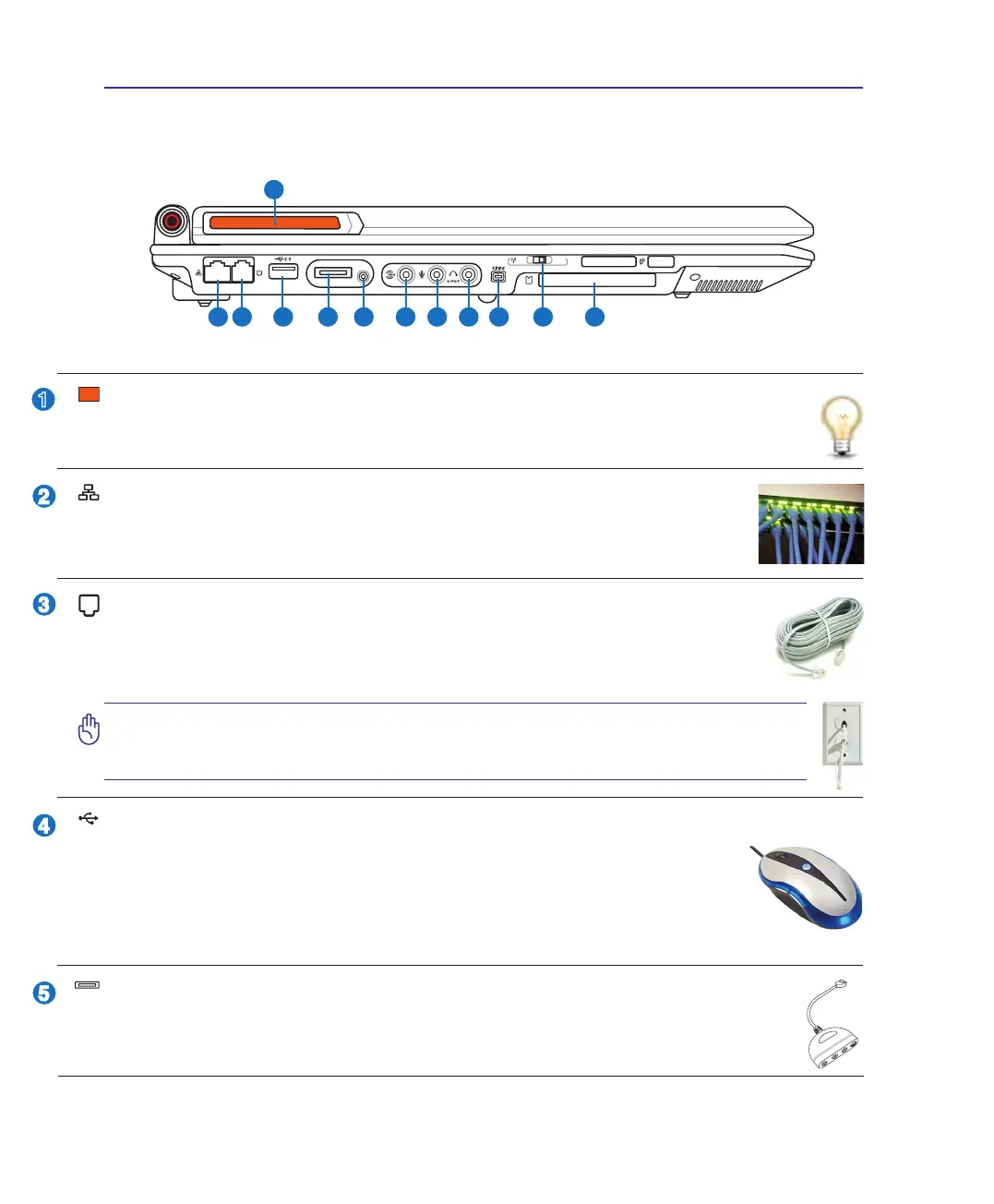
Refer to the diagram below to identify the components on this side of the Notebook PC.
ON OFF
FM/DTV/CATV
EXPRESS
2 3 4 5 6 7 8 9
1110
12
1
Direct Flash Indicator
The direct ash indicator blinks when Microsoft DirectX 9/10 (used with most games) is running.
Use the provided Direct Console software (see indicators) to enable or disable this function.
Audio/Video (AV/S) Input (on selected models)
The audio video input is a way of inputting audio and video signals through RCA jacks or
S-Video (requires the RCA adapter included with selected models). This function only works
when purchased with the TV tuner hardware and software package.
LAN Port
The RJ-45 LAN port with eight pins is larger than the RJ-11 modem port and supports a
standard Ethernet cable for connection to a local network. The built-in connector allows
convenient use without additional adapters.
Modem Port
The RJ-11 modem port with two pins is smaller than the RJ-45 LAN port and supports
a standard telephone cable. The internal modem supports up to 56K V.90 transfers. The
built-in connector allows convenient use without additional adapters.
IMPORTANT! The built-in modem does not support the voltage used in digital
phone systems. Do not connect the modem port to a digital phone system or
else damage will occur to the Notebook PC.
USB Port (2.0/1.1)
The USB (Universal Serial Bus) port is compatible with USB 2.0 or USB 1.1 devices
such as keyboards, pointing devices, cameras, hard disk drives, printers, and scanners
connected in a series up to 12Mbits/sec (USB 1.1) and 480Mbits/sec (USB 2.0). USB
allows many devices to run simultaneously on a single computer, with some peripherals
acting as additional plug-in sites or hubs. USB supports hot-swapping of devices so that
most peripherals can be connected or disconnected without restarting the computer.
(continued on next page)



 To Next Page