37
Using the Notebook PC 4
NOTE: The default setting or personal settings will only display when all of the alarms
have been dismissed.
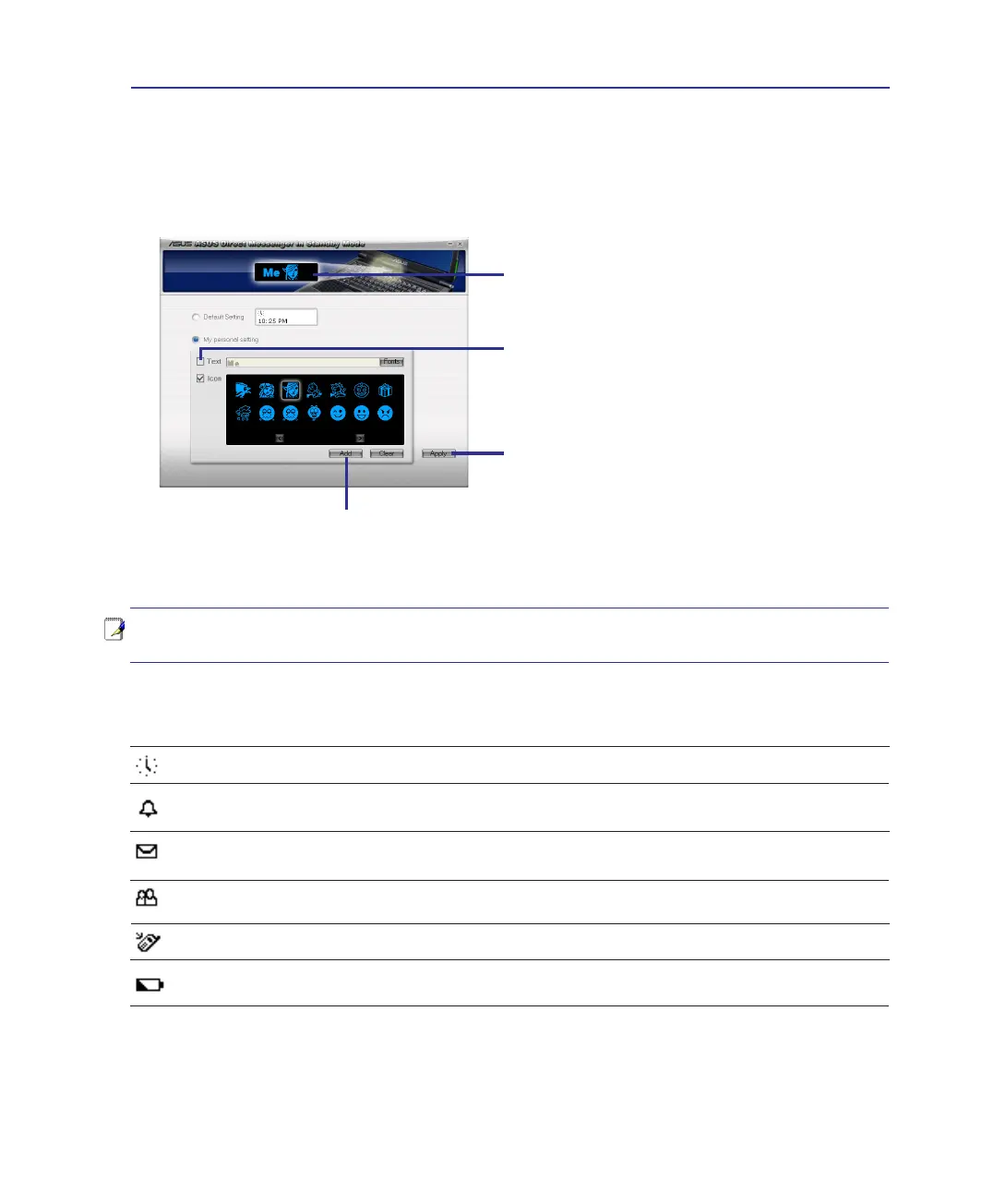
Preview window
Click Add after typing a text or
selecting an icon� (You can add
text or icons repeatedly�)
Check Text to enter text
or Icon to select an icon�
(You can add text or icons
repeatedly�)
Click Apply to send your
personal text/icon to the
Direct Messenger display�
Direct Messenger Icons
Clock icon - Default mode when no status is present; otherwise your own icon or text�
MS Outlook Meeting Alarm - Meeting venue, subject, and time will be scrolled below�
Icon will disappear 5 mins after set meeting time�
MS Outlook email - Email sender and subject will be scrolled below� Icon will disappear
after reading all new emails�
MS Messenger Call - Message sender (no message) will be scrolled below� Icon will
disappear after replying or closing the last message (older messages may be showing)�
Power4Phone Call - Caller ID (if available) will be scrolled below�
Notebook PC Battery Low - Battery power remaining from 10% will be scrolled below�
Icon will disappear after connecting external power (using the provided power adapter)�
Direct Messenger Display (Cont.)
Status Indicators
Personal settings screen - My personal setting



 To Next Page