4
Getting started
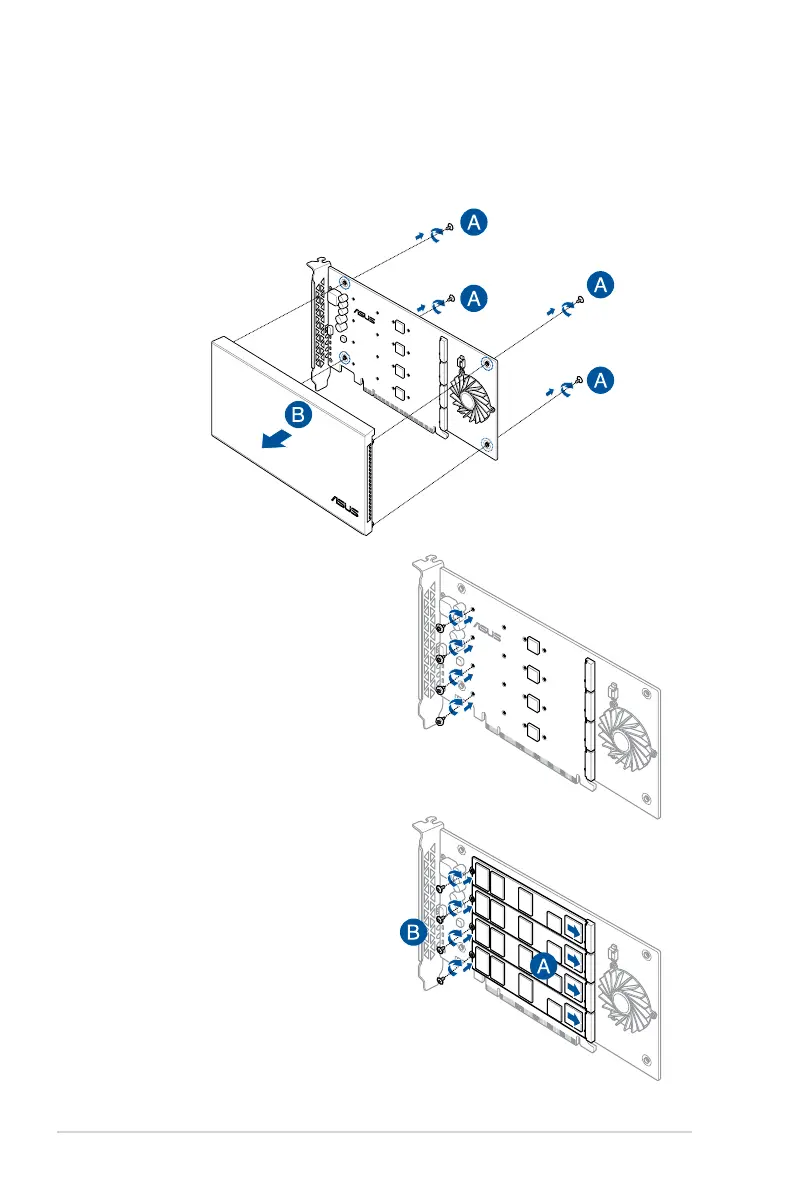
To install M.2 storage devices onto your ASUS HYPER M.2 X16 card:
3. Insert the M.2 storage devices into
the M.2 connectors, then secure
the M.2 storage devices with the
bundled screws.
2. Secure the stand screws onto the
ASUS HYPER M.2 X16 card.
1. Remove the four cover screws that secure the cover to the ASUS HYPER M.2 X16
card, then remove the cover and set it aside.
M.2_LED4
M.2_LED2
M.2_LED3
M.2_LED1
HYPER M.2 X16 CARD
M.2_LED4
M.2_LED2
M.2_LED3
M.2_LED1
HYPER M.2 X16 CARD
M.2_LED4
M.2_LED2
M.2_LED3
M.2_LED1
HYPER M.2 X16 CARD



 To Next Page