56
A Appendix
Optional Accessories
These items, if desired, come as optional items to complement your Notebook PC.
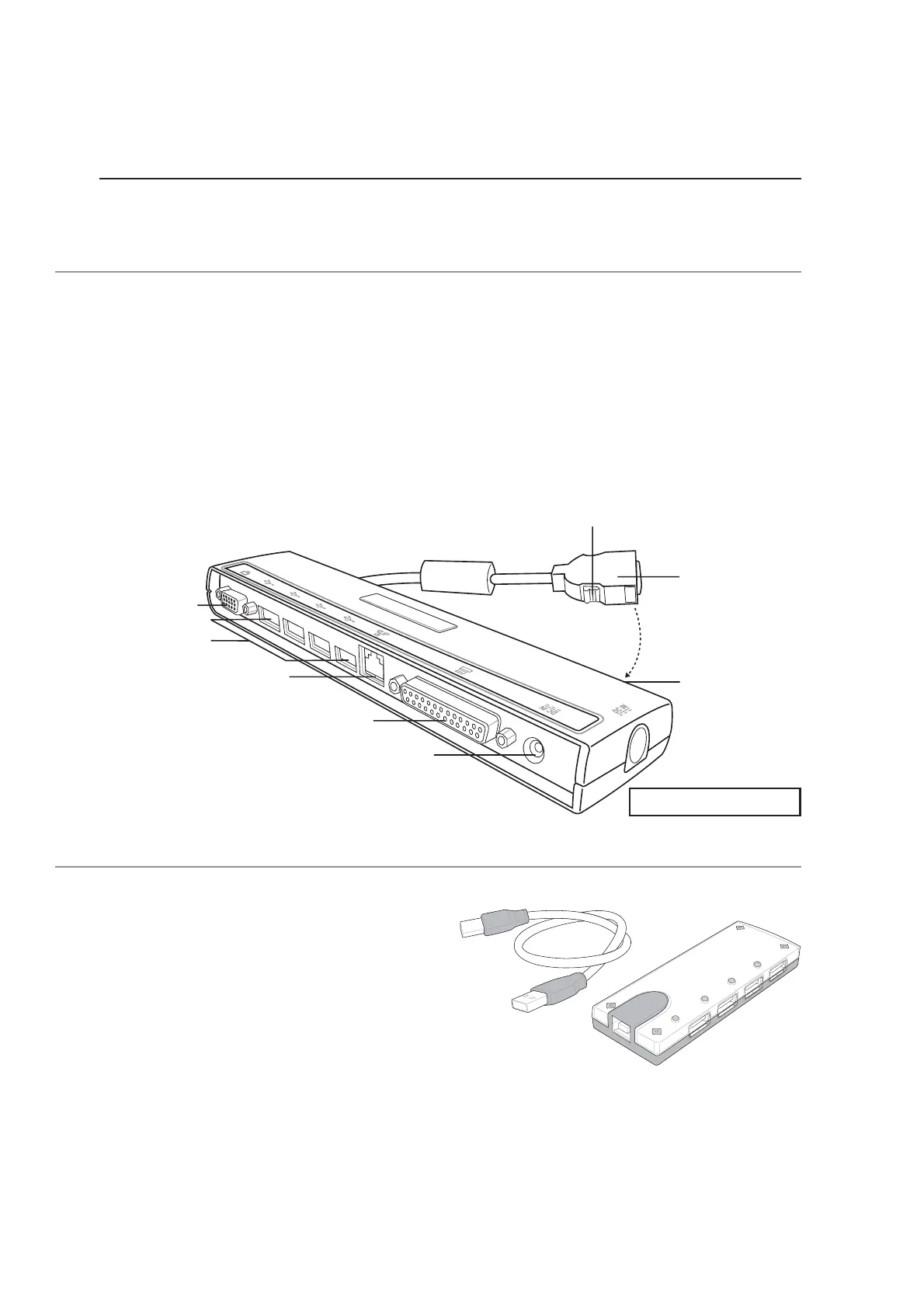
PortBar (Optional)
If you require a simple inexpensive docking solution, just use a PortBar to connect your desktop de-
vices and then quickly connect or disconnect all the devices through a single easy-to-use connector.
The PortBar’s Plug & Play feature allows it to be connected or disconnected while the Notebook PC is
ON or OFF (hot-dockable). Except for the device connected to the serial port, other devices should
function normally while hot-dockable. If any device does not function or cannot be seen, you can
refresh devices by: (1) right clicking the “My Computer” icon on the desktop, (2) selecting “Properties”
on the menu, (3) selecting the “Device Manager” tab, (4) clicking the “Refresh” button, and (5) click-
ing “OK” button to finish.
USB Hub (Optional)
Attaching an optional USB hub will increase your
USB ports and allow you to quickly connect or
disconnect many USB peripherals through a single
cable.
Docking
Connector
Press both sides to release
Monitor Port
65W DC Power Pass
Through to Notebook PC
USB Ports (4)
LAN (RJ-45)
Parallel Port
Attach cable
here when
transporting.
Portbar III shown here









 To Next Page