ASUS P5AD2-E PremiumASUS P5AD2-E Premium
ASUS P5AD2-E PremiumASUS P5AD2-E Premium
ASUS P5AD2-E Premium
5-95-9
5-95-9
5-9
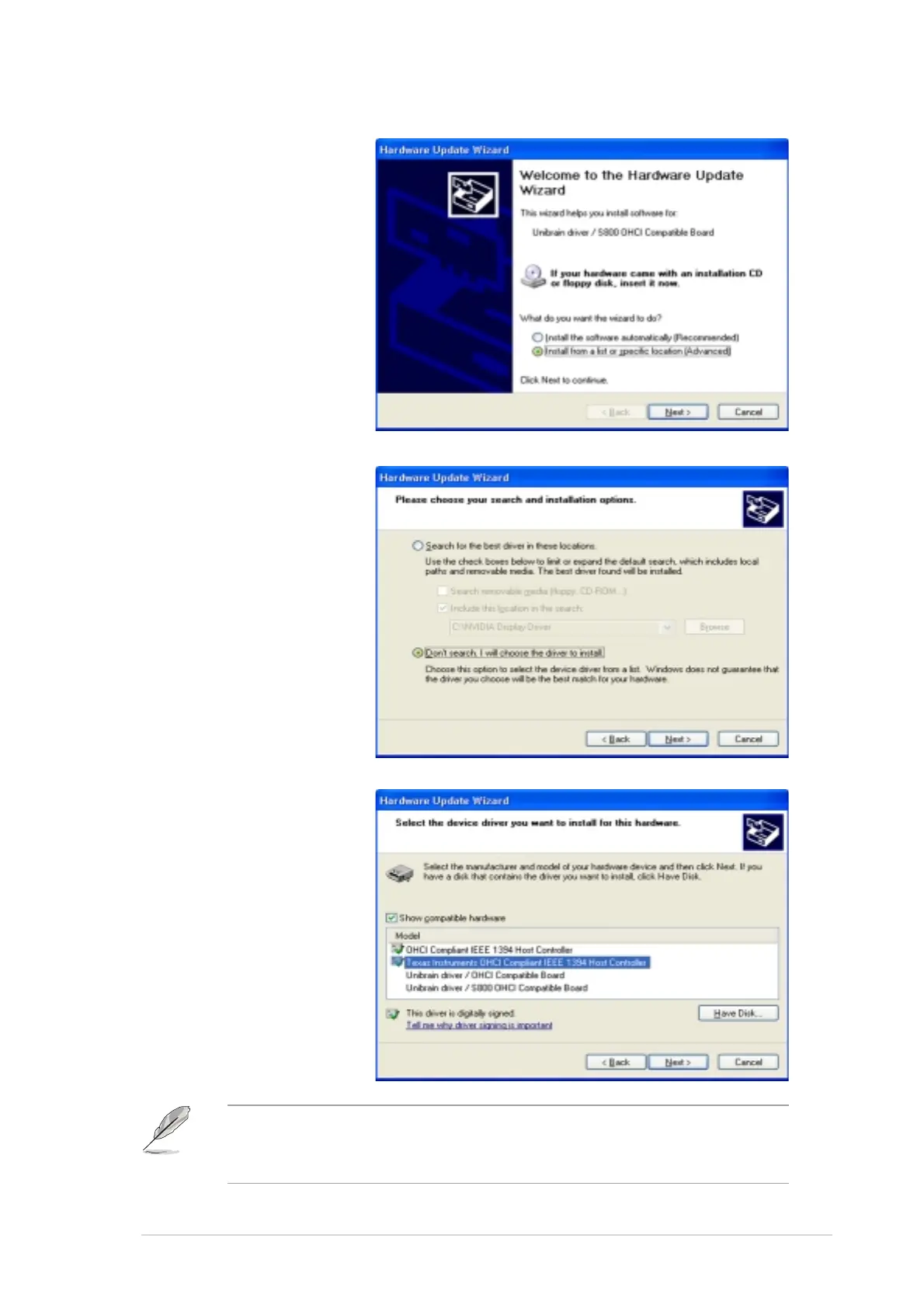
5. Select the option
Install from a listInstall from a list
Install from a listInstall from a list
Install from a list
or specificor specific
or specificor specific
or specific
locationlocation
locationlocation
location
(Advanced)(Advanced)
(Advanced)(Advanced)
(Advanced), then
click
NextNext
NextNext
Next.
6. Select the option
Don’t search, IDon’t search, I
Don’t search, IDon’t search, I
Don’t search, I
will choose thewill choose the
will choose thewill choose the
will choose the
driver to installdriver to install
driver to installdriver to install
driver to install,
then click
NextNext
NextNext
Next.
7. Select the Microsoft
1394 stack driver
from the list, then
click
NextNext
NextNext
Next.
The Microsoft 1394 stack driver follows the IEEE 1394 OHCI host
contoller. For this motherboard, the Microsoft 1394 stack driver is the
Texas Instrument OHCI IEEE 1394 Host Controller.



 To Next Page