ASUS P5AD2-E PremiumASUS P5AD2-E Premium
ASUS P5AD2-E PremiumASUS P5AD2-E Premium
ASUS P5AD2-E Premium
5-315-31
5-315-31
5-31
5.5.35.5.3
5.5.35.5.3
5.5.3
IntelIntel
IntelIntel
Intel
®®
®®
®
RAID configurations RAID configurations
RAID configurations RAID configurations
RAID configurations
This motherboard supports RAID 0, RAID 1, and Intel
®
Matrix Storage
configurations for Serial ATA hard disks drives through the Intel
®
ICH6R
Southbridge chip.
Setting the RAID item in BIOSSetting the RAID item in BIOS
Setting the RAID item in BIOSSetting the RAID item in BIOS
Setting the RAID item in BIOS
You must set the RAID item in the BIOS Setup before you can create a RAID
set(s). To do this:
1. Enter the BIOS Setup during POST.
2. Go to the
Main MenuMain Menu
Main MenuMain Menu
Main Menu, select
IDE ConfigurationIDE Configuration
IDE ConfigurationIDE Configuration
IDE Configuration, then press <Enter>.
3. Select the item
Configure SATA AsConfigure SATA As
Configure SATA AsConfigure SATA As
Configure SATA As, then press <Enter> to display
the configuration options.
4. Select
RAID RAID
RAID RAID
RAID from the
Configure SATA As Configure SATA As
Configure SATA As Configure SATA As
Configure SATA As item options, then
press <Enter>.
5. Select the item
Onboard Serial-ATA BOOTROMOnboard Serial-ATA BOOTROM
Onboard Serial-ATA BOOTROMOnboard Serial-ATA BOOTROM
Onboard Serial-ATA BOOTROM, press <Enter>,
then select
EnabledEnabled
EnabledEnabled
Enabled from the options.
6. Save your changes, then exit the BIOS Setup.
Refer to Chapter 4 for details on entering and navigating through the
BIOS Setup.
IntelIntel
IntelIntel
Intel
®®
®®
®
Application Accelerator RAID Option ROM Utility Application Accelerator RAID Option ROM Utility
Application Accelerator RAID Option ROM Utility Application Accelerator RAID Option ROM Utility
Application Accelerator RAID Option ROM Utility
The Intel
®
Application Accelerator RAID Option ROM utility allows you to
create RAID 0 and RAID 1 set(s) from SATA hard disk drives that are
connected to the SATA connectors supported by the motherboard
Southbridge chip.
To enter the Intel
®
Application Accelerator RAID Option ROM utility:
1. Turn on the system after installing all the SATA hard disk drives.
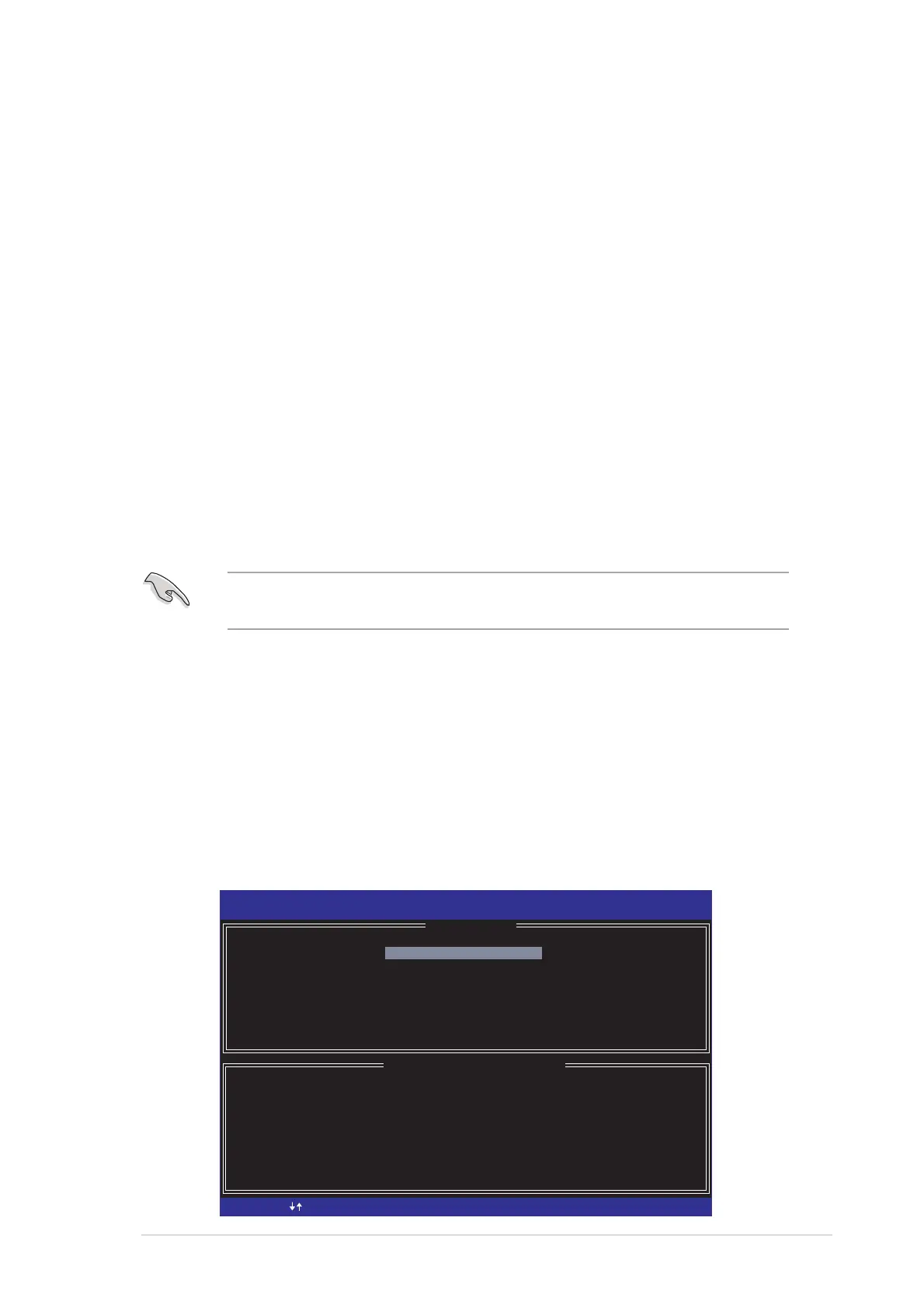
2. During POST, press <Ctrl+I> to display the utility main menu.
[
DISK/VOLUME INFORMATION
]
RAID Volumes:
None defined.
Non-RAID Disks:
Port Drive Model Serial # Size Type/Status (Vol ID)
0 ST380013AS xxxxxxxx 74.5GB Non-RAID Disk
1 ST380013AS xxxxxxxx 74.5GB Non-RAID Disk
Intel(R) Application Accelerator RAID Option ROM v4.0.0.6211
Copyright(C) 2003-04 Intel Corporation. All Rights Reserved.
[
MAIN MENU
]
1. Create RAID Volume
2. Delete RAID Volume
3. Reset Disks to Non-RAID
4. Exit
[ ]-Select
[ESC] Exit
[Enter]-Select Menu



 To Next Page