ASUS P5P41D 1-13
1.7.2 Memory congurations
You may install 512MB, 1GB, and 2GB unbuffered non-ECC DDR2 DIMMs into the DIMM
sockets.
• DDR2 1066 memory modules are only supported by DIMM_A1 and DIMM_A2.
• Always install DIMMs with the same CAS latency. For optimum compatibility, it is
recommended that you obtain memory modules from the same vendor.
• Due to the memory address limitation on 32-bit Windows
®
OS, when you install 4GB
or more memory on the motherboard, the actual usable memory for the OS can be
about 3GB or less. For effective use of memory, we recommend that you do any of the
following:
- Use a maximum of 3GB system memory if you are using a 32-bit WindowsUse a maximum of 3GB system memory if you are using a 32-bit Windows
®
OS.
- Install a 64-bit WindowsWindows
®
OS when you want to install 4GB or more memory on
the motherboard.
• This motherboard does not support DIMMs made up of 256 megabits (Mb) chips or less.
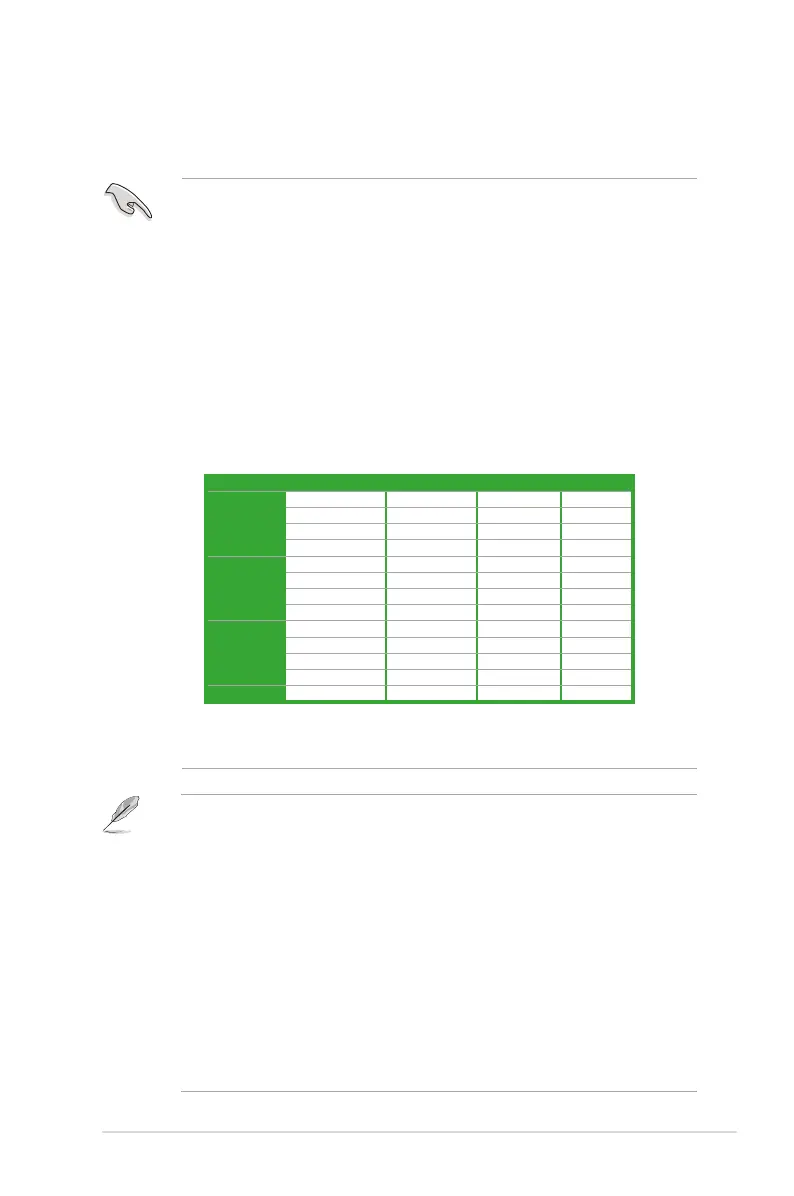
• Due to chipset limitation, you can only use the DIMM slots under specic conditions.
Refer to the table below for details.
Mode DIMM_A1 DIMM_A2 DIMM_B1 DIMM_B2
One DIMM DS/SS
DS/SS
DS/SS
DS/SS
Two DIMMs DS/SS** DS/SS**
DS/SS** DS/SS**
DS/SS DS/SS
DS/SS DS/SS
Three DIMMs SS SS DS/SS
SS SS DS/SS
DS/SS SS SS
DS/SS SS SS
Four DIMMs SS SS SS SS
* DS: Double-sided DIMM; SS: Single-sided DIMM
** When using two DIMMs, we recommend that you insert the DIMMs in DIMM_A1 and
DIMM_B1, or in DIMM_A2 and DIMM_B2.
• This motherboard supports up to 8 GB on Windowsindows
®
XP Professional x64 and Windows
®
Vista x64 editions. You may install a maximum of 2GB DIMM on each slot.. You may install a maximum of 2GB DIMM on each slot.
• The default memory operation frequency is dependent on its Serial Presence Detect
(SPD), which is the standard way of accessing information from a memory module.
Under the default state, some memory modules for overclocking may operate at a lower
frequency than the vendor-marked value.
• For system stability, use a more efcient cooling system to support a full memory load (2
DIMMs) or overclocking conditions.
• Some old-version DDR2-800 DIMMs may not match Intel
®
’s On-Die-Termination (ODT)
requirement and will automatically downgrade to run at DDR2-667. If this happens,
contact your memory vendor to check the ODT value.
• Due to chipset limitation, DDR2-800 with CL=4 will be downgraded to run at DDR2-667
by default setting. If you want to operate with lower latency, adjust the memory timing
manually.



 To Next Page