1-22 Chapter 1: Product introduction
1.10.2 Internal connectors
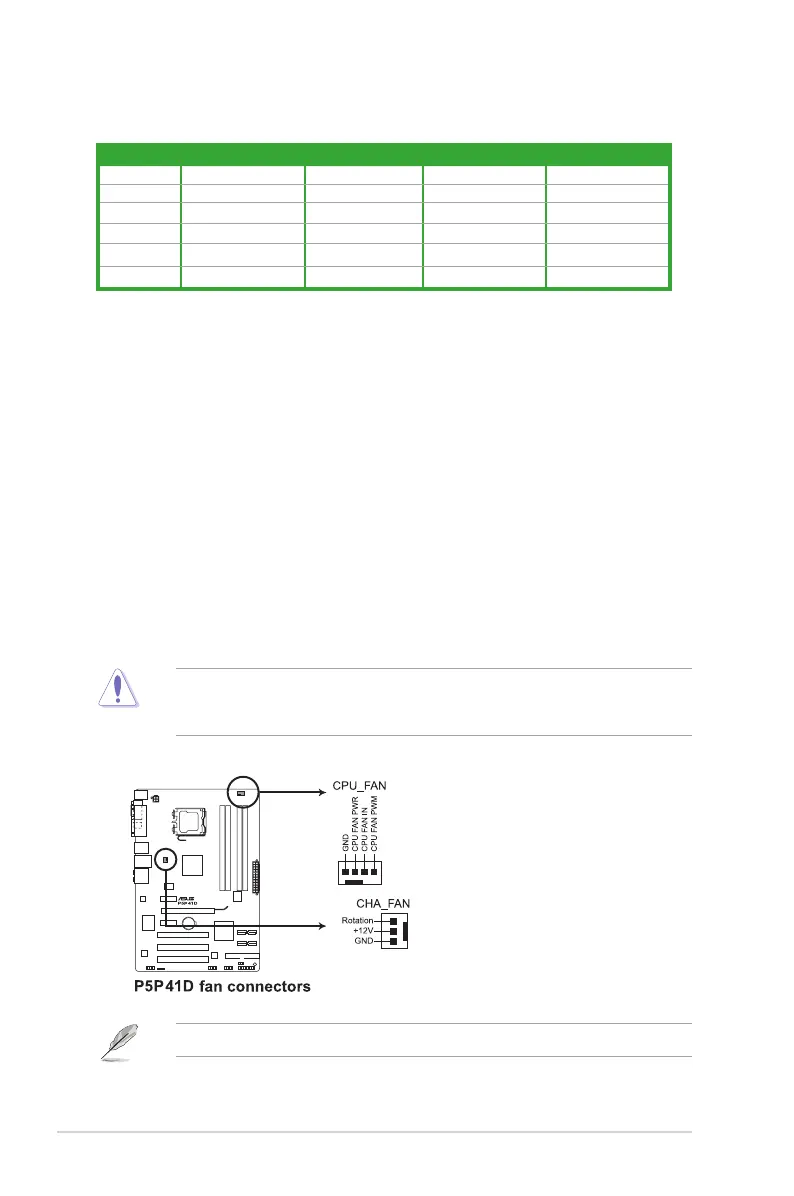
1. CPU and chassis fan connectors (4-pin CPU_FAN, 3-pin CHA_FAN)
These fan connectors support a cooling fan of 350mA~740mA (8.88W max.) or a total
of 1A~2.22A (26.64W max.) at +12V. Connect the fan cables to the fan connectors on
the motherboard, ensuring that the black wire of each cable matches the ground pin of
the connector.
Do not forget to connect the fan cables to the fan connectors. Insufcient air ow inside the
system may damage the motherboard components. These are not jumpers! Do not place
jumper caps on the fan connectors!
Only the 4-pin CPU fan connector supports the ASUS Q-FAN feature.
10. USB 2.0 ports 1 and 2. These two 4-pin Universal Serial Bus (USB) ports are
available for connecting USB 2.0 devices.
11. USB 2.0 ports 3 and 4. These two 4-pin Universal Serial Bus (USB) ports are
available for connecting USB 2.0 devices.
12. Optical S/PDIF Out port. This port connects an external audio output device via an
optical S/PDIF cable.
13. COM port. This 9-pin COM1 port is for pointing devices or other serial devices.
14. PS/2 Keyboard port (purple). This port is for a PS/2 keyboard.
Audio 2, 4, 6, or 8-channel conguration
Port Headset 2-channel 4-channel 6-channel 8-channel
Light Blue Line In Line in Line in Line in
Lime Line Out Front Speaker Out Front Speaker Out Front Speaker Out
Pink Mic In Mic In Mic in Mic in
Orange - - Center/Subwoofer Center/Subwoofer
Black - Rear Speaker Out Rear Speaker Out Rear Speaker Out
Gray - - - Side Speaker Out



 To Next Page