1-24 Chapter 1: Product introduction
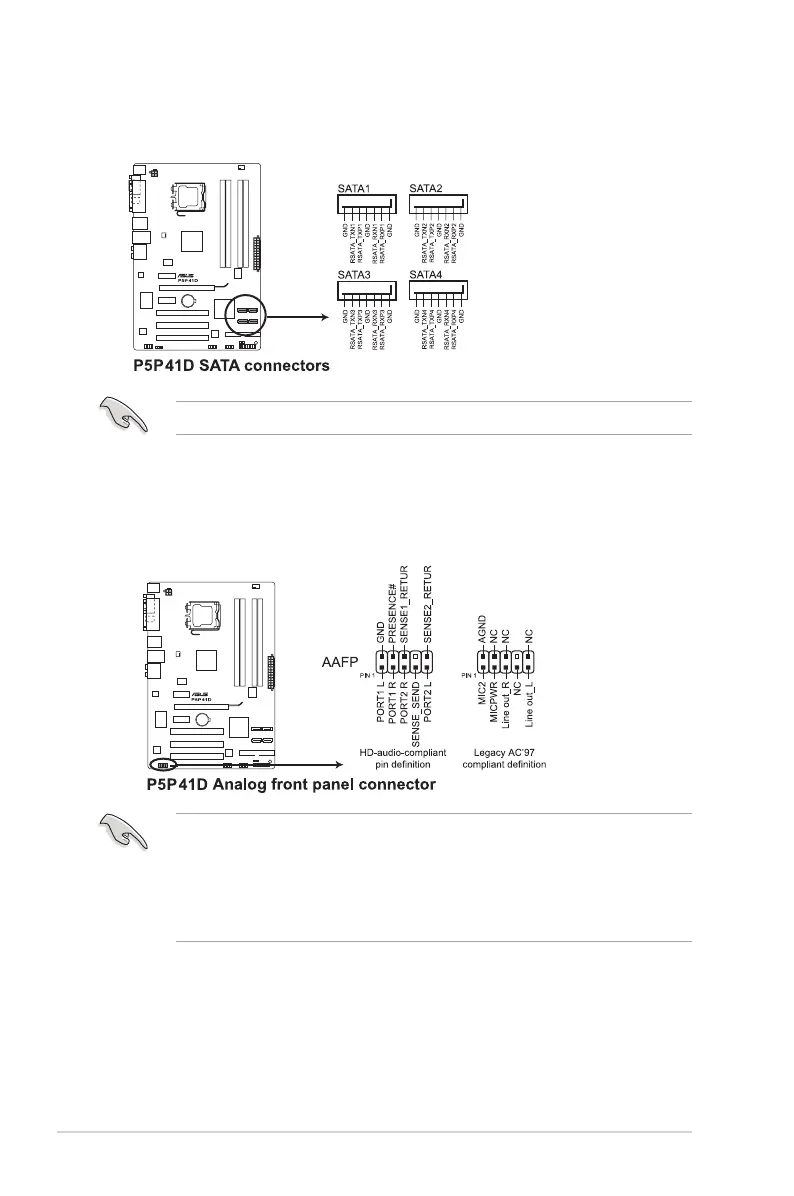
4. Serial ATA connectors (7-pin SATA1-4)
These connectors are for the Serial ATA signal cables for Serial ATA hard disk drives.
Install the Windows
®
XP Service Pack 2 or later version before using Serial ATA.
5. Front panel audio connector (10-1 pin AAFP)
This connector is for a chassis-mounted front panel audio I/O module that supports
either HD Audio or legacy AC`97 audio standard. Connect one end of the front panel
audio I/O module cable to this connector.
• We recommend that you connect a high-denition front panel audio module to this
connector to avail of the motherboard’s high-denition audio capability.
• If you want to connect a high-denition front panel audio module to this connector, set
the Front Panel Type item in the BIOS setup to [HD Audio]. If you want to connect an
AC'97 front panel audio module to this connector, set the item to [AC97]. By default, this
connector is set to [HD Audio]. See section 2.4.3 Chipset for details.



 To Next Page