ASUS P5WD2-E PremiumASUS P5WD2-E Premium
ASUS P5WD2-E PremiumASUS P5WD2-E Premium
ASUS P5WD2-E Premium
4-334-33
4-334-33
4-33
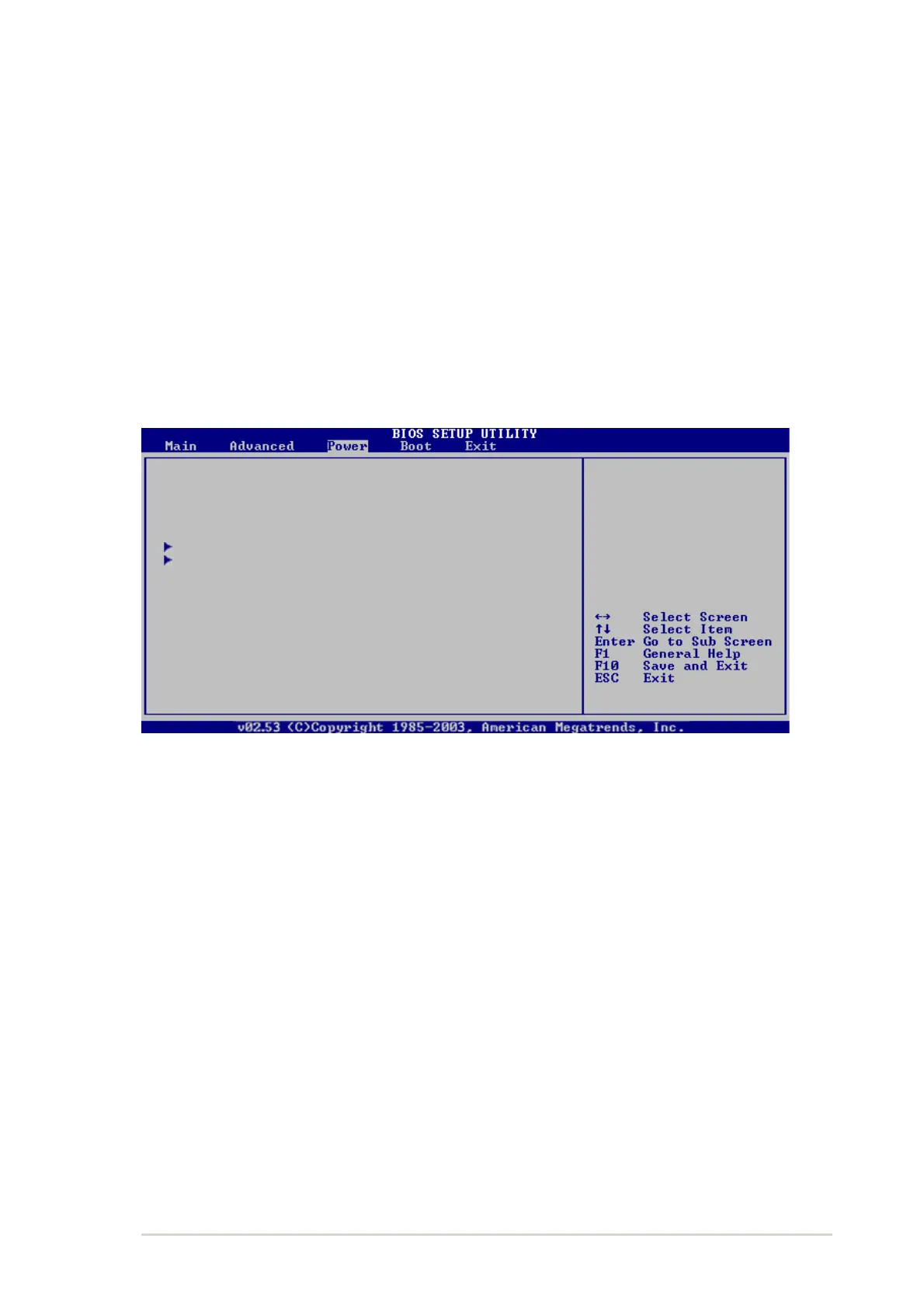
4.5 Power menu
The Power menu items allow you to change the settings for the ACPI and
Advanced Power Management (APM) features. Select an item then press
<Enter> to display the configuration options.
4.5.14.5.1
4.5.14.5.1
4.5.1
Suspend Mode [Auto]Suspend Mode [Auto]
Suspend Mode [Auto]Suspend Mode [Auto]
Suspend Mode [Auto]
Allows you to select the Advanced Configuration and Power Interface (ACPI)
state to be used for system suspend. Setting this item to [Auto] allows the
OS to select the ACPI state. Configuration options: [S1 (POS) Only]
[S3 Only] [Auto]
4.5.24.5.2
4.5.24.5.2
4.5.2
Repost Video on S3 Resume [No]Repost Video on S3 Resume [No]
Repost Video on S3 Resume [No]Repost Video on S3 Resume [No]
Repost Video on S3 Resume [No]
Determines whether to invoke VGA BIOS POST on S3/STR resume.
Configuration options: [No] [Yes]
4.5.34.5.3
4.5.34.5.3
4.5.3
ACPI 2.0 Support [No]ACPI 2.0 Support [No]
ACPI 2.0 Support [No]ACPI 2.0 Support [No]
ACPI 2.0 Support [No]
Allows you to add more tables for Advanced Configuration and Power
Interface (ACPI) 2.0 specifications. Configuration options: [No] [Yes]
Suspend Mode [Auto]
Repost Video on S3 Resume [No]
ACPI 2.0 Support [No]
ACPI APIC Support [Enabled]
APM Configuration
Hardware Monitor
Select the ACPI state
used for System
Suspend.
IRQ-xx assigned to [PCI Device]IRQ-xx assigned to [PCI Device]
IRQ-xx assigned to [PCI Device]IRQ-xx assigned to [PCI Device]
IRQ-xx assigned to [PCI Device]
When set to [PCI Device], the specific IRQ is free for use of PCI/PnP
devices. When set to [Reserved], the IRQ is reserved for legacy ISA
devices. Configuration options: [PCI Device] [Reserved]



 To Next Page