6-66-6
6-66-6
6-6
Chapter 6: Chapter 6:
Chapter 6: Chapter 6:
Chapter 6:
ATIATI
ATIATI
ATI
®®
®®
®
MVP technology support MVP technology support
MVP technology support MVP technology support
MVP technology support
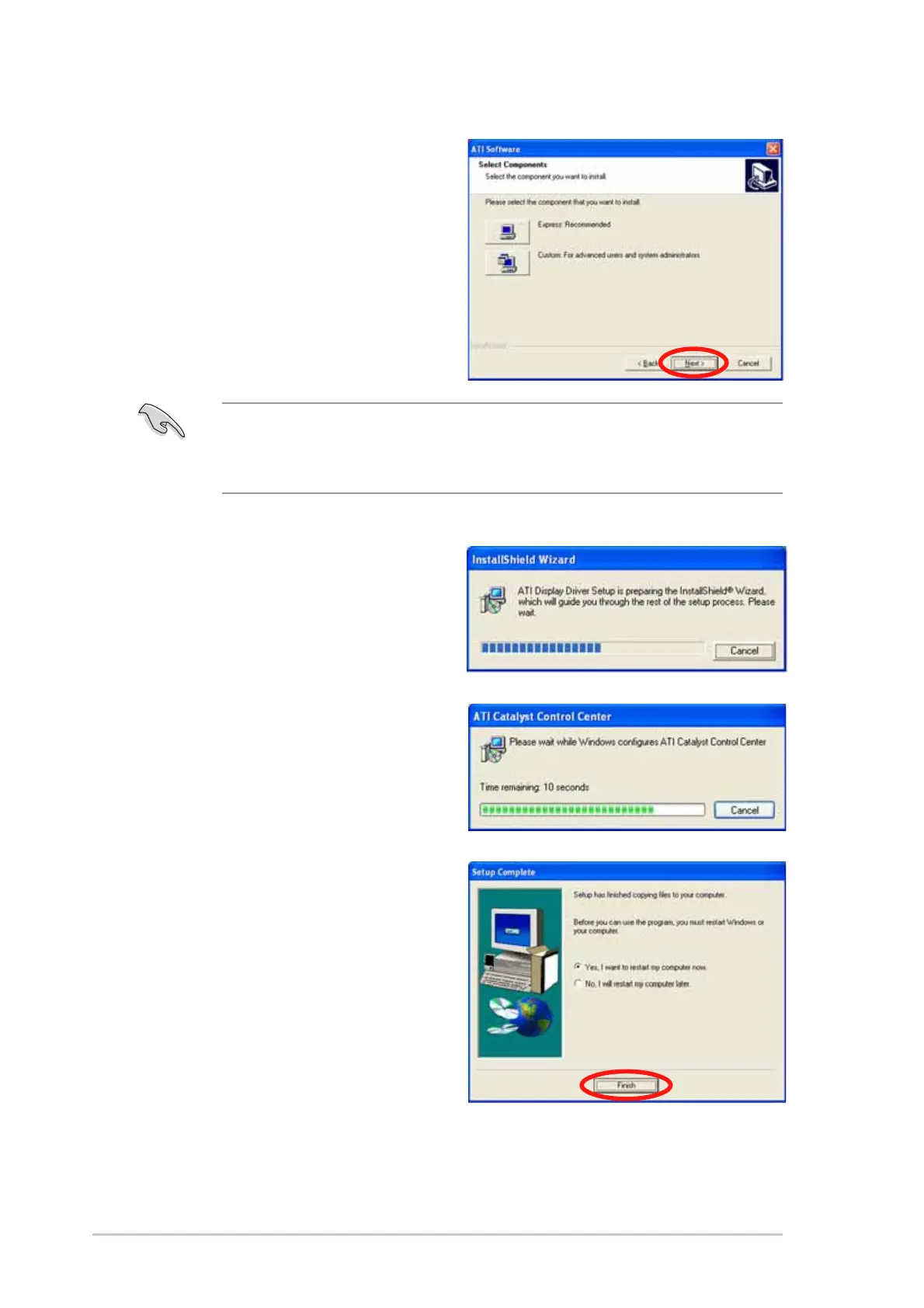
6. Select the components that
you want to install, then click
NextNext
NextNext
Next.
Setup prepares the installation
wizard that will guide you to
setup process.
Windows automatically
configures the ATI Catalyst
Control Center. The status
windows indicates the progress
of the installation.
7. The
Setup CompleteSetup Complete
Setup CompleteSetup Complete
Setup Complete window
appears, indicating that the
driver files have been copied to
your computer.
Click
YesYes
YesYes
Y e s to restart your
computer now or
NoNo
NoNo
N o to restart
later
8. Click
FinishFinish
FinishFinish
Finish.
•
Select
ExpressExpress
ExpressExpress
Express to install the HydraVision™ multi-monitor and
desktop management software, as well as the ATI driver.
•
Select
CustomCustom
CustomCustom
Custom to individually choose desired software components.



 To Next Page