ASUS P6X58-E WS 4-19
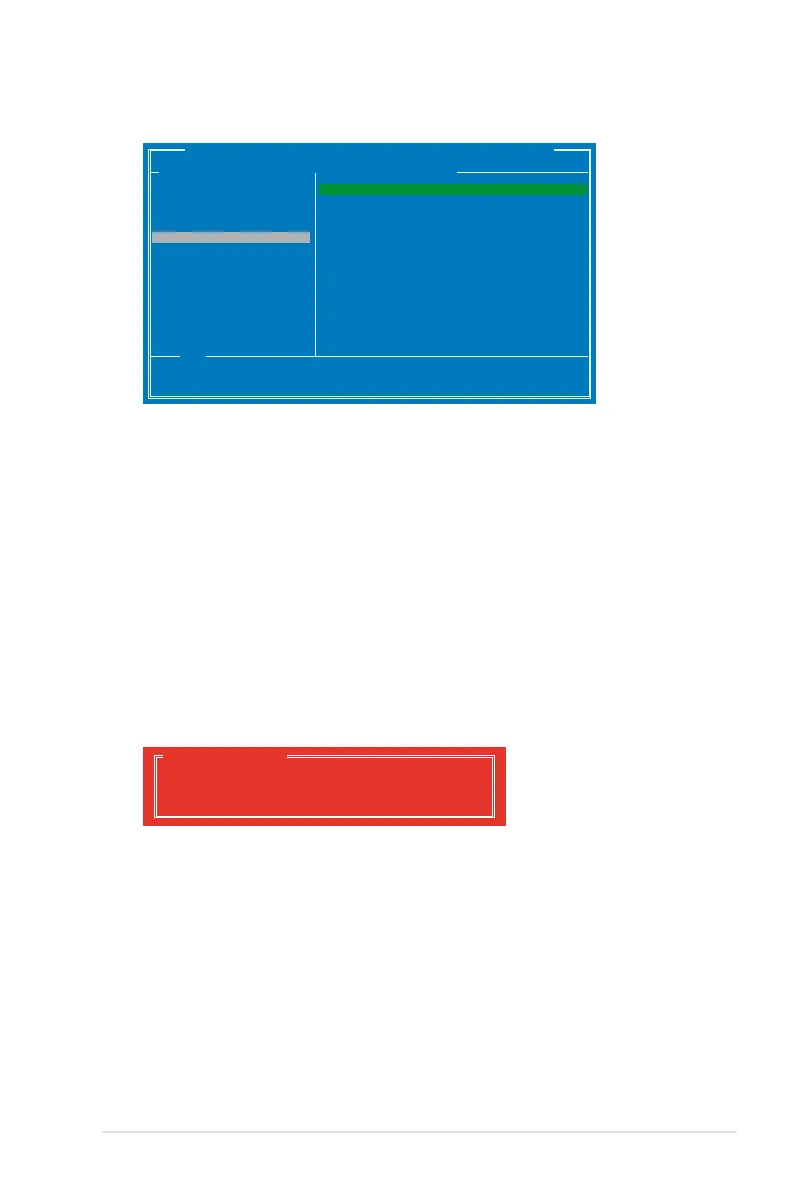
4. Use the up or down arrow key to move the selection bar and press <Enter>
to congure further RAID settings.
RAID Level: Select a RAID Level. Conguration options: [RAID 0] [RAID 1]
Stripe Size: Species the size of single data block on the virtual disk. In
general, a larger stripe size is recommended for applications requiring large
data transfers such as audio, video, and graphics. A smaller stripe size is
better for applications with content in much smaller size, such as e-mails and
documents.
Conguration options: [32K] [64K]
Name: Enter a name with 1–10 letters (no special characters) for the RAID
array.
5. Move the selection bar to Next and press <Enter>. The following warning
message appears:
Do you want to create this virtual disk ?
Yes No
Create Virtual Disk
Press <Y> to create the RAID array, or press <N> to cancel. The new RAID
array appears under Virtual Disks, as shown in the image below.
Marvell BIOS Setup (c) 2009 Marvell Technology Group Ltd.
Congure->Select free disksCreate Virtual Disk
Help
Virtual disk congurations.
ENTER: Select F10: Exit/Save ESC: Return
HBA 0: Marvell 0
├ Virtual Disks
└ Free Physical Disks
* ├ PD 0: ST3160812AS
* └ PD 8: ST3160812AS
RAID Level : RAID 0
Max Size(MB) : 305253
Stripe Size : 64KB
Gigabyte Rounding : 1G
Quick Init : Yes
Name : Default
Threshold(%) : 90
Next
▶ ▶







 To Next Page