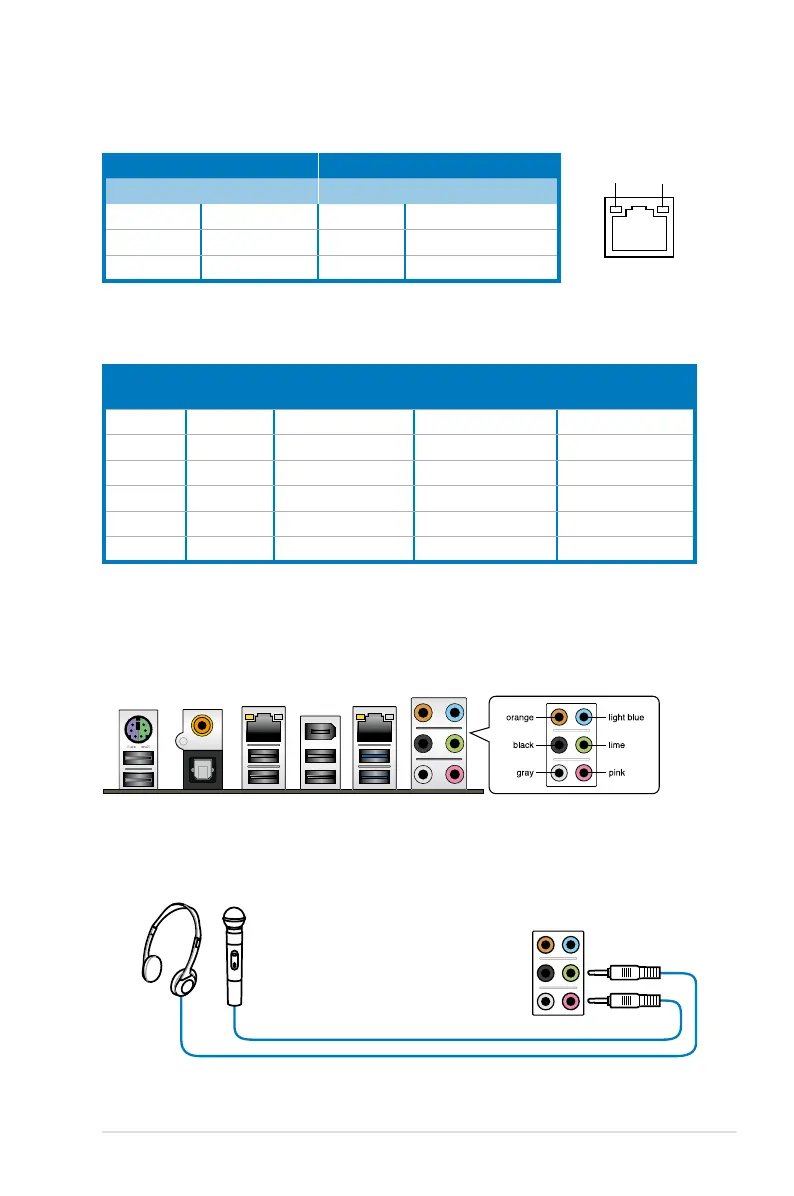
* LAN port LED indications
** Audio 2, 4, 6, or 8-channel conguration
Port
Headset
2-channel
4-channel 6-channel 8-channel
Light Blue Line In Line In Line In Line In
Lime Line Out Front Speaker Out Front Speaker Out Front Speaker Out
Pink Mic In Mic In Mic In Mic In
Orange – – Center/Subwoofer Center/Subwoofer
Black – Rear Speaker Out Rear Speaker Out Rear Speaker Out
Gray – – – Side Speaker Out
SPEED
LED
ACT/LINK
LED
LAN port
Activity Link LED Speed LED
Status Description Status Description
OFF No link OFF 10 Mbps connection
ORANGE Linked ORANGE 100 Mbps connection
BLINKING Data activity GREEN 1 Gbps connection
2.8.2 Audio I/O connections
Audio I/O ports
Connect to Headphone and Mic
ASUS P6X58-E WS 2-27







 To Next Page