2-26 Chapter 2: Hardware information
Chapter 2
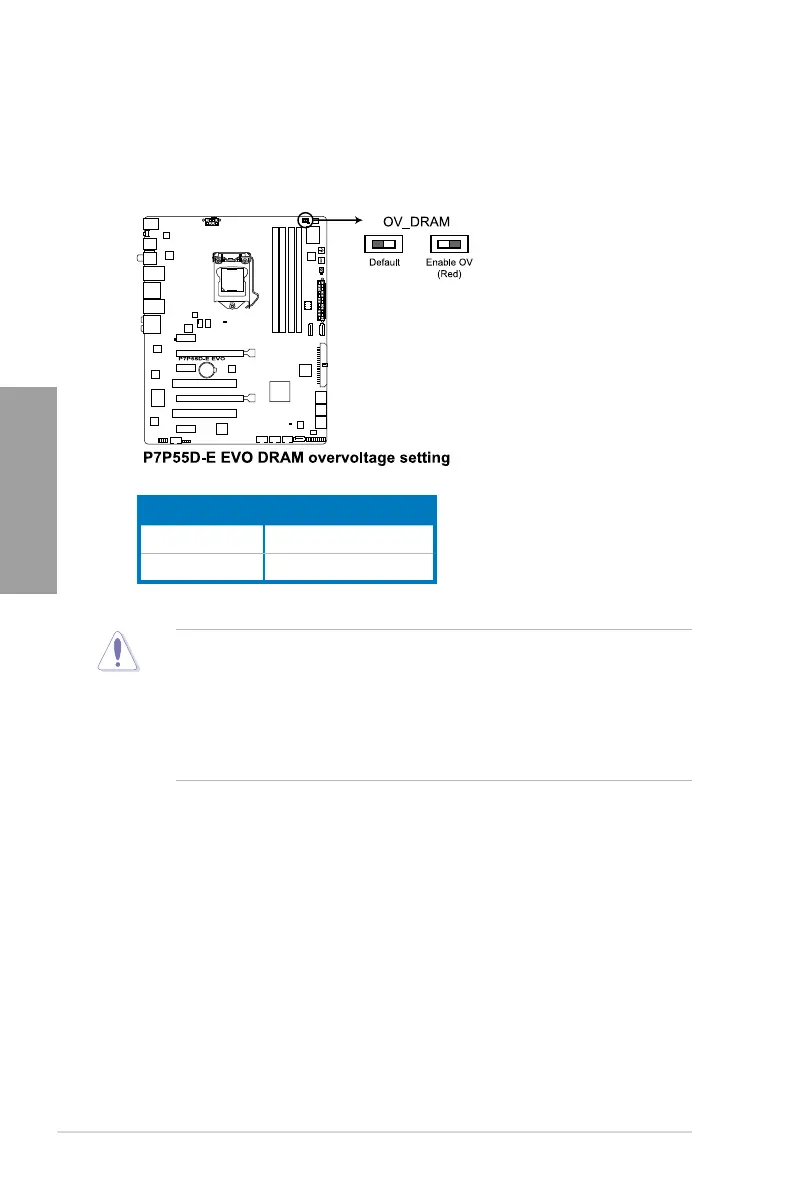
4. DRAM overvoltage setting switch (OV_DRAM)
This switch allows you to enable or disable the advanced DRAM overvoltage settings in
BIOS. Read the following information before you change the switch settings.
• Before you change the settings for extra-high overvoltage ability, use the BIOS items
rst to adjust the desired DRAM performance. Ensure your system functions well
under the highest BIOS voltage settings before you change the setting of this switch.
• According to Intel CPU spec, DIMMs voltage below 1.65V is recommended to protect
the CPU.
• The system may need a better cooling system (for example, a water-cooling system)
to work stably under high voltage settings.
OV_DRAM
Default up to 2.0V
Enable OV (red) up to 2.5V



 To Next Page