3-6
Chapter 3: General Instructions
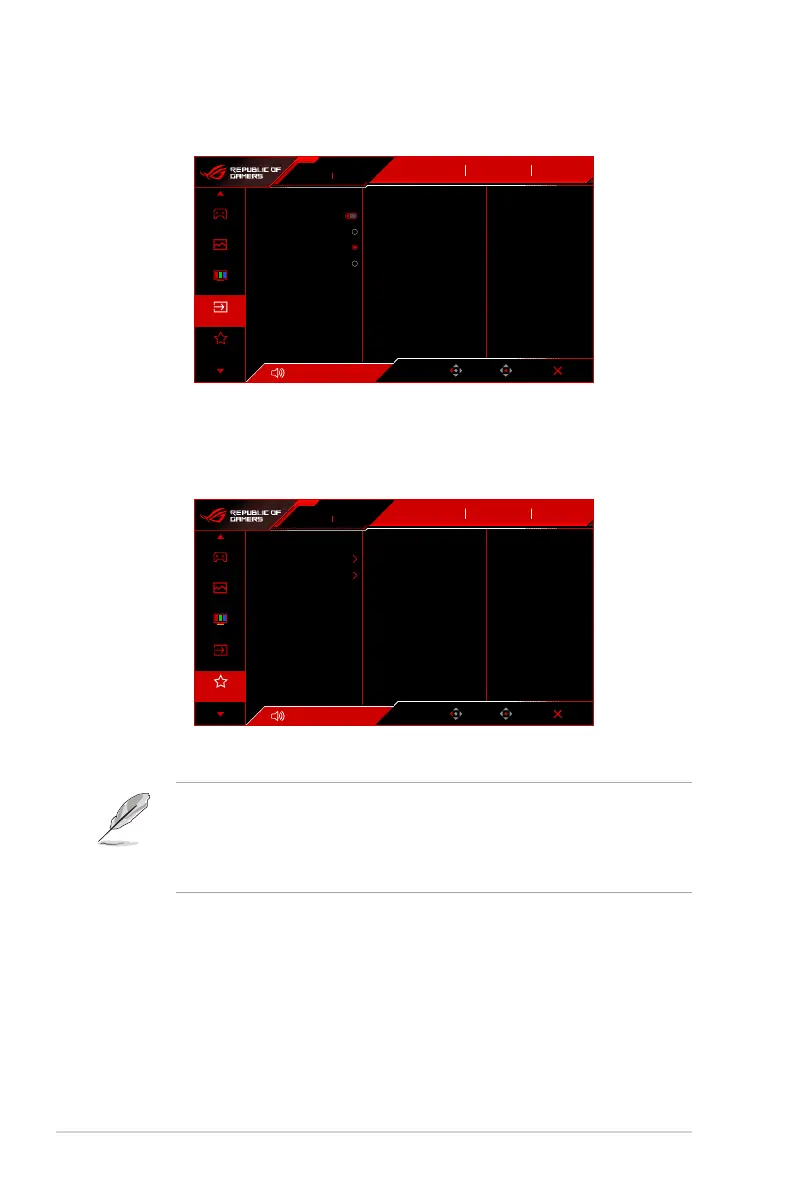
4. Input Select
In this function, you can select your desired input source.
Volume 50
Back
Enter Exit
310Hz
1920x1080
ROG STRIX XG259CMS
Input Select
DisplayPort OFF
GameVisual
Racing Mode
HDR
Auto Input Detection
USB-C
DisplayPort
HDMI
Gaming
Image
Color
Input Select
MyFavorite
• Auto Input Detection: When enabled, the system will automatically select the
latest inserted I/O port.
• USB-C/DisplayPort/HDMI: Manually selects the input source.
5. MyFavorite
Volume 50
Back
Enter Exit
310Hz
1920x1080
ROG STRIX XG259CMS
Input Select
DisplayPort
Gaming
Image
Color
Input Select
MyFavorite
OFF
GameVisual
Racing Mode
HDR
Shortcut
Customized Setting
• Shortcut:
• Shortcut 1/Shortcut 2: Sets the shortcut functions for shortcut buttons.
When a certain function is selected or activated, your shortcut button may not
support. Available function choices: GamePlus, GameVisual, Variable OD,
Brightness, Mute, Shadow Boost, Contrast, Input Select, HDR Setting,
Blue Light Filter, Color Temp., Volume (Earphone Out), Customized
Setting-1 (Load), Customized Setting-2 (Load).
• Customized Setting: Loads/Saves all settings on the monitor.




 To Next Page