3-7ROG Strix XG259CMS Series Gaming LCD Monitor
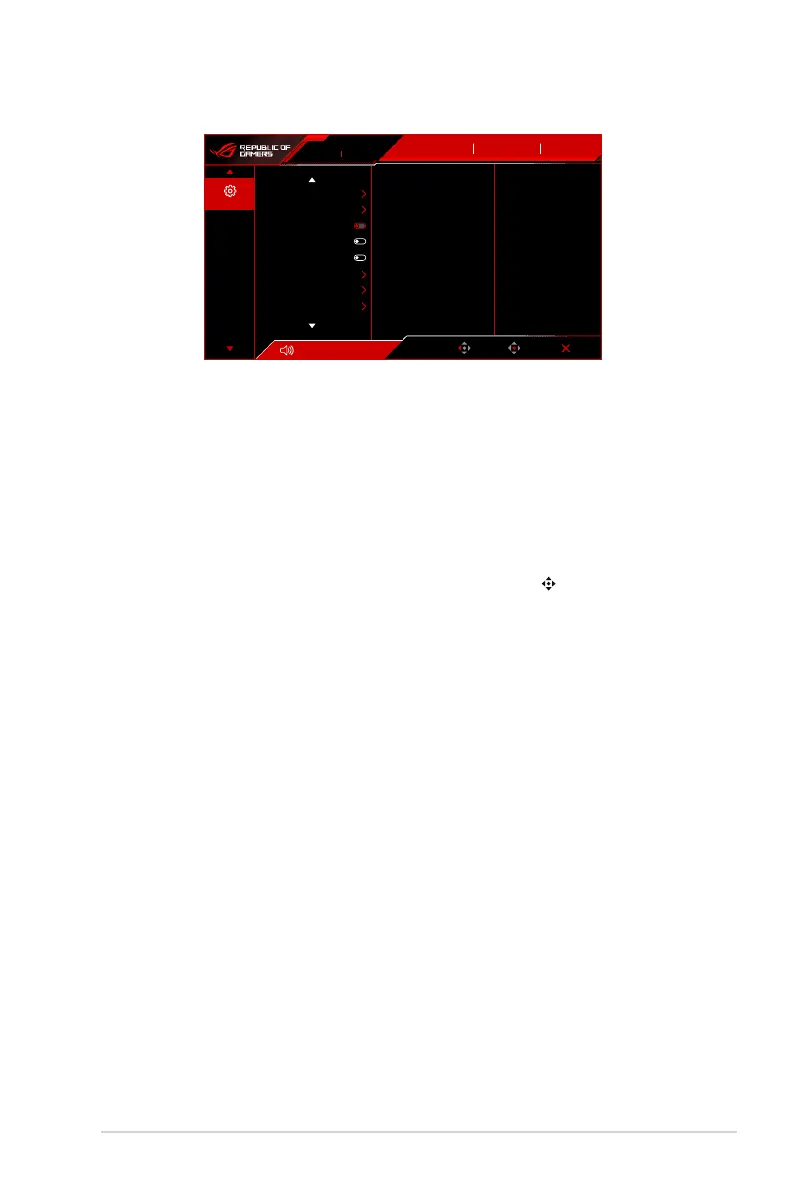
6. System Setup
Volume 50
Back
Enter Exit
310Hz
1920x1080
ROG STRIX XG259CMS
Input Select
DisplayPort
System Setup
OFF
GameVisual
Racing Mode
HDR
Language
Sound
Power Indicator
Power Key Lock
Key Lock
Power Setting
OSD Setup
DisplayPort Stream
• Language: There are 23 languages for your selection, including English, French,
German, Italian, Spanish, Dutch, Portuguese, Russian, Czech, Croatian, Polish,
Romanian, Hungarian, Turkish, Simplified Chinese, Traditional Chinese, Japanese,
Korean, Thai, Indonesian, Persian, Ukrainian, Vietnamese.
• Sound: Sets the sound related settings from this menu.
• Volume (Earphone Out): The adjusting range is from 0 to 100.
• Mute: Toggles the monitor sound between on and off.
• Power Indicator: Turns the power LED indicator on/off.
• Power Key Lock: Enables or disables the power key.
• Key Lock: To disable all function keys. Move and hold the (5-way) button
downward for over 5 seconds to cancel the key lock function.
• Power Setting:
• Standard Mode: Standard mode setting may result in higher power
consumption.
• Power Saving Mode: Power saving mode may cause limited luminance
performance.
• OSD Setup:
• Adjusts the OSD position.
• Adjusts the OSD timeout from 10 to 120 seconds.
• Adjusts the OSD background from opaque to transparent.
• Enables or disables the DDC/CI function.
• DisplayPort Stream: Compatibility with graphic card. Select DisplayPort 1.2,
DisplayPort 1.4 by graphic card DP version.
• Information: Shows the monitor information.
• All Reset: Selecting “Yes” allows you to restore the default settings.






 To Next Page