39
3.5.3 3G/4G
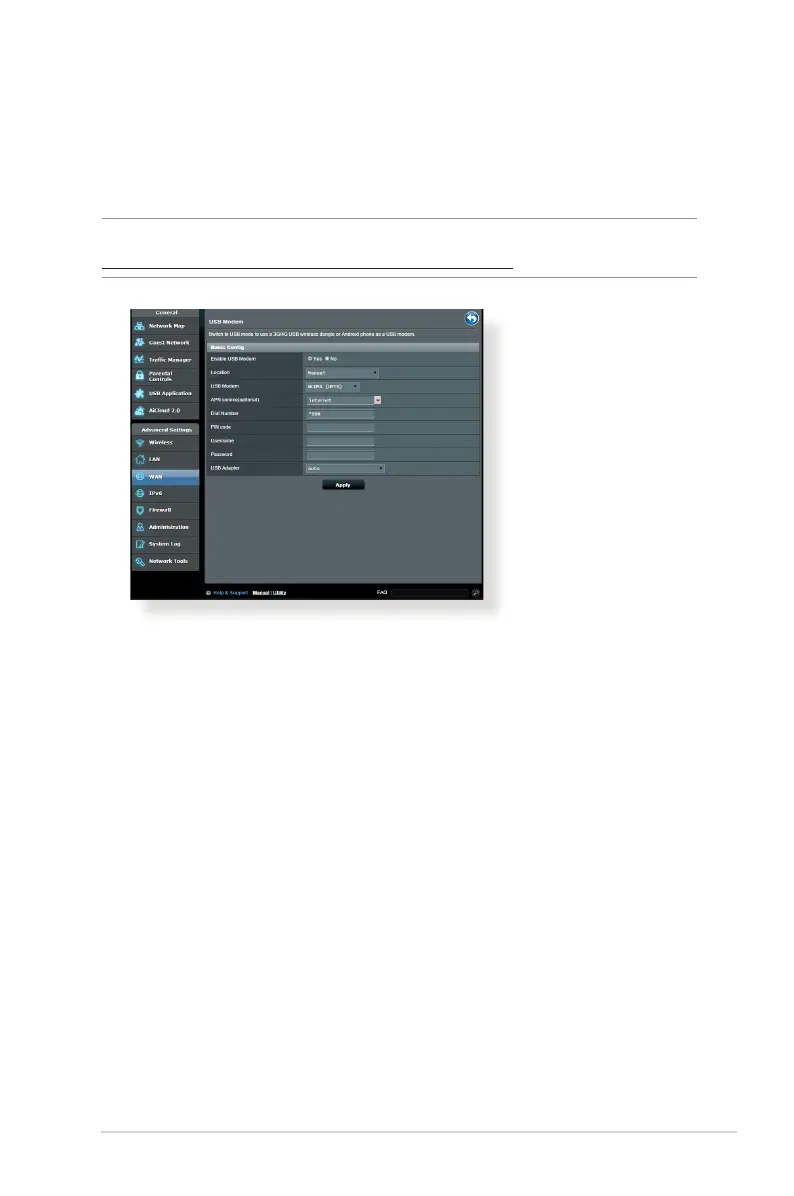
3G/4G USB modems can be connected to RT-ACRH13 to allow
Internet access.
NOTE: For a list of veried USB modems, please visit:
http://event.asus.com/2009/networks/3gsupport/
To set up 3G/4G internet access:
1. From the navigation panel, click General > USB application >
3G/4G.
2. In the Enable USB Modem eld, select Ye s .
3. Set up the following:
• Location: Select your 3G/4G service provider’s location from
the dropdown list.
•
ISP: Select your Internet Service Provider (ISP) from the
dropdown list.
•
APN (Access Point Name) service (optional): Contact your
3G/4G service provider for detailed information.
•
Dial Number and PIN code: The 3G/4G provider’s access
number and PIN code for connection.



 To Next Page