27
3.3 Using the Trac Manager
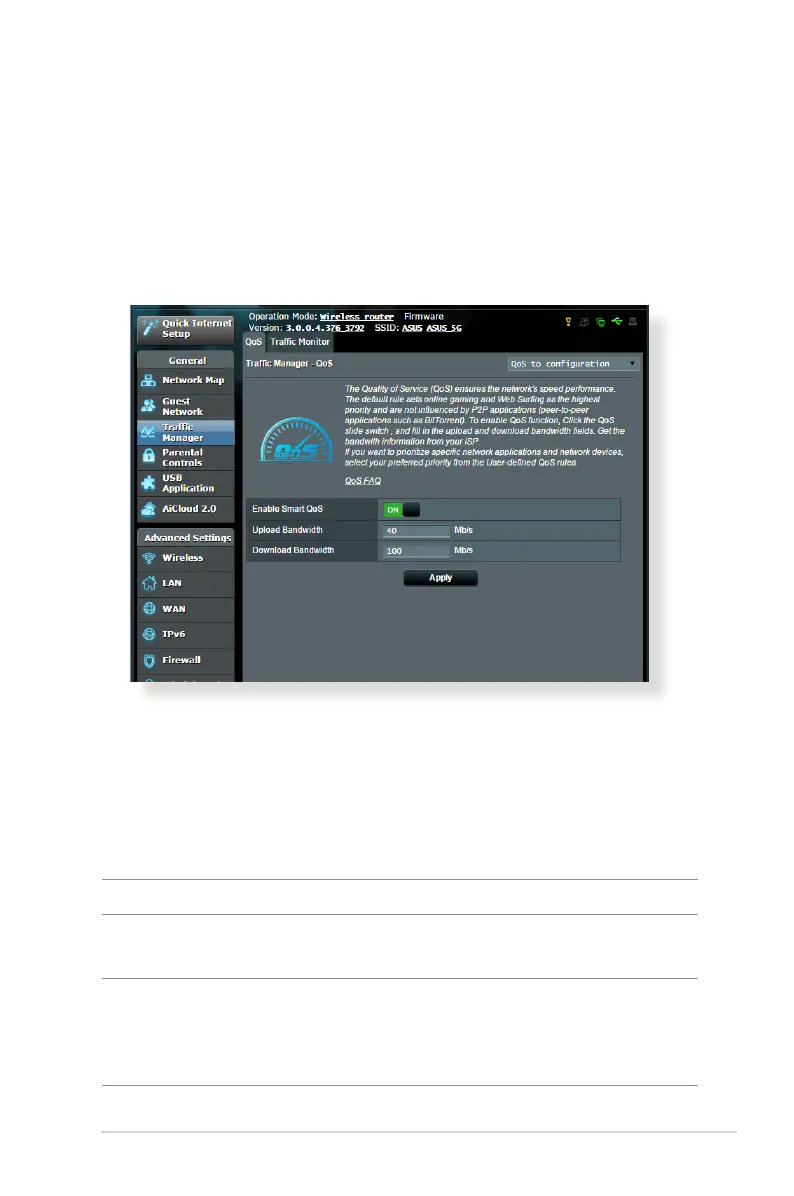
3.3.1 Managing QoS (Quality of Service) Bandwidth
Quality of Service (QoS) allows you to set the bandwidth priority
and manage network trac.
To set up bandwidth priority:
1. From the navigation panel, go to General > Trac Manager >
QoS tab.
2. Click ON to enable QoS. Fill in the upload and download
bandwidth elds.
NOTE: Get the bandwidth information from your ISP.
3. Click Save.
NOTE: The User Specify Rule List is for advanced settings. If you want
to prioritize specic network applications and network services, select
User-dened QoS rules or User-dened Priority from the drop-down
list on the upper-right corner.



 To Next Page