A-4
Notebook PC User Manual
System BIOS Settings
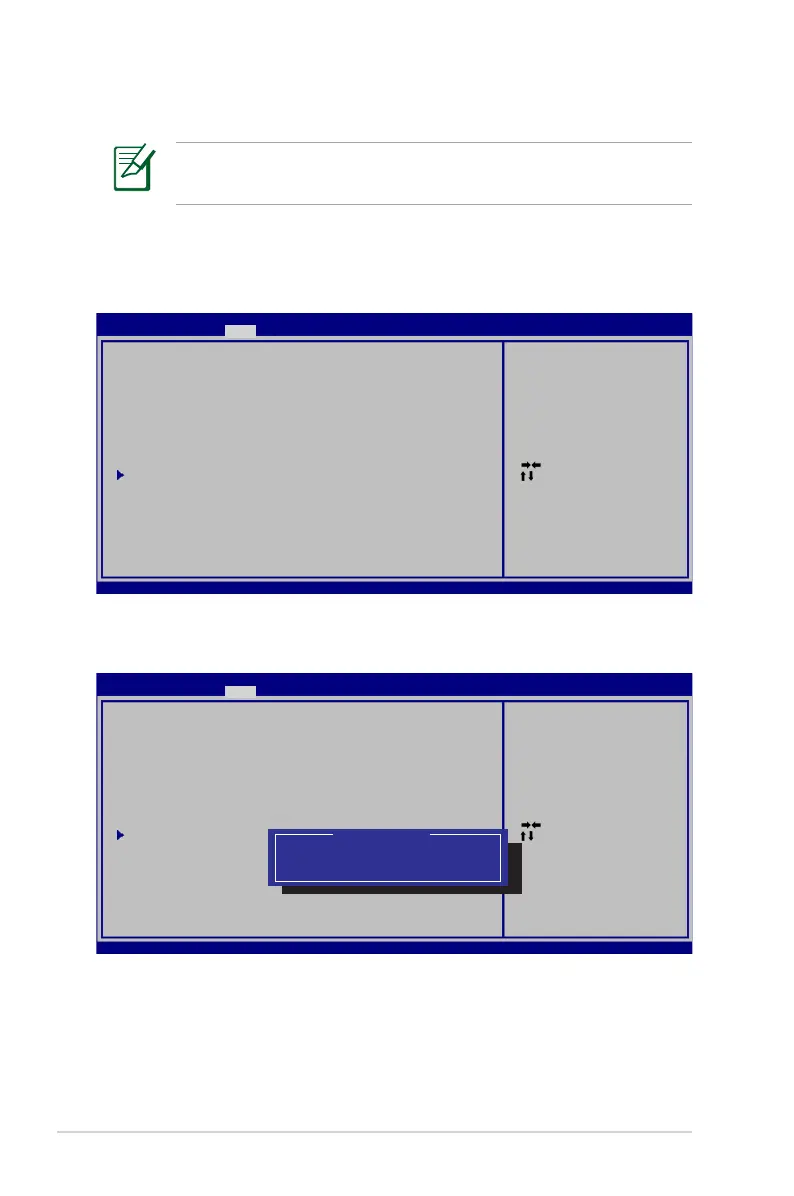
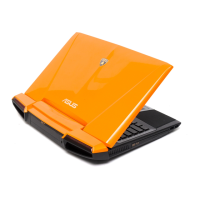
Boot Device
1. On the Boot screen, select Boot Option #1.
2. Press [Enter] and select a device as the Boot Option #1.
The BIOS screens in this section are for reference only. The actual
screens may differ by models and territories.
: Se le ct S creen
: Se le ct I te m
Ent er : Se le ct
+/— : Ch an ge O pt .
F1: G eneral H el p
F9: O ptimiz ed D ef au lt s
F10 : Sa ve ES C: Exit
Ver si on 2 .0 0.1201 . Co py ri gh t (C) 20 09 A me ri ca n Me ga tr en ds , In c.
Apt io S et up U ti lity - C op yr ig ht (C) 2 00 9 Am er ic an Meg at re nd s, I nc .
M ai n Adva nc edMai n A dv anced B oo t S ecur it y S av e & Ex it
Bo ot C on figura ti on
UE FI B oo t [Di sa bl ed ]
PX E RO M [Di sa bl ed ]
Bo ot O pt ion Pr io ri ti es
Bo ot O pt ion #1 [P0 : S T9 75 0420AS . .. ]
Bo ot O pt ion #2 [P1 : M AT SH ITABD- M. .. ]
Ha rd D ri ve BBS P ri or it ie s
CD /D VD R OM Dri ve B BS P ri or ities
De le te B oo t Opti on
Set t he s ys tem bo ot o rd er .
: Se le ct S creen
: Se le ct I te m
Ent er : Se le ct
+/— : Ch an ge O pt .
F1: G eneral H el p
F9: O ptimiz ed D ef au lt s
F10 : Sa ve ES C: Exit
Ver si on 2 .0 0.1201 . Co py ri gh t (C) 20 09 A me ri ca n Me ga tr en ds , In c.
Apt io S et up U ti lity - C op yr ig ht (C) 2 00 9 Am er ic an Meg at re nd s, I nc .
M ai n Adva nc edMai n A dv anced B oo t S ecur it y S av e & Ex it
Bo ot C on figura ti on
UE FI B oo t [Di sa bl ed ]
PX E RO M [Di sa bl ed ]
Bo ot O pt ion Pr io ri ti es
Bo ot O pt ion #1 [P0 : S T9 75 0420AS . .. ]
Bo ot O pt ion #2 [P1 : M AT SH ITABD- M. .. ]
Ha rd D ri ve BBS P ri or it ie s
CD /D VD R OM Dri ve B BS P ri or ities
De le te B oo t Opti on
Set t he s ys tem bo ot o rd er .
Boo t Op ti on #1
P0: ST 97 50 420AS
P1: MA TS HI TA BD-MLT U J2 40 AS
Dis ab le d


 To Next Page