29ASUS Xonar DGX
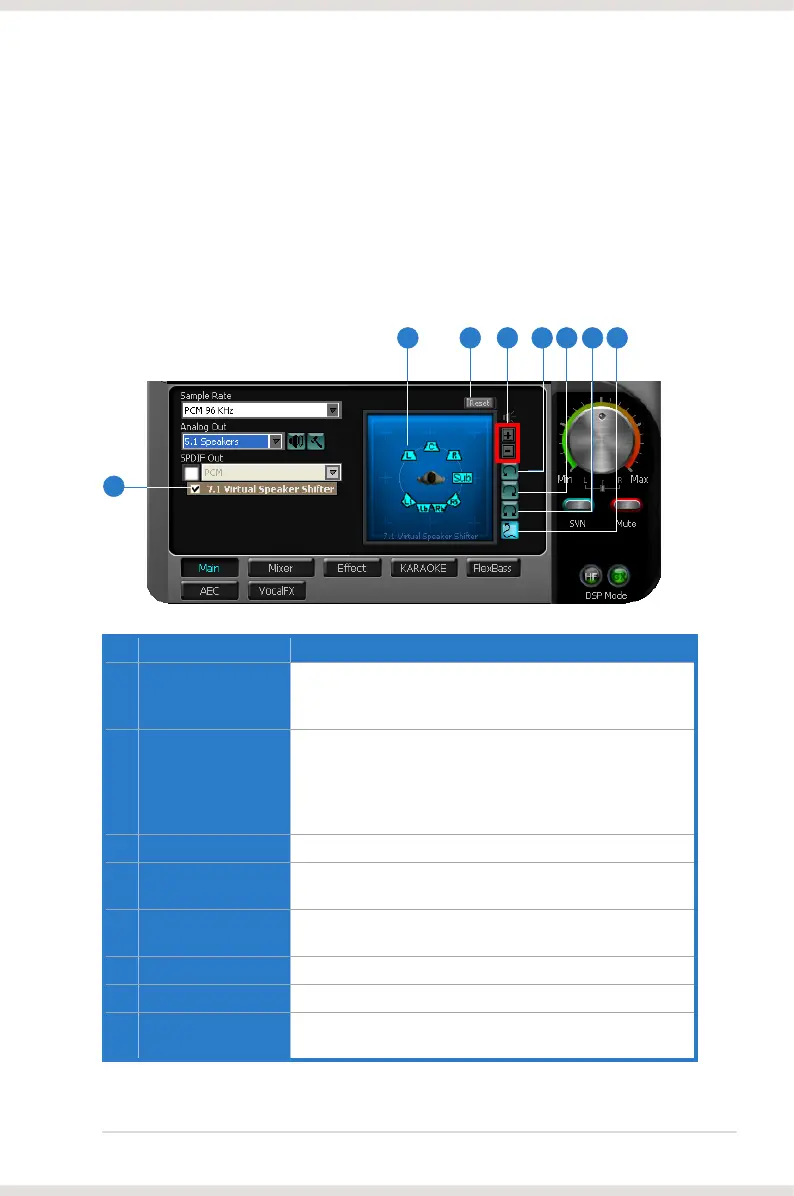
6.2.5 7.1 Virtual Speaker Shifter
The 7.1 Virtual Speaker Shifter has the following major features:
• Expanding/upmixing audio to 7.1-channel surround sound
easily without moving physical speakers and wires
No Item Description
1 Shifter enable/disable
Click this check box to enable the 7.1 Virtual Speaker Shifter.
Clicking the text bar will switch the right window to the
Speaker Shifter page for manual adjustments.
2 Drag speaker or
listener
You can drag each speaker or listener to a different relative
position “virtually” using only your mouse. The Xonar DGX
real-time. The Subwoofer has no directional sounds, and
hence can be moved only closer or further away.
3 Reset
Reset all Speaker Shifter settings to the defaults.
4 Increase/decrease
volume
decrease volume (move speakers further away)
5 Counter-clockwise
Make all speakers (except Subwoofer) rotate counter-
clockwise
6 Clockwise
Make all speakers (except Subwoofer) rotate clockwise
7 Manual Rotation
Manually drag and rotate all speakers (except Subwoofer)
8 Manual Drag Mode
This is the default mode that allows you to manually drag
each speaker or the listener with your mouse.
42 3 5 6 7 8
1



 To Next Page