26
ASUS Xonar DS
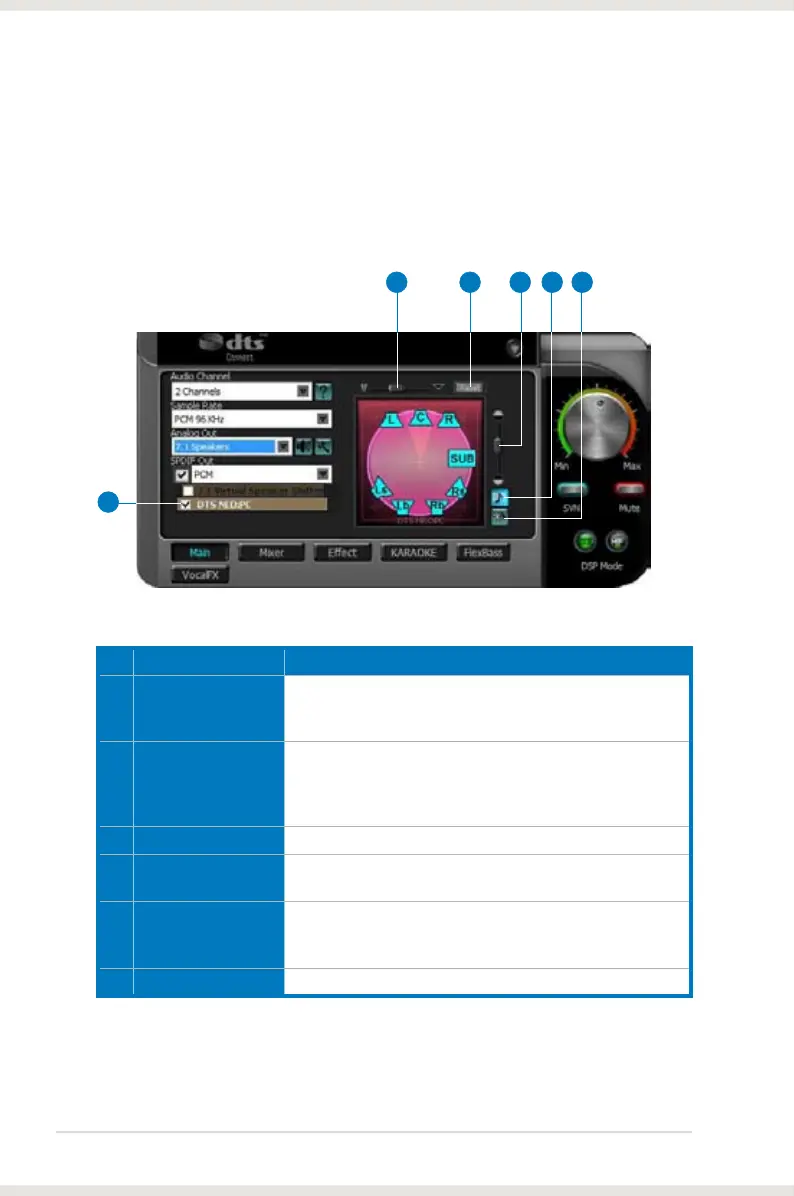
6.2.6 DTS Neo:PC
DTS Neo:PC is a 7.1 surround upmixing technology and is widely used in home
theater systems, TVs, game consoles, and car audio systems. It can expand
stereo audio, such as MP3, CD, and TV programs into immersive 5.1 or
7.1-channel surround.
No Item Description
1 DTS Neo:PC
enable/disable
Click this check box to enable DTS Neo:PC. Clicking the text
bar will switch the right window to the Pro-Logic IIx page for
manual adjustments.
2 Center Width
This parameter is used to set the spread of the center, mainly
for the vocal signals of songs and music. Drag the scroll bar
to the left to centralize the vocal signal. Drag to the right side
to widen the vocal sound range.
3 Reset
Reset all settings to the defaults.
4 Dimension
The dimension parameter fades sounds to the front or rear
of the listener.
5 Music Mode
Music mode is the default mode for regular music playback.
In this mode, you can adjust the Center Width and
Dimension parameters.
6 Movie Mode
Movie mode is a preset optimized for movie audio.
2 3 4
1
5 6



 To Next Page