21ASUS Xonar U3
8.5 Karaoke / Magic Voice
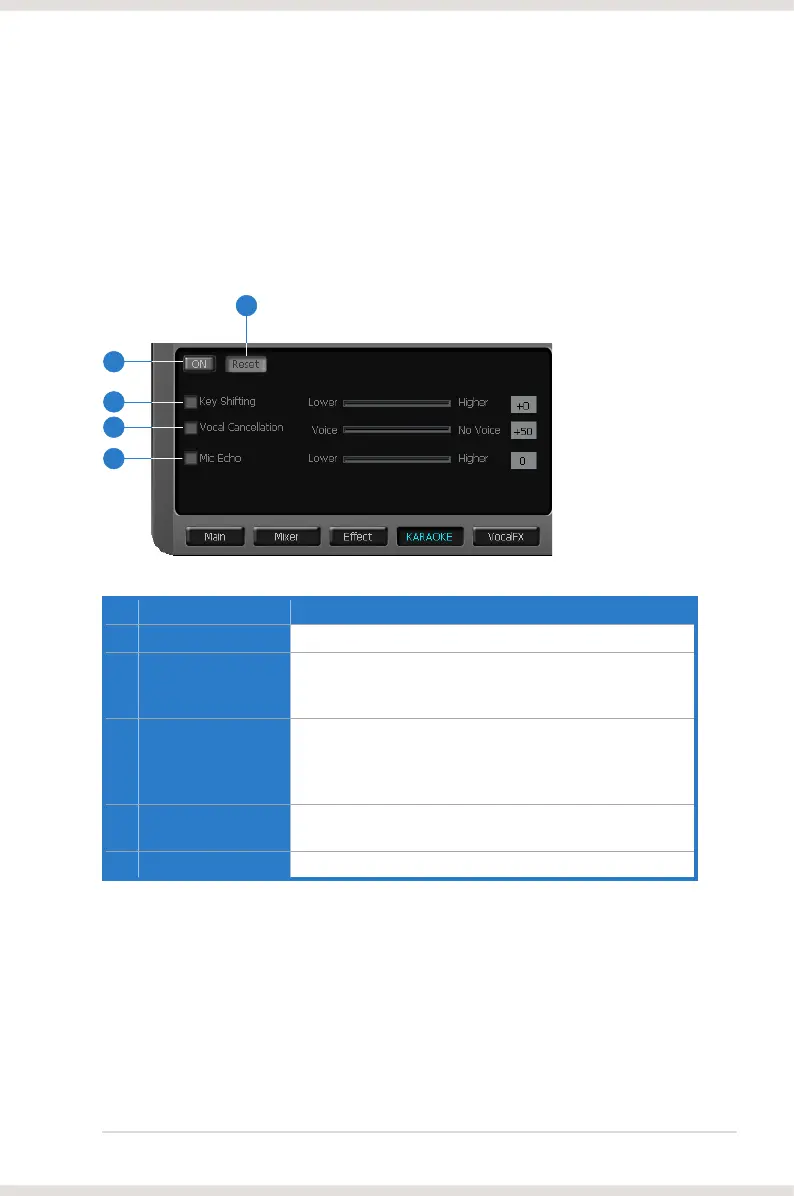
The Xonar U3 provides powerful features for VOIP and Karaoke, including Key-
Shifting, Vocal Cancellation and Microphone Echo. Microphone Echo can generate
natural echo effects on your singing voice just like a karaoke machine. Key-Shifting
can change the pitch of Karaoke background music, and Vocal Cancellation can
reduce the original vocal in songs and keep the music and symphony for karaoke.
*** Microphone Echo and Magic voice features are not available on Windows Vista.
No Item Description
1 On/Off
Click the switch to turn on or off the functions on this page.
2 Key-Shifting
Check the box to enable or disable the key shifting feature
for music playback from 4 semitones below, to 4 semitones
above.
3 Vocal Cancellation
Check the box to enable or disable the vocal cancellation
function and adjust the voice cancellation level from 0 to
+100. +100 will eliminate most original vocals (default value
is 50).
4 Mic Echo
Select the Mic Echo function and adjust the gain for echo
signals (30~16KHz)
5 Reset
Reset all settings to the default.
1
2
3
4
5



 To Next Page