EasyManua.ls Logo

ASUSTOR FLASHSTOR 12 Pro - Installing the Memory Module

ASUSTOR FLASHSTOR 12 Pro
7 pages
Print Icon
To Next Page IconTo Next Page
To Previous Page IconTo Previous Page
Loading...
ASUSTOR NAS Memory Installation Guide
Page 5 of 7
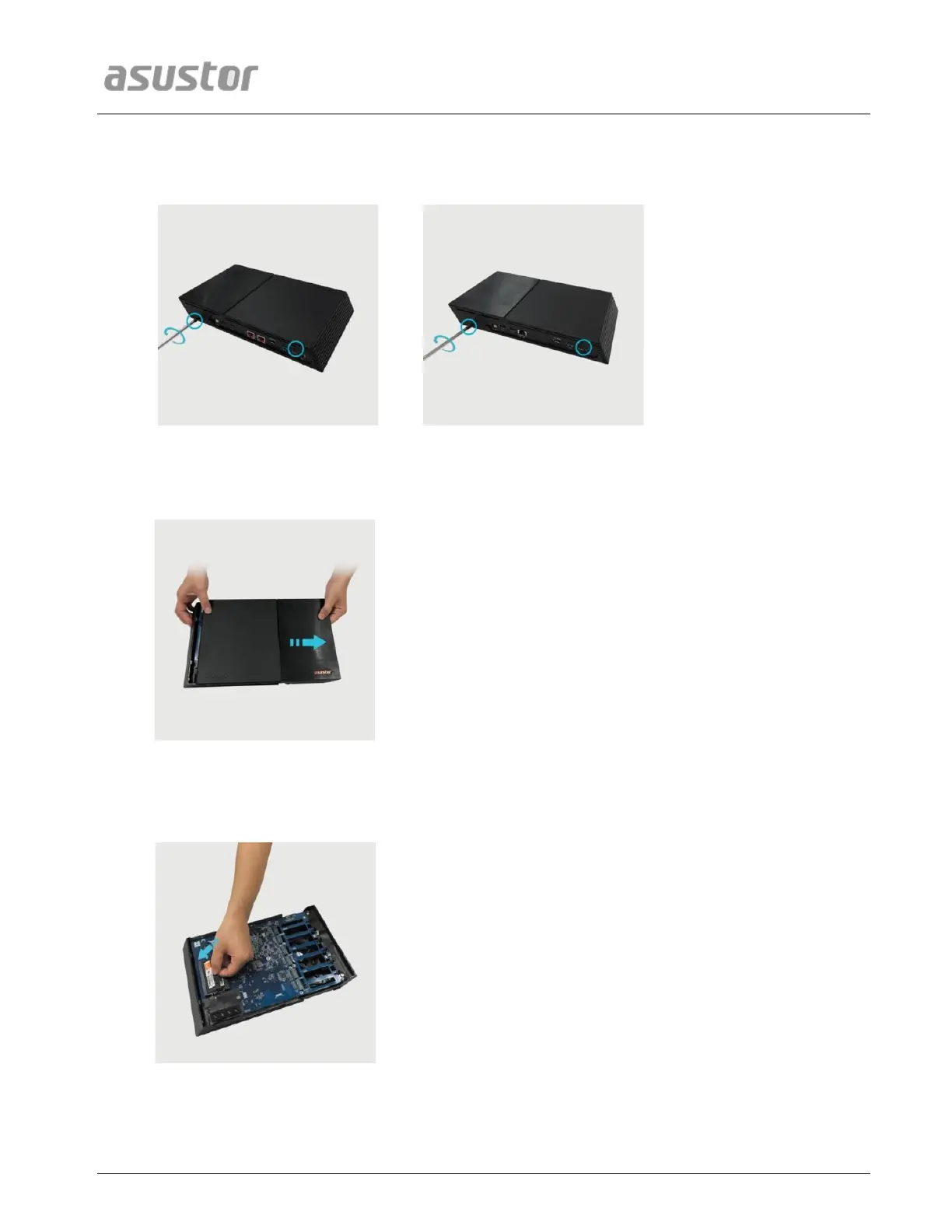
Use a screwdriver to loosen the three screws found on the rear of the NAS as shown in the illustration.
FS6706T
FS6712X
Grip the cover from both sides with two hands and then gently push it back to remove it from the chassis.
2.2. Installing Memory
Upon opening the NAS, RAM slots can be found on the motherboard on the left hand side of the NAS. Insert a
DIMM into an empty slot at a 45° angle and align the notches of the RAM and the slot.
Gently push the DIMM down until both latches click into place. RAM should be flush with the motherboard.

Related product manuals