Getting started
3
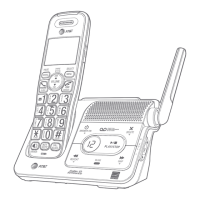
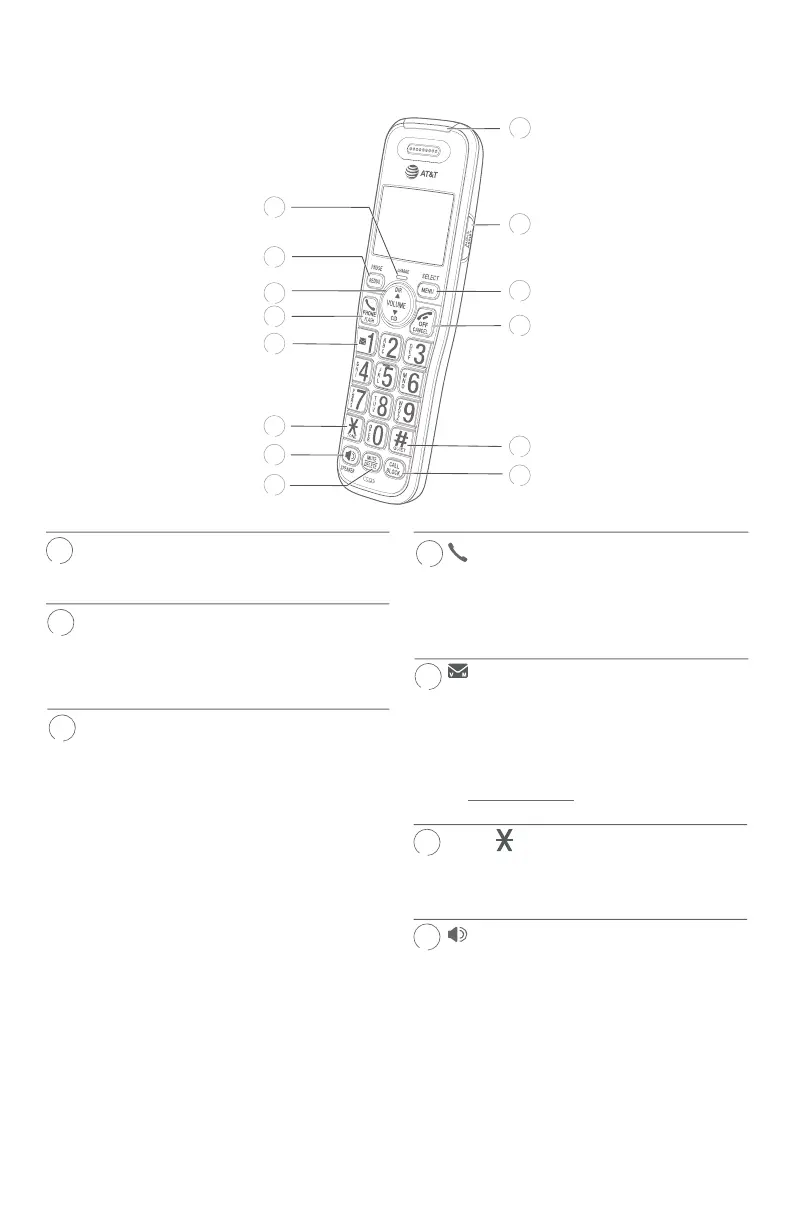
Quick reference guide - handset
CHARGE indicator
f On when the handset is charging in the
telephone base or charger.
REDIAL/PAUSE
f Press repeatedly to view the last ten
numbers dialed (page 24).
f While entering numbers, press and hold
to insert a dialing pause (page 32).
pDIR/VOLUME
f Press pDIR to show directory entries
when the handset is not in use (page
34).
f Press to scroll up while in menus.
f While entering names or numbers, press
to move the cursor to the right.
f Press to increase the listening volume
when on a call (page 26), or to
increase the message playback volume
(page 80).
qCID/VOLUME
f Press qCID to show caller ID log when
the handset is not in use (page 38).
f Press to scroll down while in menus.
f While entering names or numbers, press
to move the cursor to the le.
f Press to decrease the listening volume
when on a call (page 26), or to
decrease the message playback volume
(page 80).
PHONE/FLASH
f Press to make or answer a call (page
23).
f During a call, press to answer an
incoming call when you receive a call
waiting alert (page 26).
1
f While reviewing a caller ID log entry,
press repeatedly to add or remove 1 in
front of the telephone number before
dialing or saving it in the directory
(page 39).
f Press and hold to set or to dial your
voicemail number (page 19).
TONE
f Press to switch to tone dialing
temporarily during a call if you have
pulse service.
/SPEAKER
f Press to make or answer a call using
the speakerphone (page 24).
f Press to switch between the
speakerphone and the handset (page
24).
1
2
11
10
12
13
14
3
4
6
5
7
8
4
6


 To Next Page
 Loading...