EasyManua.ls Logo

AT&T Syn248 SB35010 - User Manual

AT&T Syn248 SB35010
132 pages
Print Icon
To Next Page IconTo Next Page
Loading...
© 2012–2013 Advanced American Telephones. All Rights Reserved. AT&T and the AT&T logo are trademarks of AT&T Intellectual Property licensed to Advanced
American Telephones, San Antonio, TX 78219. Syn248® is a registered trademark of Advanced American Telephones. Issue 5.0 09/13
Syn248
Installation and
Configuration Guide
®

Table of Contents

Questions and Answers

  • C
    caitlin29Aug 19, 2025
    Why does my AT&T Telephone System have static and distorted speech?
    • J
      Jordan WrightAug 20, 2025
      If your AT&T Telephone System displays static, sudden silences, gaps, echoes, or distorted/garbled speech, it could stem from network or telephone line issues. Your LAN administrator should ensure a switched network topology, using switches instead of hubs. Also, ensure a DSL filter is plugged between each DSL line and the telephone wall jack.
  • T
    Thomas ThomasAug 21, 2025
    How to fix incorrect time on AT&T Telephone System?
    • N
      Nathan HinesAug 22, 2025
      If the system clock on your AT&T Telephone System displays the wrong time, it is possible that the system lacks Internet access. To fix this, log on to the WebUI as administrator and click System Basic Settings. From there, you can specify a local Network Time Protocol (NTP) Server or manually set the time.
  • Y
    ykentAug 25, 2025
    What to do if AT&T Syn248 SB35010 Telephone System deskset displays synchronizing and cannot make calls?
    • D
      David SanchezAug 25, 2025
      If your AT&T Telephone System deskset cannot make or receive calls and shows 'Synchronizing,' the deskset may have an incompatible software version. You can resolve this by logging into the WebUI using the deskset's IP address and updating the software.
  • A
    Angela LopezAug 26, 2025
    What to do if AT&T Telephone System displays host not found after upgrade?
    • C
      christopher00Aug 26, 2025
      If your AT&T Telephone System device displays 'Host Not Found' after a software upgrade attempt, it's likely due to a missing Internet connection. Ensure you have Internet connectivity and that your connection to your Internet Service Provider is operating normally.
  • K
    kellymillerAug 27, 2025
    How to reduce echo on AT&T Telephone System outside calls?
    • P
      Paula WilliamsAug 28, 2025
      If you experience excessive echo on outside calls with your AT&T Telephone System, log on to the WebUI as administrator and click Device Management, then Device Log in the navigation menu. Check the loss numbers within the Line Calibration Data box for each telephone line on each Gateway. Also, try unplugging the telephone line at the Gateway. External devices connected in parallel may affect line calibration; disconnect these devices from the telephone wall jacks connected to the same telephone lines.
  • T
    Timothy MccoyAug 29, 2025
    What to do if AT&T Syn248 SB35010 WebUI is unresponsive?
    • H
      hopkinskevinAug 30, 2025
      If your AT&T Telephone System WebUI is unresponsive, the web browser may have encountered an unexpected problem. Close the unresponsive web browser, reopen it, and log back in as administrator.
  • L
    Lindsey WebsterSep 1, 2025
    What to do if AT&T Syn248 SB35010 Telephone System deskset synchronization failed?
    • C
      Christine BarrettSep 1, 2025
      If your AT&T Telephone System deskset synchronization failed or is synchronizing for a long time, it could be due to network disruption, the deskset having been part of a different network, or an AC power failure. You may need to remove the deskset from the system and reintroduce it.
  • K
    Kevin MossSep 2, 2025
    How to fix a sluggish AT&T Telephone System device?
    • G
      Gary ScottSep 3, 2025
      To resolve a sluggish, unresponsive, or unusually behaving AT&T Telephone System device, reset it by pressing the RESET button for less than five seconds, or by removing and restoring AC power.
  • E
    Eric BrownSep 4, 2025
    What to do if AT&T Syn248 SB35010 Telephone System displays an error after upgrade?
    • Z
      zromeroSep 4, 2025
      If your AT&T Telephone System device displays an error message other than 'Host Not Found' after a software upgrade attempt, the device encountered an unexpected problem. Disconnect the power to the device, wait a few minutes, then reconnect the power and try the upgrade process again.
  • M
    Matthew WellsSep 7, 2025
    What to do if some AT&T Syn248 SB35010 Telephone System devices did not update after using WebUI?
    • M
      Mary TaylorSep 7, 2025
      If some devices did not update after using the AT&T Telephone System WebUI, it may be that you did not allow enough time for the software to update due to a slow Internet connection. Wait 30 minutes, then check whether additional devices have been updated.

Summary

Installation Guide Overview

System Overview

Describes the AT&T SB35010 Analog Gateway and Deskset models.

Recommended Installation Sequence

Provides a step-by-step guide for installing the Syn248 system.

Site Preparation and Network Requirements

Details site preparation steps and network infrastructure requirements for installation.

Gateway Placement and Mounting

Covers options for installing the Gateway, including rack and wall mounting.

Deskset Installation Procedures

Instructions for installing the Syn248 Desksets on a desktop or wall.

System Configuration and Management

System Settings Configuration

Guides on changing basic system settings, time, date, and system parameters.

Auto Attendant Setup and Customization

Instructions for configuring Auto Attendant menus, voice prompts, and names.

Extension Settings and Management

Covers extension basic settings, personal directory, and programmable feature keys.

Device Management and Updates

Procedures for deleting devices, changing extension numbers, backups, and software updates.

Device Configuration Details

SB35010 Gateway Features

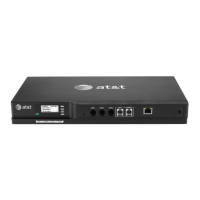
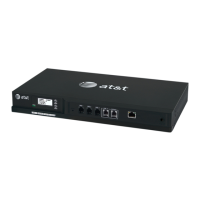
Details the physical features and connection ports of the SB35010 Gateway.

Gateway Front Panel Interface

Explains how to use the Gateway's front panel for basic operations and configuration.

Gateway Configuration Options

Covers static IP address configuration and software upgrades via the gateway.

Deskset Admin Settings Menu

Guides for accessing and using the Deskset Admin Settings menu for system features.

Troubleshooting Common Issues

Common Troubleshooting Procedures

Provides general methods for resolving common system operational issues.

Resetting Devices

Instructions for restarting or restoring devices to factory defaults.

Resolving Audio Issues

Steps to diagnose and fix audio problems like echoes and garbled speech.

Deskset Connectivity and Synchronization

Troubleshooting guide for Desksets failing to connect or synchronize with the system.

Gateway Setup and WebUI Troubleshooting

Addresses issues with Gateway setup, line calibration, and WebUI responsiveness.

PC;Deskset Interaction Problems

Troubleshoots issues related to PC connectivity and network performance with Desksets.

Appendices and Reference Information

Appendix B: IP Addresses and Connectivity

Explains IP addressing concepts and network connectivity for the Syn248 system.

Appendix C: Technical Specifications

Lists the detailed technical specifications for Syn248 Gateways and Desksets.

Appendix D: Default Settings

Details the default configuration settings for the Syn248 system and Desksets.

AT&T Syn248 SB35010 Specifications

General IconGeneral
BrandAT&T
MPNSB35010
DisplayYes
Speed DialYes
Caller IDYes
Headset JackYes
Volume ControlYes
SpeakerphoneYes
TypeCorded Phone

Related product manuals