A20/A21/A20W/A21W Quick Start Guide
ATCOM TECHNOLOGY CO., LIMITED
2.2.2 Configure phone to register SIP account
a) LAN Port Configuration
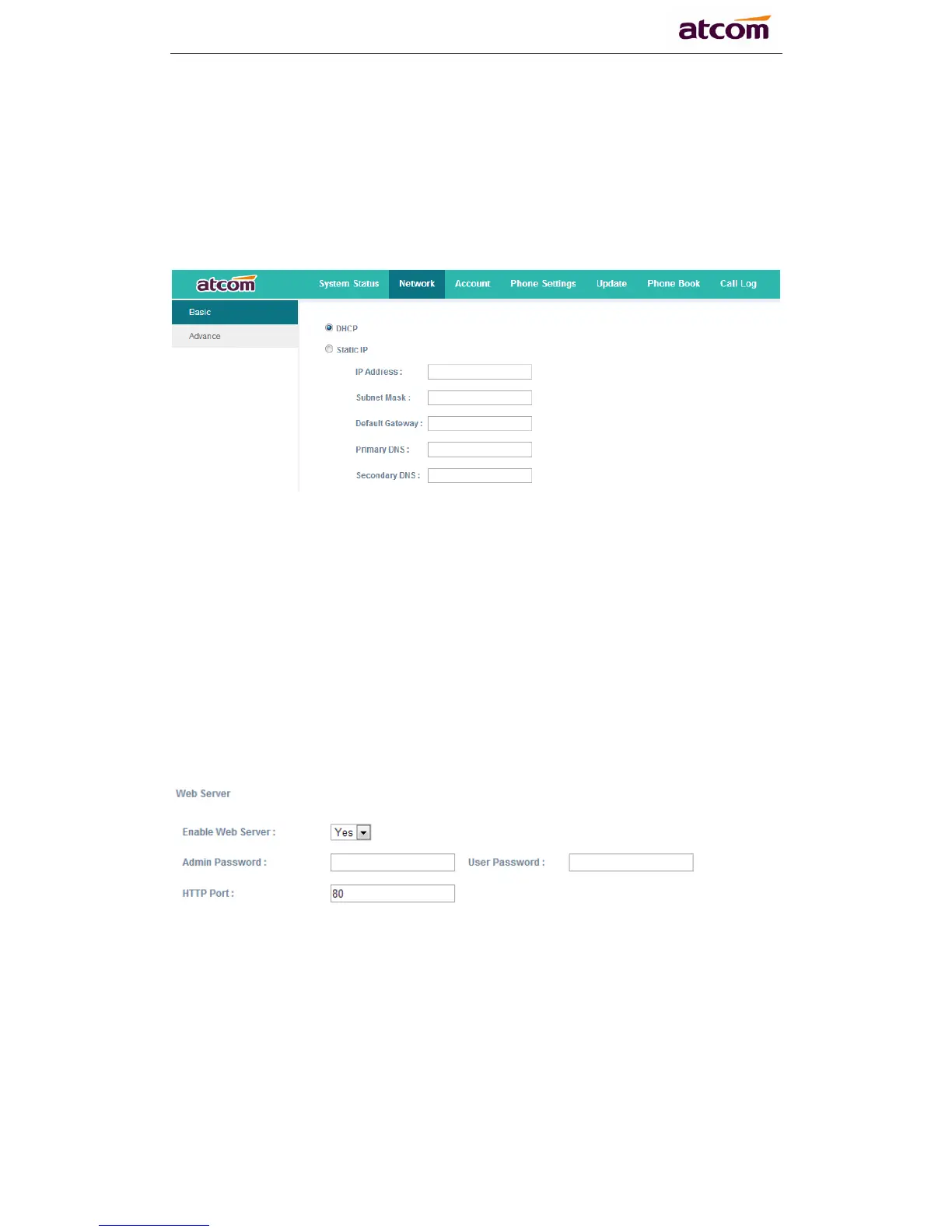
Enter "Network" -> "Basic" page.
There are 2 ways to connect to internet DHCP and Static, please choose one
according to your own situation.
Network mode: you can choose DHCP, Static.
DHCP: A20/A21/A20W/A21W default to use DHCP to obtain IP from DHCP
Server.
Static: If you want to set the IP as static, you should fill IP, Netmask,
Gateway and DNS information.
b) Password Configuration
Enter "Network" -> "Advance" page.
There are 2 modes to set the authority of web accessing and command line:
User mode and Admin mode. All the parameters can be visible and changed in
Admin mode while part of them can be visible in User mode.
Enable Web Server: enable or disable web access. If choose "no", you can
not access A20/A21/A20W/A21W‟s webpage.
Admin password: set admin webpage access password.(username:admin)
User password: set user webpage access password.(username:user)
c) Account Configuration
Enter "Account" -> "SIP" page to configure SIP account which is provided
from the SIP Server.



 To Next Page