

EasyManua.ls Logo

atflee T9 - User Manual

atflee T9
10 pages
Print Icon
To Next Page IconTo Next Page
Loading...
Smart Body fat scale
Instruction Manual
Scan the corresponding QR Code to download APP
Thanks for choosing Smart body Scale. This fully body composition scale can help you conveniently
measure body weight, Body balance, BMI, Body fat rate, Visceral fat, Body water, Skeletal muscle rate,
Muscle mass, bone mass, Protein, BMR, Body age,Heart rate, Heart Index and etc;
IMPORTANT: Please read these instructions in this manual carefully before using the device. Failure
to comply with the instructions given in the manual or using this scale in ways other than the ones
mentioned in this manual may result in injury to yourself or damage to the scale.
(Onfit APP functions)
Weight Body fat Visceral fat Protein amount BMI
Muscle weight Bone mass Moisture BME Degree of obesity
Body age Muscle Standard weight Without fat BFR
Protein rate Subcutaneous fat Temperature Height record (<16 years old)
Heart rate Heart Index
INDICATION SYMBOLS
LO
Low battery - please change the batteries (3x1.5V AAA battery).
Err
Overload
C
An error has occurred during measurement. Step off the scales and step onto
them again to repeat the measuring process.
Question and Answer IconNeed help?

Do you have a question about the atflee T9 and is the answer not in the manual?

Summary

OnFit App Functions

App Measurement Parameters

Lists all body composition metrics measured by the OnFit app like BMI, Body Fat, etc.

Indication Symbols

Scale Status Indicators

Explains symbols for low battery (LO) and measurement errors (Err).

Safety Warnings and Precautions

Important Safety Warnings

Crucial safety advice for using the scale, including who should not use it.

Product Specifications

Technical Details and Requirements

Provides key specifications like weight limit, power supply, and operating conditions.

App Installation

Downloading the Onfit App

Instructions for finding and installing the Onfit application from app stores.

Fitdays App Usage

Initial Setup and Registration

Guide on inserting batteries, placing the scale, and initial app registration.

Fitdays App User Profile

Adding Personal Data

Instructions for entering user details for accurate measurement calculations.

Privacy Policy Overview

Data Collection and Use

Explains how personal data is collected and utilized for measurement and privacy.

Scale Operation and Measurement

Bluetooth Pairing and Activation

Steps to pair the scale with your phone via Bluetooth and activate the display.

Measurement Procedure

How to correctly step on the scale for accurate body fat and other measurements.

Analyzing Measurement Data

Viewing Measurement Reports

How to access detailed analysis reports and long-term tracking charts.

User Management

Adding and Switching Users

Instructions for managing multiple user profiles on the scale and app.

Special Modes and Features

Baby Weighing Mode

Procedure for weighing a baby using the scale and the Fitdays app.

Adding Height Records

How to manually add height information for users under 16 years old.

Troubleshooting Guide

Bluetooth Connection Issues

Solutions for problems where the scale fails to connect to the smartphone via Bluetooth.

Troubleshooting Common Issues

No Body Fat Data Measured

Steps to take when the scale does not measure body fat accurately.

Weight Inconsistency and Calibration

Tips for addressing unstable weight readings and recalibrating the scale.

Scale Not Turning On

Solutions for the scale failing to power on, often related to battery issues.

Overview

This document provides an instruction manual for the Smart Body Fat Scale, designed to help users conveniently measure various body composition metrics.

Function Description

The Smart Body Fat Scale is a comprehensive body composition analysis device that measures:

  • Body Weight: Overall mass of the user.
  • Body Balance: An indicator of weight distribution.
  • BMI (Body Mass Index): A measure of body fat based on height and weight.
  • Body Fat Rate: Percentage of fat in the body.
  • Visceral Fat: Fat stored around the organs in the abdomen.
  • Body Water: Percentage of water in the body.
  • Skeletal Muscle Rate: Percentage of skeletal muscle in the body.
  • Muscle Mass: Total mass of muscle in the body.
  • Bone Mass: Total mass of bone in the body.
  • Protein: An indicator of protein levels in the body.
  • BMR (Basal Metabolic Rate): The number of calories required to keep the body functioning at rest.
  • Body Age: An estimation of the body's biological age.
  • Heart Rate: The number of heartbeats per minute.
  • Heart Index: A derived metric related to heart health.

The scale connects to the "Onfit" mobile application via Bluetooth, allowing users to track their data over time. The app also includes features like:
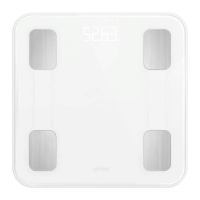
  • Baby Mode: Allows users to weigh a baby by first weighing themselves and then holding the baby.
  • Height Record: For users under 16 years old, height information can be manually added to the app.
  • User Management: Supports multiple users (up to 24 persons per account) and can recognize different users.

Important Technical Specifications

  • Product Size: 290x290x20mm
  • Weight Unit: Kilograms (kg)
  • Weight Limit: 6kg-180kg
  • Power Supply: 3xAAA batteries
  • Account Number: No limitation (each account can add 24 persons)
  • Operating Temperature: 10-40°C
  • Operation Humidity: 20%-90%
  • Support Devices:
    • iOS 8.0 or higher
    • Android 6.0 or higher

Usage Features

  1. App Installation: Download the "Onfit" app from Apple Store or Google Play by searching "Onfit" or scanning the provided QR code.
  2. Battery Installation: Insert 3xAAA batteries into the battery holder on the back of the scale.
  3. Placement: Place the scale on a hard, dry, and flat surface for accurate measurements.
  4. Bluetooth Connection: Turn on Bluetooth on your smartphone or tablet. The app will indicate when the phone is connected to the scale (e.g., "Yologram").
  5. User Registration: Register an ID in the app using email or a social media account.
  6. Personal Data Entry: Add personal data such as gender, age, height, and corporeal level. Incorrect data may lead to inaccurate measurements.
  7. Activation: Tap your foot on the scale to activate the display. Wait until it shows "0.0"kg.
  8. Measurement: Step onto the scale with BARE feet to initiate a full body composition analysis. If stepping with socks, only weight and BMI will be measured.
  9. Data Synchronization: Stand still on the scale until the display shows "0000", indicating that all data has been received by the phone.
  10. Data Analysis: The app provides a detailed analyzing report on various body metrics and allows users to view long-term track charts.
  11. User Switching: Users can add and switch between different profiles within the app. The scale can recognize the user and prompt for correct user selection.
  12. Baby Mode Usage: In Baby Mode, first weigh yourself, then hold the baby to get the baby's weight. The app automatically calculates the baby's weight.
  13. Height Record for Minors: For users under 16, height can be manually added in the app.

Maintenance Features

  • Cleaning: Do not immerse the scale in water or use chemical cleaning agents. Clean the scale with a slightly damp cloth.
  • Battery Replacement: When the display shows "LO", it indicates low battery. Replace with 3x1.5V AAA batteries.
  • Troubleshooting - Bluetooth Connection:
    • Ensure Bluetooth is on for both the scale and smartphone.
    • For Android, allow location permission for the app.
    • Open the app while using the scale.
    • Check for the connection icon on the scale's display.
    • Verify that your smartphone's OS is iOS 8.0 or higher or Android 6.0 or higher.
    • If issues persist, try navigating through the app settings to "Device" or "Setting" to find and connect to "My_scale".
  • Troubleshooting - No Body Fat Data:
    • Ensure bare feet are used for measurement.
    • Make sure feet and scale are dry.
    • Stand still on the scale for about 10 seconds until the display stops flashing.
    • Ensure Bluetooth is on and not paired with a different scale.
    • If feet are too dry, try adding some water to the bottom of the feet.
    • If multiple devices are connected to the scale, ensure unused devices are turned off.
  • Troubleshooting - Inconsistent Weight:
    • Check if the scale is on a hard, flat surface.
    • Inspect each sensor foot on the back for obstructions.
    • Remove and reinsert batteries to restart the scale.
  • Troubleshooting - Incorrect Fat-Muscle Ratio:
    • Verify that the body parameter settings (gender, height, age) in the app are correct.
  • Recalibration: After moving the scale or changing batteries, step on the scale to turn it on and let it automatically drop to "0.0kg" to calibrate.
  • Scale Not Turning On: Remove and reinsert batteries, ensuring correct polarity.

Safety Warnings

  • Medical Implants: DO NOT use if you have medical implants such as pacemakers.
  • Physical Safety: DO NOT stand on the edge of the scale or jump on it.
  • Overload: DO NOT overload the scale (Max. 180kg).
  • Damage: DO NOT drop the scale or objects on it, as this may damage the sensors.
  • Cleaning: DO NOT immerse the scale in water or use chemical cleaning agents. Clean with a slightly damp cloth.
  • Specific Groups: Not recommended for pregnant women, infants, toddlers, and children under 10 years of age.
  • Medical Advice: Any measurements obtained are for reference only and should not be considered medical opinions. Consult a primary care doctor before making changes to diet, exercise, or physical activities.
  • Battery Handling: Connect batteries according to indicated polarities. Remove batteries if the scale will not be used for a prolonged period.

atflee T9 Specifications

General IconGeneral
Brandatflee
ModelT9
CategoryScales
LanguageEnglish