Page 8 A&(%$*4.8"4,7%B'*#$"&8#C%/7*,#*%4,77%DEFFFEF>>E=G?G1 Item 56936 56939
HIA6JK LM6NIJOLP QIOPJ6PIPR6H6JSM
I##*5+7*%H.,2$
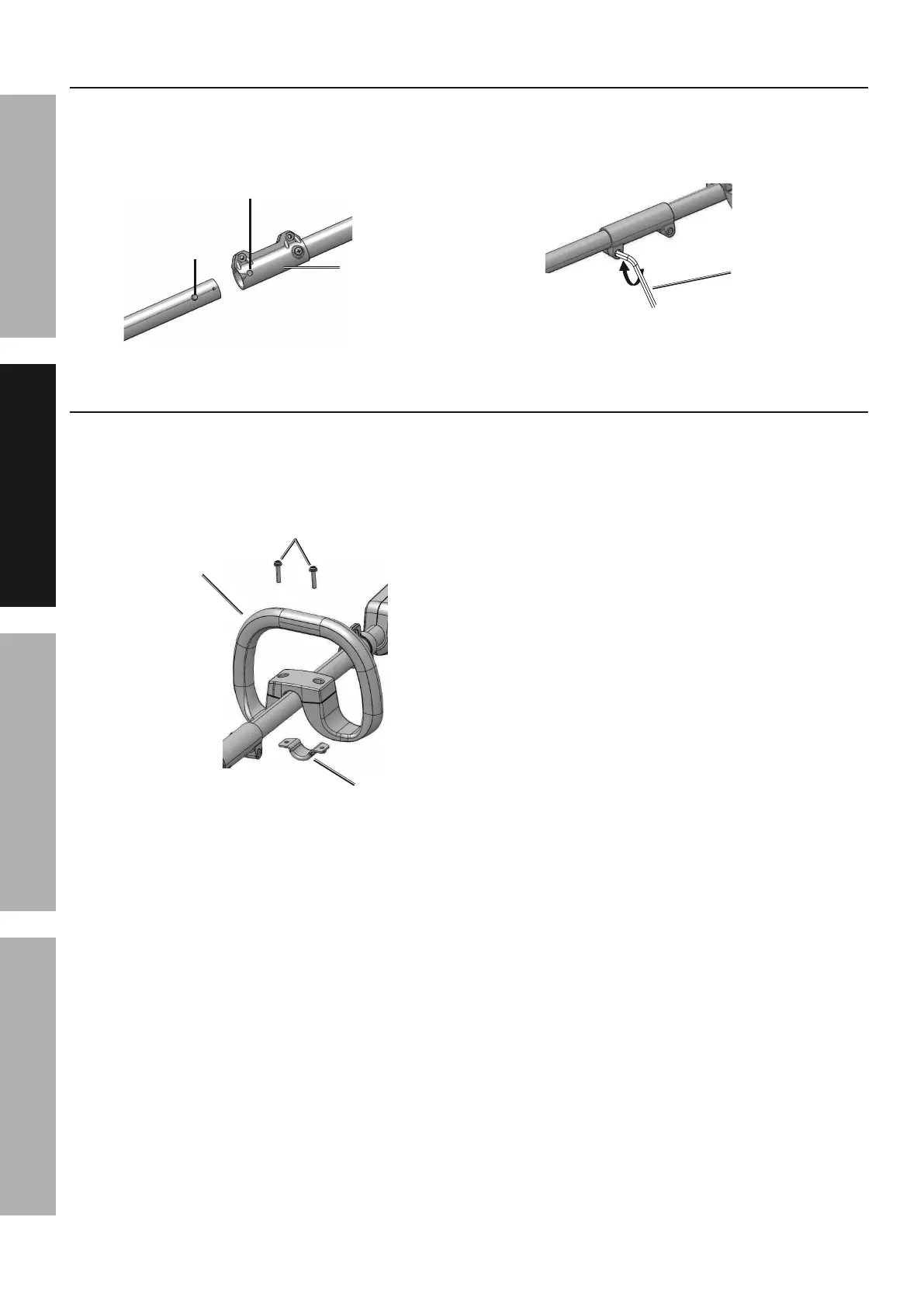
1. Loosen the screw on the open end of the Coupler.
2. Align Release Button with the open slot on the
Coupler and slide the two shafts into each other.
R&'/7*(
N*7*,#*%
;'$$&8
H7&$
3. Adjust the lower shaft until Release
Button locks into Slot.
4. Tighten coupler screw with Hex Wrench.
^*\%
T(*84.
O8#$,77%I'\"7",(<%^,897*
1. Use a screwdriver to remove Screws
from Auxiliary Handle.
2. Place Auxiliary Handle and Clamp onto the
shaft and use Screws to connect together.
R7,5/
I'\"7",(<%
^,897*
H4(*)#
3. Adjust Handle to desired position
and tighten Screws to secure.



 To Next Page