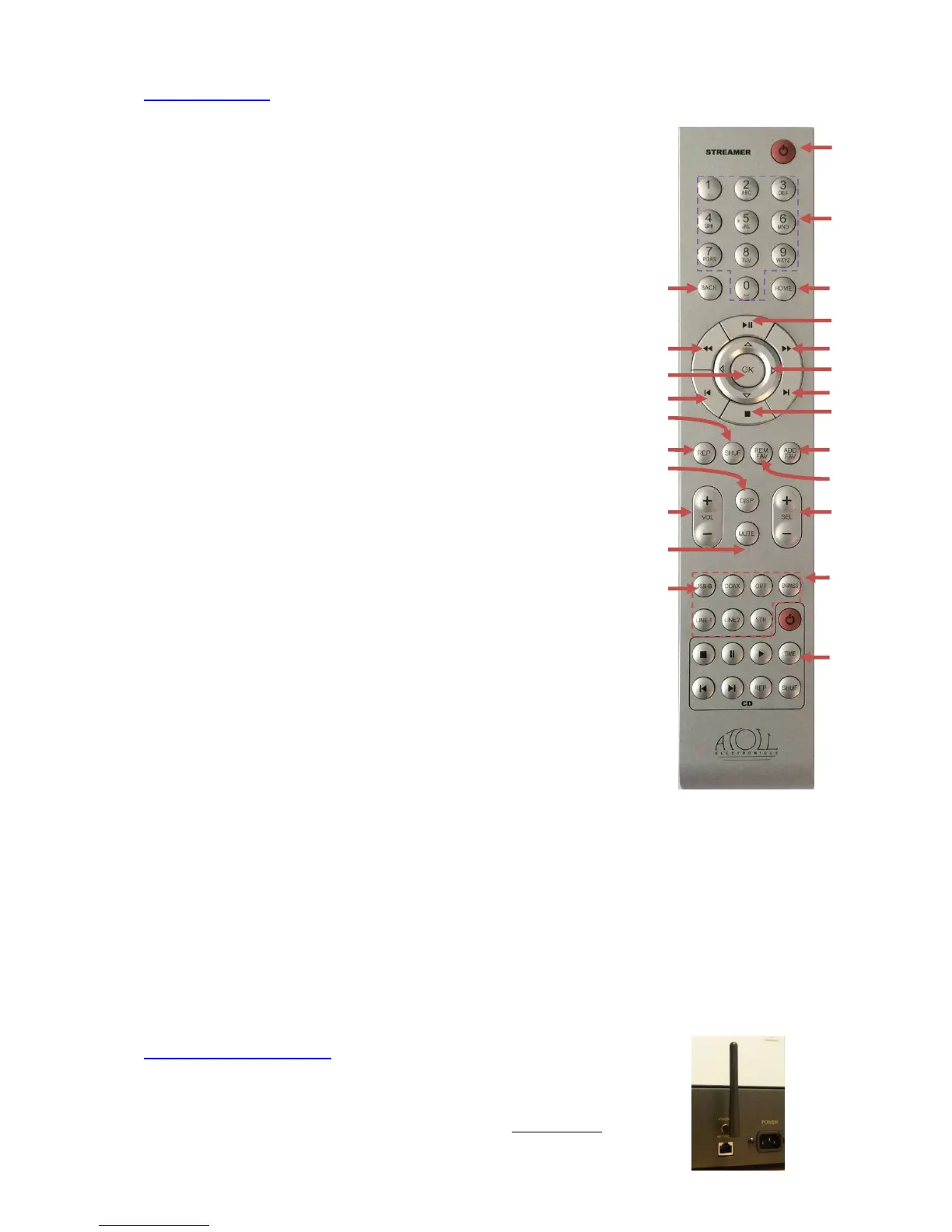
REMOTE CONTROL:
Reminder of these keys on the front panel:
14- Volume control + & -
15- Inputs selections + & -
19- Navigation in the menu keys
21- Stand-by key 5 (2 modes: see previous chapter)
22- Alphanumeric keys Used to select track, or input numbers,
letters and characters (from 0 to 9 and from A to Z)
By quick successive press on keys 2 for example, allows to scroll: a, b, c, 2, A, B, C
23- Home: to return to the playing source
24- Play / Pause & Enter key
25- Fast forwards key
26- Next track keys
27- Stop key
28- ADD FAV: Key to put the selection in the "Favorites" menu.
Press OK to validate and return to normal playback.
29- REM FAV : key to remove the 'Favorites' menu selection.
30- Input selection button: USB-B ; Coaxial ; Optical ; By-Pass
(press during 2 seconds) ; Line1 ; Line2 ; Streamer.
31- CD players keys: keys allowing to control the CD players
and Drive from Atoll.
32- BACK: Key return back in menus.
33- Backwards through track
34- OK: Validation key in menu’s choices.
35- Previous track selection key
36- SHUF: plays current list on random order
37- REP: repeat key
38- DISP: changes of display appearance
39- MUTE: sound muting
40- USB-B/Bluetooth: A short press selects the USB-B input (red led); a long press (2-3 sec.) selects the
Bluetooth input (see p.10)
WIFI ANTENNA CONNECTING:
Make sure the good implementation of the Wi-Fi antenna prior to connection and any use.
The antenna is packed with the remote control.
Please use the supplied antenna or a similar Wifi antenna with male connector.



 To Next Page