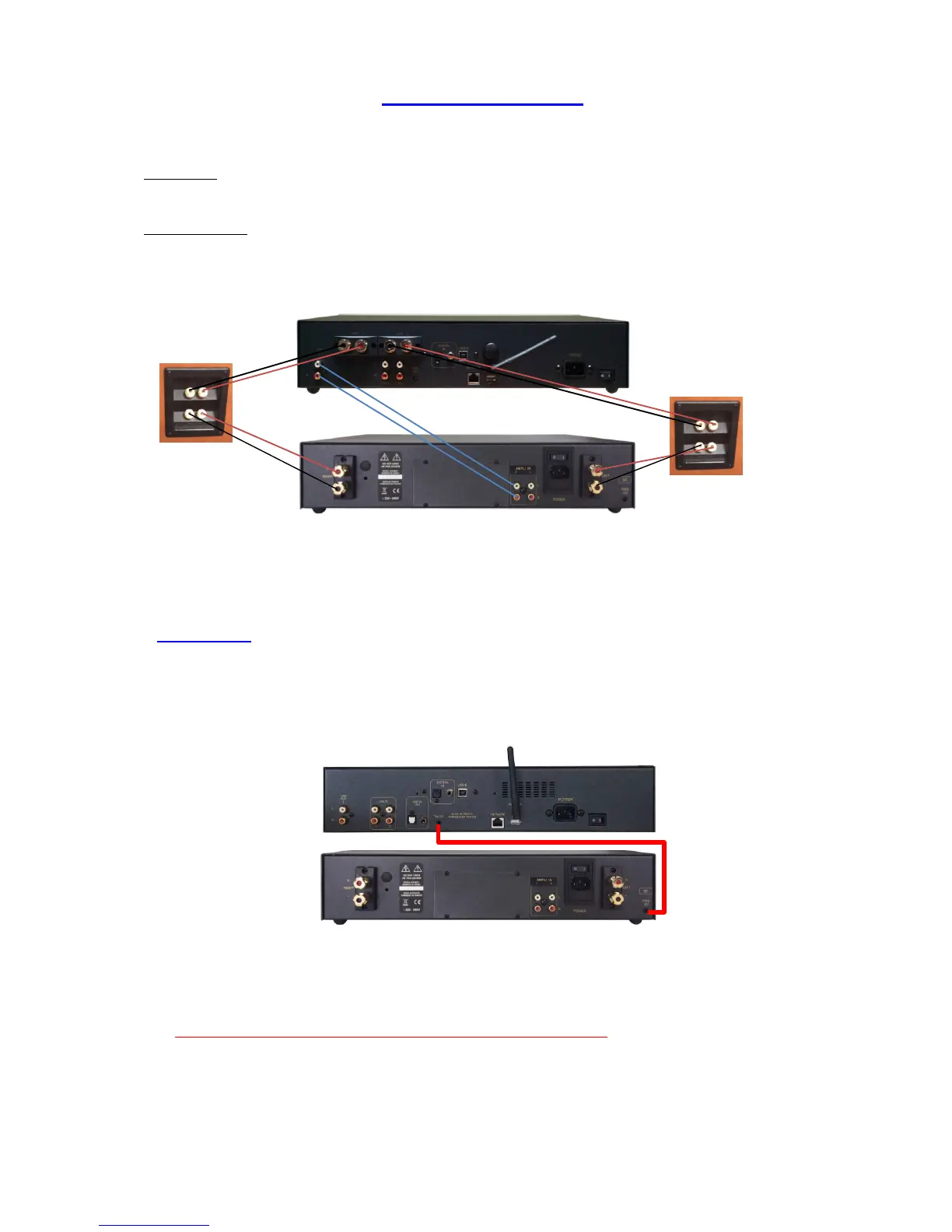
2 – CONNECTING SETUP
Connecting: As an Integrated, the SDA can be directly connected to a pair of loudspeakers. Take care to respect
Left & Right polarity between outputs and terminal inputs of the speakers.
Bi-amplification: Your appliance can also be used as a single power amplifier (preamp section by-pass) and
also be used for bi-amplification. See below details about connecting.
TRIGGER LINK
This appliance is equipped with a Trigger that allows the switch ON/OFF of any amplifier equipped with the
same kind of trigger inputs (amplifier ATOLL AM200se).
Appliances must be linked as shown below:
Streamer
Amplifier AM200se
In order that the system is operating, the ON/OFF button of your AM200se must remain in position OFF
(position (0)). If the switch is in the ON position (I), the amplifier will work but not the Trigger function.
Trigger cable must be a Male to Male STEREO jack plug 3.5mm (1/8”)



 To Next Page