6
CONNECTORS
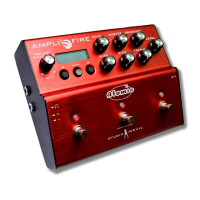
1. DATA ENTRY ENCODER – used
to select and edit user presets.
Turn to select a preset or change
a parameter value. Push (click) to
select menus for editing presets.
2. BACK BUTTON – used to decrease
preset or to go to previous item in
edit menus.
3. SAVE BUTTON WITH LED – used to
save presets. Press once to select
destination and new preset name.
Press again to commit the save.
Press and HOLD for TUNER function.
Built-in LED blinks when a preset
has been edited but not saved as a
warning to save your edits.
4. NEXT BUTTON – used to increase
preset or to go to next item in edit
menus.
5. LCD SCREEN – displays currently
active preset or edited data name
and value.
6. GAIN KNOB – adjusts the gain
control of the preamp of the virtual
guitar amplifier model.
7. MASTER KNOB – adjusts the
master volume control of the virtual
guitar amplifier model.
8. PRESENCE KNOB – adjusts the
presence control of the simulated
power amp section of the virtual
guitar amplifier model.
9. BASS KNOB – adjusts the bass
equalization control of the tone
stack in the virtual guitar amplifier
model.
10.
MIDS KNOB – adjusts the mids
equalization control of the tone
stack in the virtual guitar amplifier
model.
11. TREBLE KNOB – adjusts the treble
equalization control of the tone
stack in the virtual guitar amplifier
model.
12. LEVEL KNOB – sets the output
level of all outputs simultaneously
(MAIN outputs, AUX outputs, and
HEADPHONES level). This is like an
analog output level control.
13. FOOTSWITCH – fully programmable
footswitch for changing presets,
enabling individual effects, selecting
tap tempo, and more.
14. DUAL-COLOR LED – indicates
the state of the programmable
footswitch. In preset mode, lights up
in RED or AMBER to indicate preset
A or preset B. In effect enable mode,
lights up RED when effect is active.
Blinks at repeat rate for TAP TEMPO
function.
15. GUITAR INPUT – Hi-Z input for
connecting an electric guitar with a
1/4” phone jack.
16. MAIN OUTPUTS – TRS balanced
(or unbalanced) 1/4” output jacks
for connecting to amplifiers, mixers,
computer interfaces, or input
channels of other audio devices.
17.
1
2
3
4
5
6
7
8
9
10
11
12
14
13
16
15


 To Next Page