II
3.
Microcomputer Controller Operation Instruction:
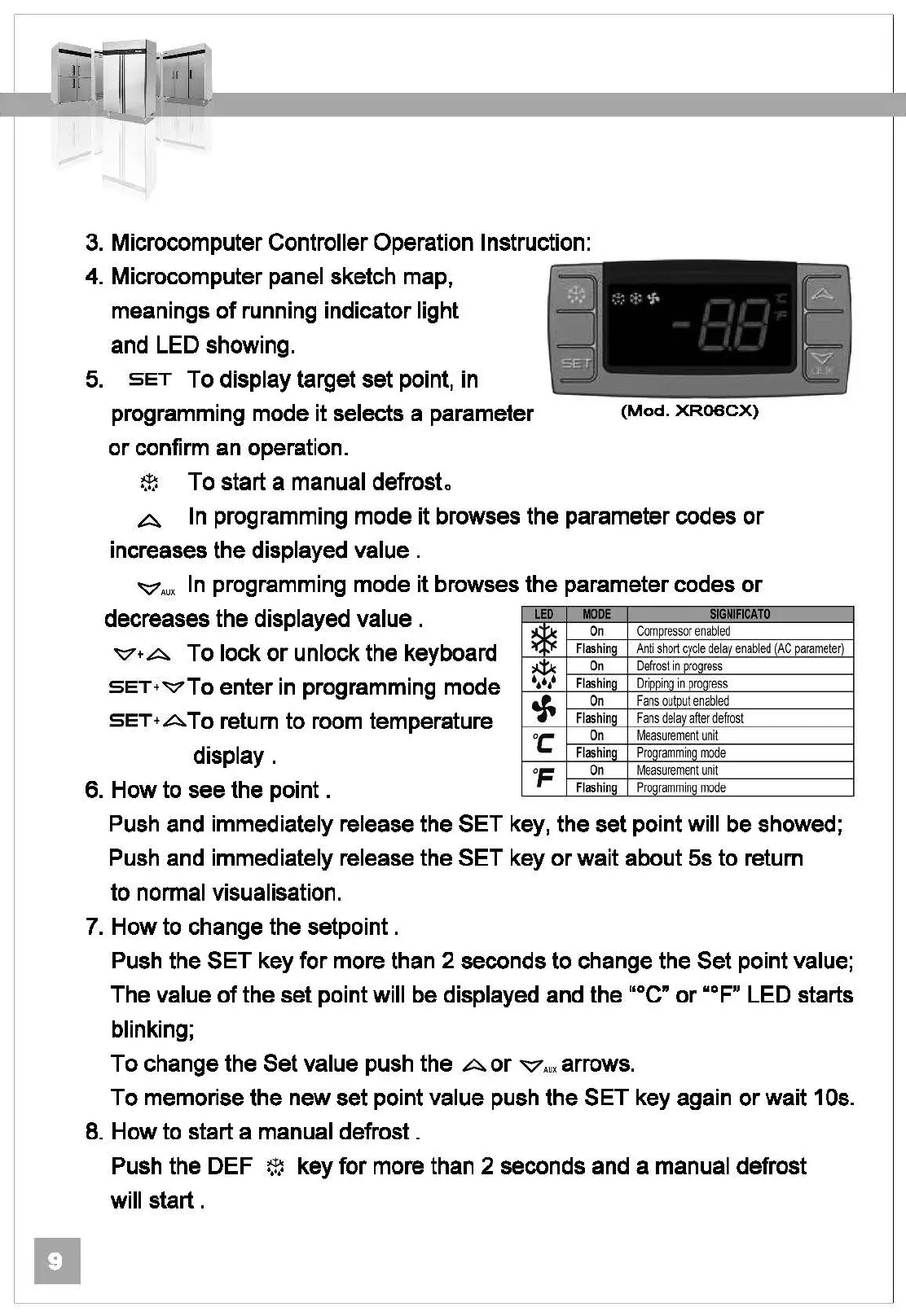
4. Microcomputer panel sketch map,
meanings
of
running indicator light
and LED showing.
5.
SET To display target set point, in
programming mode it selects a parameter
or
confirm an operation.
~
To start a manual defrosto
(Mod.
XR06CX)
A In programming mode it browses the parameter codes
or
increases the displayed
value.
"'7Aux
In
programming mode it browses the parameter codes
or
decreases the displayed value .
~+A
To lock
or
unlock the keyboard
SET+~To
enter
in
programming mode
SET+ATo
return
to
room temperature
display.
6. How to see the point .
LED
*
¢Jc
•••••
tf.
oc
OF
MOOE
SIGNIFICATO
On
Co
mpres
sor
enable
d
Flashing
Anti
sh
ort
cyc
le
delay
en
ab
led
(AC
pa
r
ameter
)
On
De
fr
ost
in
pro(l
re
ss
Flashing
Drippinq
in
proqress
On
Fans out
pu
t
enable
d
FlashinQ
Fa
ns
dela
v a
ft
er
defrost
On
M
easurement
un
it
Flashing
P
rogrammi
ng m
ode
On
M
ea
s
urement
un
it
Flashing
P
rogrammi
ng m
ode
Push and immediately release the SET key, the set point will be showed;
Push and immediately release the SET key
or
wait about
5s
to
return
to
normal visualisation.
7. How to change the setpoint .
Push the SET key for more than 2 seconds to change the
Set
point value;
The value
of
the set point will be displayed and the "°C"
or
HF" LED starts
blinking;
To
change the Set value push the A
or
"'7Aux arrows.
To
memorise the new set point value push the SET key again
or
wait 10s.
8.
How to start a manual defrost .
Push the DEF
~
key for more than 2 seconds and a manual defrost
will
start.



 To Next Page