4 5
6 7
7. Aircraft Functions
5. How To Fly
6.Using the Remote Controller
Left Stick Right Stick
Up / Down Forward / Backward
Turn left / Turn Right Left-sideward / Right-sideward
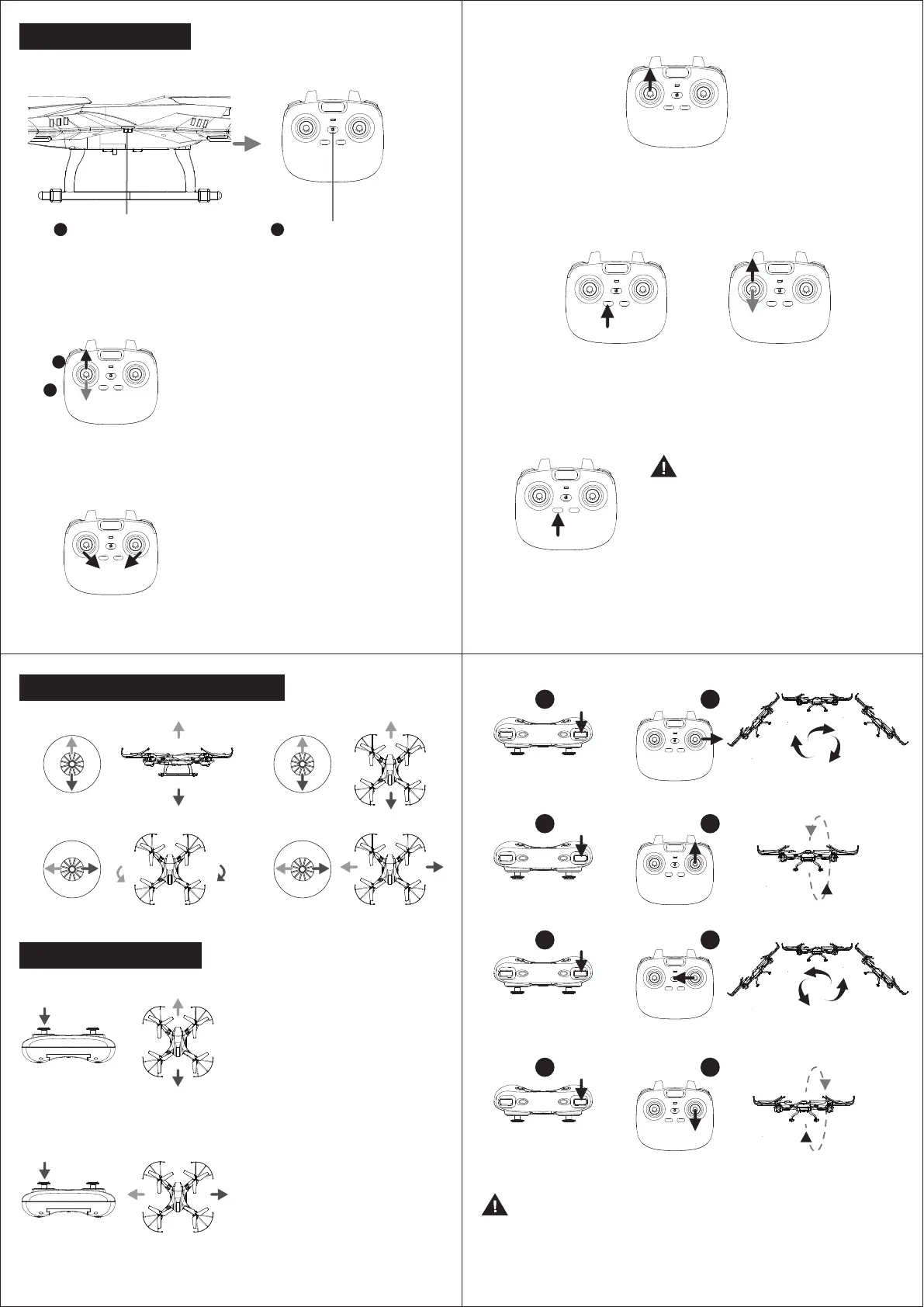
(1) Switch On the Power
OFF ON
Power on the drone. Power on the Controller.
(3) Gyroscope Calibration
(4) Activate motors for taking-off
Push Left Joystick to right corner and Right
Joystick to left corner at the meantime (Pic 2).
The indicator lights of the drone are flashing
rapidly for about 3 seconds. The The indicator
lights are turning solid when completed.
1
(2) Pairing
2
Take off: After activating motors, press “Left function switch”
(or push up the Left Joystick slowly) to take off.
Landing: When the drone is in the air, press “Left function switch”
(or keep pushing down the Left Joystick slowly) to land.
Emergency Stop
In case of emergency status,
keep press “Left function switch”
about 3 seconds, the drone will
immediately stop functions and
drop off.
After pairing, push the Left Joystick to the top then release to activate motors,
then the propellers start rotating.
After Powering On the drone, both indicator
lights on the Drone and Remote are flashing,
then push the Left Joystick to the top, and
then down to the lowest (Pic 1). After 2 secs,
the indicator lights are turning solid,
that means the pairing succeeds.
(5) Take off / Landing
360° Stunt Function
Adjustment for deviated flying to Front/Backward
Adjustment for deviated flying to Sideward
1. Press the 360° Stunt
2. Push the stick to right, the drone will rotate 360° toward right direction
1. Press the 360° Stunt
2. Push the stick to top, the drone will rotate 360° toward front direction.
1. Press the360° Stunt
2. Push the stick to left, the drone will rotate 360° toward left direction.
1. Press the 360° Stunt
2. Push the stick to bottom, the drone will rotate 360° toward back direction.
Vertically press Left Joystick for activate
adjustment fucntion.
If it leans forward, push Right Joystick to
backward.
If it leans backward, push Right Joystick to
forward.
Vertically press Left Joystick for activate
adjustment fucntion.
If it leans right sideward, push Right
Joystick to left side.
If it leans left sideward, push Right
Joystick to right side.
Note:
* There are continuous beeps from the remote when you activate this function.
If you do not move the Right Joystick about 5 seconds after you press the 360°
Stunt switch, the function will be cancelled and the remote will stop beeping.
* This function can’t be activated when the battery of the drone is low.
Vertically press Left Joystick again for deactivate adjustment fucntion,
after finished adjustment.
Vertically press Left Joystick again for deactivate adjustment fucntion,
after finished adjustment.
1
2
OR
1 2
360°
flip
360°
flip
1 2
1 2
1 2
(Pic 1)
(Pic 2)



 To Next Page
 Loading...