20
21
2, Control with the remote controller
(IF your drone with controller)
1, Power on the drone and power on the remote, after pairing the
frequency between the remote and drone (the lights of the drone
and controller become permanent), then connect the WIFI signal
between your device and the drone.
2, Put the device to the clamp of the remote controller, then go to the
app interface to play the FPV flying.
3, Press the “Picture”button on interface or on controller, to take
picture. Press the “Video” button on interface or on controller, to
take video. After taking you can review the files from the media
folder, or from your album file of your device.
APP operation method
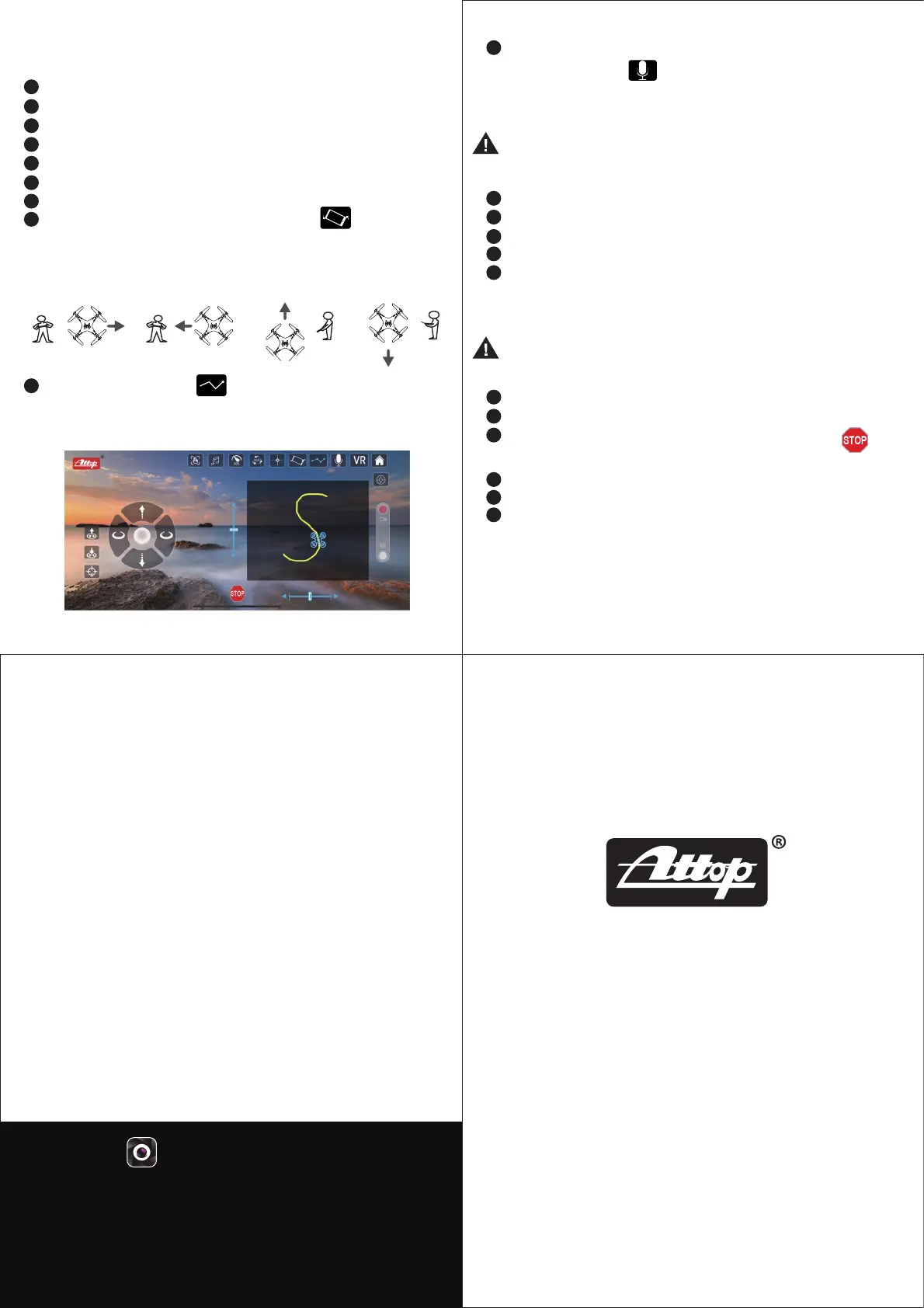
Ascend / Descend / Turn left / Turn right
Go forward / Go backward / Left side flying / Right side flying
Gesture control
Music
Speed mode: 30%,60%,100%
360° flip
Headless mode
Gravity Control: Switch “Gavity Sense Mode ”, wave the
mobile phone as image showed below, the drone will move as
same direction movement.
Flight path mode: Press and you can draw a flying route
plan on the screen, the drone will fly according to the route
you designed.
1
2
3
4
5
6
7
8
9
Voice control: Unlock the motors and the rotors of the drone start
rotating, then press and say “Take off ” / “Landing” /
“Forward” / “ Backward” / “Left side” / “Right side” six voice
instructions, the drone will reflect correspondent actions.
10
19
20
21
VR mode: Suitable for VR glasses using.
Return home page
On/Off for control interface
Switch to take video
Switch to take photo
After taking photos and videos, you can review them from
Home page Media Folder or your album file of your mobile device.
Note: The APP needs your access allowance to phone album,
when first activate this function.
Go Forward / Backward trimmer
Left / Right side flying trimmer
EMERGENCY STOP:In case of an emergency, press
the drone will immediately stop functions and drop off.
One key take off
One key landing
Calibration
11
12
13
14
15
16
17
18
1.Turn Right 2.Turn Left 3. Forward 4.Backward
Customer Service Email : support@attoptoys.com
www.attoptoys.com
Name of App: ATTOP CLUB
Apply to IOS \ Android system (Note: Apply to Android 2.3 or above
such as SAMSUNG, SONY, HUAWEI and etc.
But cannot guarantee the phone of other brands with Android system
could operate stably.)
22
30-Day Whole Unit Warranty For Quality-Related Issue
For 30 days after the date of purchase, we take care of all quality-related
issues with a REPLACEMENT.
Reminder : Be sure to operate your drone as directed.
90-Day Accessories Warranty For Any Reason
For 90 days after the date of purchase, we take care of all accessories
quality-related issues with an ACCESSORY REPLACEMENT.
Reminder: Be sure to maintain your drone as directed.
Note: The APP needs your access allowance to use
microphone,when first activate this function.


 To Previous Page
 Loading...