EasyManua.ls Logo

Audi A4 2023 - Page 141

Audi A4 2023
310 pages
Print Icon
To Next Page IconTo Next Page
To Previous Page IconTo Previous Page
Loading...
8W10127218G
Driver
assistance
Overriding
control
‘Apples
to:
vehicles
with
Audl
adaptive
cruise
control
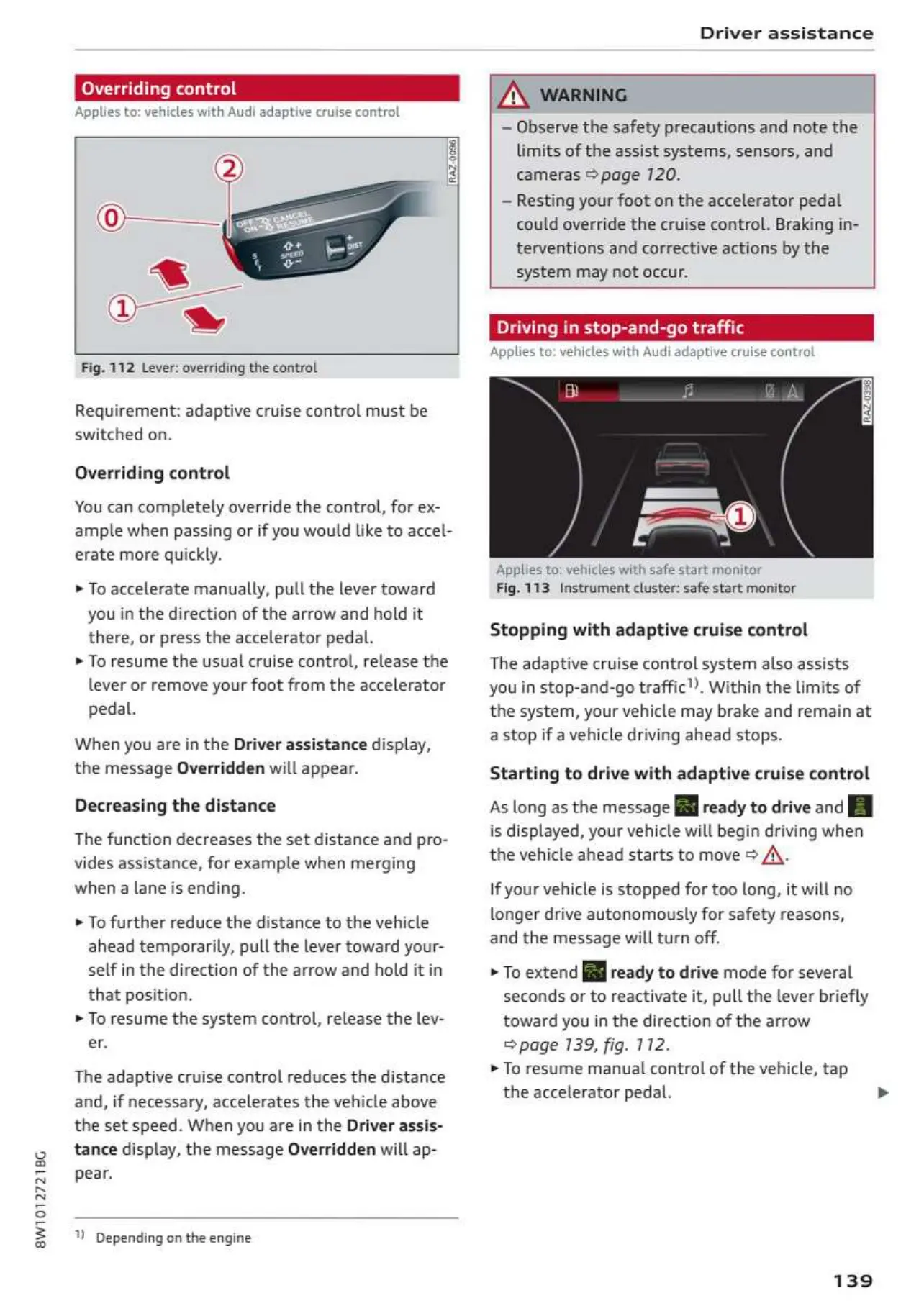
Fig.
112
Lever:
overriding
the
control
Requirement:
adaptive
cruise
control
must
be
switched
on.
Overriding
control
You
can
completely
override
the
control,
for
ex-
ample
when
passing
or
if
you
would
like
to
accel-
erate
more
quickly.
»
To
accelerate
manually,
pull
the
lever
toward
you
in
the
direction
of
the
arrow
and
hold
it
there,
or
press
the
accelerator
pedal.
»
To
resume
the
usual
cruise
control,
release
the
lever
or
remove
your
foot
from
the
accelerator
pedal.
When
you
are
in
the
Driver
assistance
display,
the
message
Overridden
will
appear.
Decreasing
the
distance
The
function
decreases
the
set
distance
and
pro-
vides
assistance,
for
example
when
merging
when
a
lane
is
ending.
»
To
further
reduce
the
distance
to
the
vehicle
ahead
temporarily,
pull
the lever
toward
your-
self
in
the
direction
of
the
arrow
and
hold
it
in
that
position.
»
To
resume
the
system
control,
release
the
lev-
er.
The
adaptive
cruise
control
reduces
the
distance
and,
if
necessary,
accelerates
the
vehicle
above
the
set
speed.
When
you
are
in
the
Driver
assis-
tance
display,
the
message
Overridden
will
ap-
pear.
Depending
on
the
engine
—
Observe
the
safety
precautions
and
note
the
limits
of
the
assist
systems,
sensors,
and
cameras
©
page
120.
—
Resting
your
foot
on
the
accelerator
pedal
could
override
the
cruise
control.
Braking
in-
terventions
and
corrective
actions
by
the
system
may
not
occur.
Driving
in
stop-and-go
traffi
Applies
to:
vehicles
with
Audi
adaptive
cruise
control
‘Applies
to:
vehicles
with
safe
start
monitor
Fig.
113.
Instrument
cluster:
safe
start
monitor
Stopping
with
adaptive
cruise
control
The
adaptive
cruise
control
system
also
assists
you
in
stop-and-go
traffic’).
Within
the
limits
of
the
system,
your
vehicle
may
brake
and
remain
at
a
stop
if
a
vehicle
driving
ahead
stops.
Starting
to
drive
with
adaptive
cruise
control
As
long
as
the
message
[i
ready
to
drive
and
[El
is
displayed,
your
vehicle
will
begin
driving
when
the
vehicle
ahead
starts
to
move
>
A\.
If
your
vehicle
is
stopped
for
too
long,
it
will no
longer
drive
autonomously
for
safety
reasons,
and
the
message
will
turn
off.
»
To
extend
[J
ready
to
drive
mode
for
several
seconds
or
to
reactivate
it,
pull
the
lever briefly
toward
you
in
the
direction
of
the
arrow
©
page
139,
fig.
112.
»
To
resume
manual
control
of
the
vehicle,
tap
the
accelerator
pedal.
139

Table of Contents