Copyright © by Audiotechnik Dietz
®
Vertriebs-GmbH ● Germany
Rev 0, Stand: 12 / 2006
11
Installation
The interface is intended to connect an external audio and video source with the following
navigation systems:
Audi 16:9 DVD Navigation Plus RNS-E without original TV tuner
E
N
G
L
I
S
H
Installation 1417
1. Remove and disconnect the navigation system.
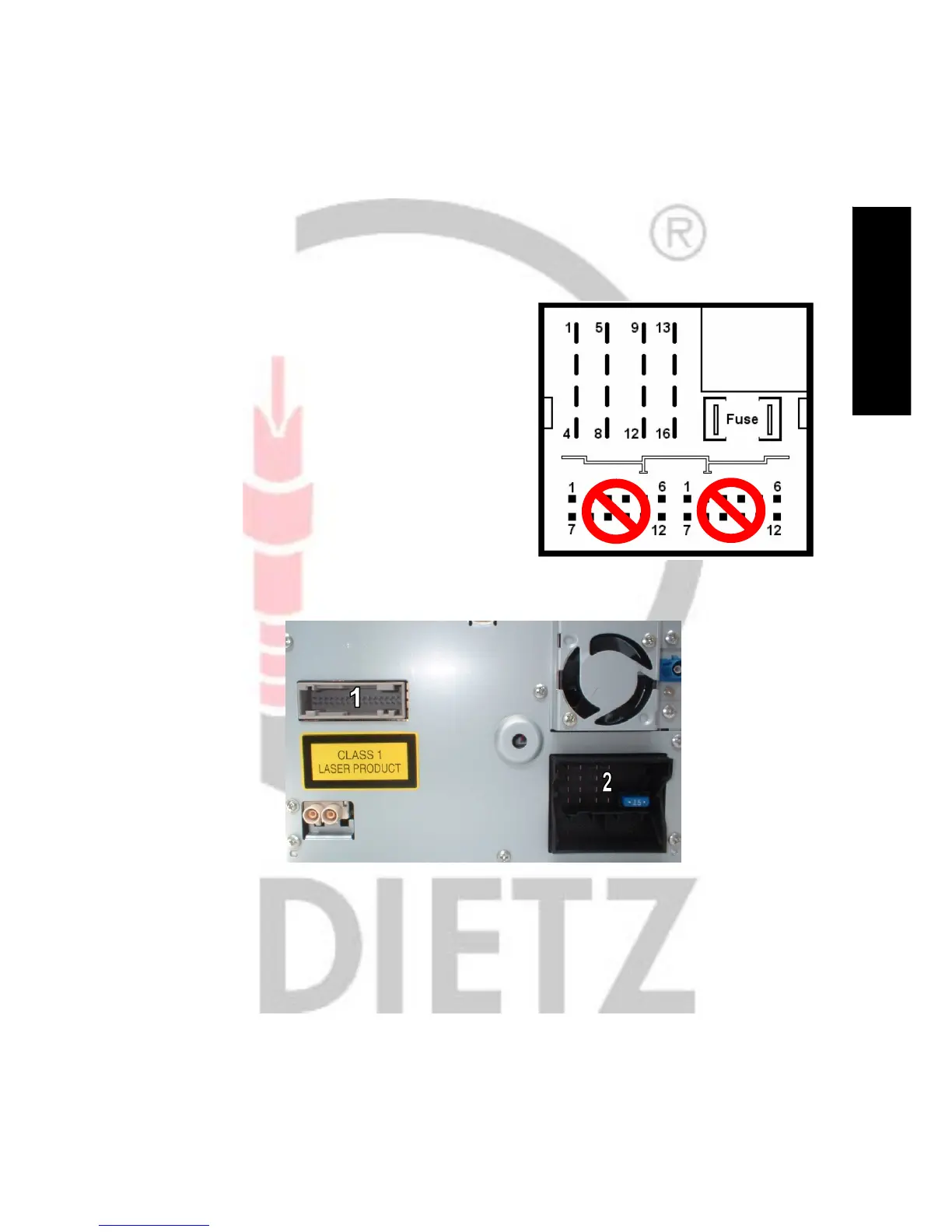
2. Connect the wires with loose ends from 1417 as follows: MOST connector at head unit
White (CAN high) Pin 9
Green (CAN low) Pin 10
Black (ground) Pin 12
Red (+12V, permanent) Pin 15
Wires have to be connected in parallel to the existing at the MOST connector (2).
3. Connect the grey plug from 1417 with the jack in the rear (1) of the head unit.
4. Connect RCA jacks - A: audio right (black), B: audio left (black), C: video (red, CVBS) with the video source.
Connection to the video source should only be done with high quality RCA video cables,
otherwise the picture quality could be bad, caused by a weak video signal.
5. Refit the head unit.


 To Next Page
 Loading...

