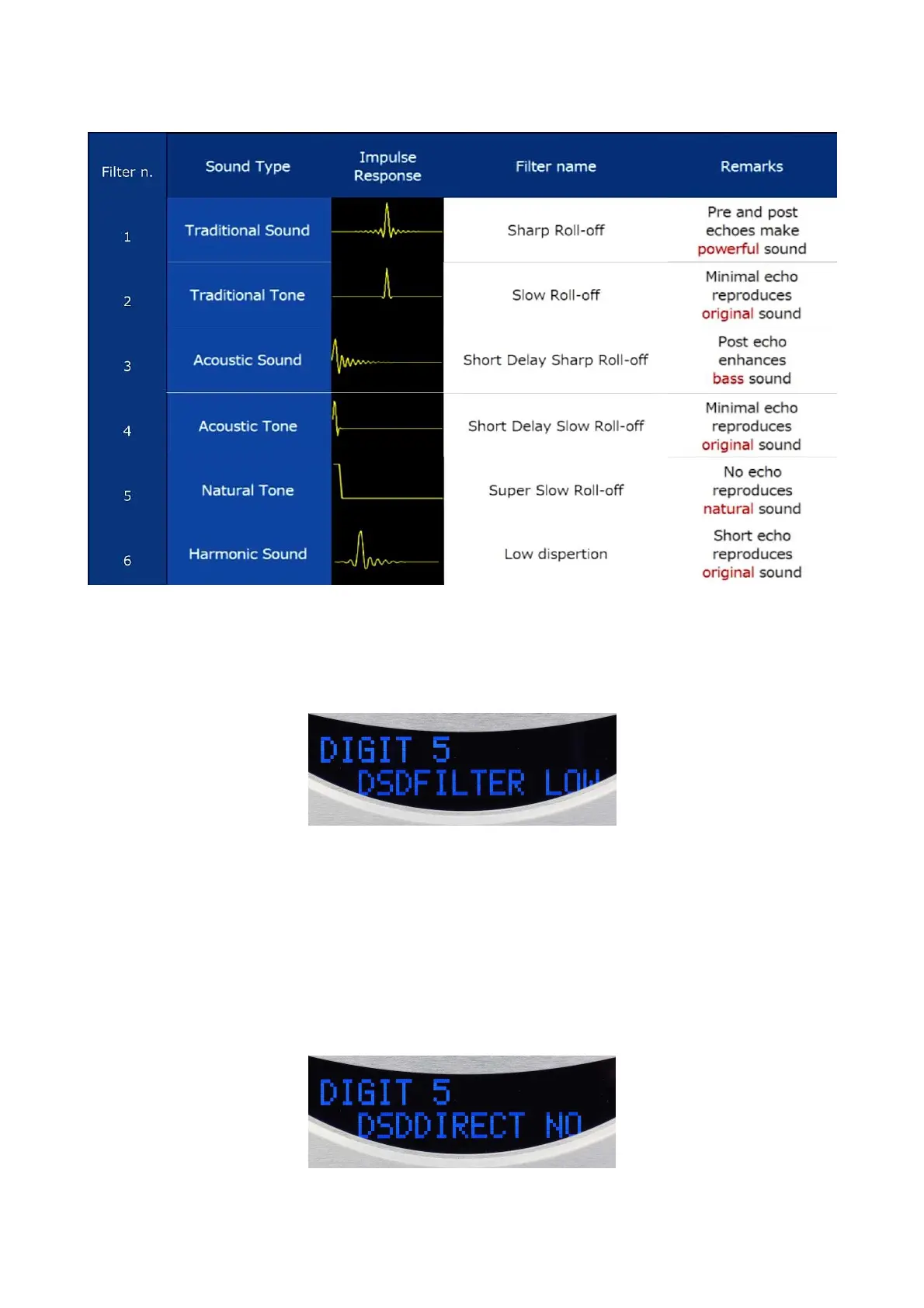
Here is a table to illustrate the differences between the 6 PCM filters :
Mode SET DSD FILTER
By this function you can choose the filter applied to the DSD stream on the DIGIT 5 (USB
input )only. Two filters are available and act in the analogic domain after the conversion : LOW
(roll-off at 39 kHz and soft slope ) ou HIGH (roll-off at 76 kHz and sharp slope).
Upon entering in this mode, the display shows automatically the USB input and on second line
either LOW or HIGH filter blinking. Press SET key to confirm otherwise press + or – keys to
select tthe other filter. Validation is effective when the display stops blinking after few seconds
without instructions. The display returns to the initial mode screen.
Mode SET DSD DIRECT
Like the previous one, this mode only concerns the USB input (DIGIT 5). It allows the choice for
the only DSD stream to bypass (DIRECT YES) or to pass though a filter to reduce the noise
(DIRECT NO).


 To Next Page