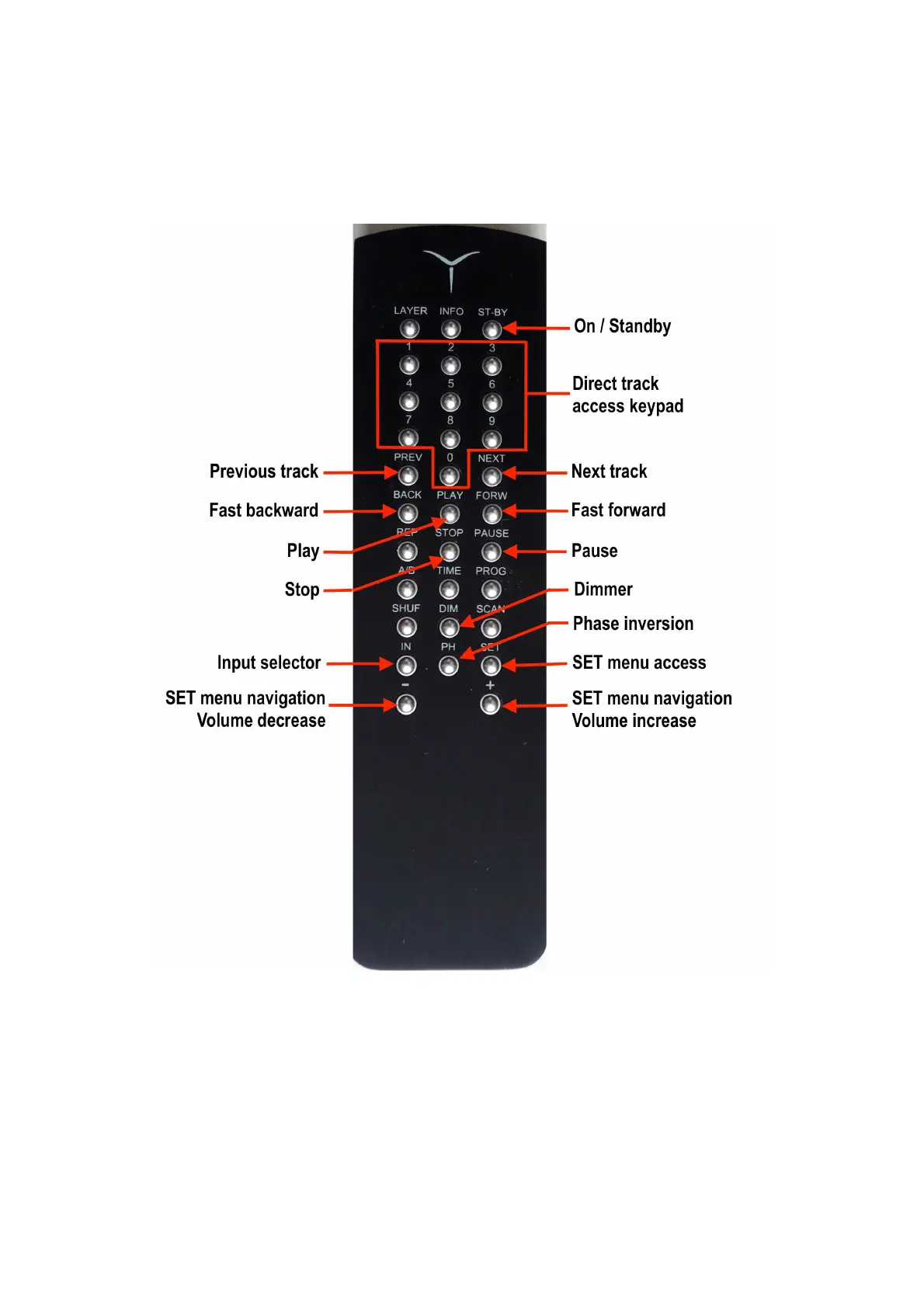
Remote control
You will find the remote control in the accessories box with a screwdriver and the battery. The
battery is lithium button 3V, CR2032 type. To place the battery, remove the bottom of the case by
loosening the 3 screws with the provided tool and insert the battery in its compartiment while
observing the correct polarity : + pole upside.
You will find on the remote control all the functions on the front panel and several additional
functions ; some of them will be effective in a next update.
ST-BY (= ON) : to turn the unit in ON or in STANDBY mode
Direct track access keypad : to access to any track of the CD after starting playback
BACK and FORW : to CD playback in fast reverse ou fast forward mode; the position is indicated
by the elapsed time and/or the track's number display
IN (= INPUT) and + or – keys : to select one of the digital inputs displayed on the first line in front
of ... < INPUT
SET and + or – keys : to navigate in the SET menu (see below)


 To Next Page