1514
ANSWERING PHONE CALLS
An audible signal will notify you of incoming calls on your smartphone via
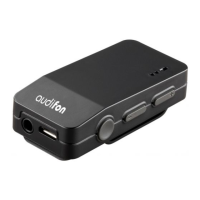
the MULTISTREAMER PRO in your hearing systems. Briefly press the multi-
function button ON the MULTISTREAMER PRO to accept the call. Speak into
the microphone of your MULTISTREAMER PRO for the caller to hear you. For
this, the smartphone only has to be within range (approx. 10 metres) of the
MULTISTREAMER PRO.
When you want to end the call, press the multi-function button briefly again.
A tone confirms to you that the telephone call has ended.
The MULTISTREAMER PRO must be paired with your hearing aids and
smartphone to use these functions.
. Volume selection
Use the buttons with the (+) and (-) symbols to adjust the volume of the audio
signal. Press the buttons briefly to do this.
When Bluetooth pairing is successful, the volume control on the MULTI-
STREAMER PRO and that on the smartphone is synchronised and changes to
volume can me made in either devices.


 To Next Page