1716
USE AS AN TV TRANSMITTER
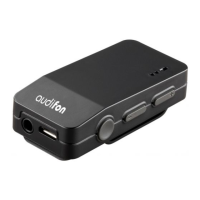
Your MULTISTREAMER PRO can also be used as an TV transmitter. For this, it
is necessary to pair the audio source your the TV with the MULTISTREAMER
PRO via Bluetooth (see 3.3.2) or to connect the MULTISTREAMER PRO with
the enclosed cable.
If the MULTISTREAMER PRO is connected to the audio source and switched
ON, the audio signal is transmitted directly to the hearing aids. For best per-
formance, the MULTISTREAMER PRO should be placed with a clear line of
sight to the hearing aid user.
Use the (+)and (-) keys on the MULTISTREAMER PRO to adjust volume to a
comfortable level. Make sure that your hearing aids are comfortably adjusted
before you change the settings with the volume control. Ask your hearing
care professional when in doubt.
USE AS A TABLE MICROPHONE
The MULTISTREAMER PRO can be used as a table microphone in acoustically
challenging environment.
To activate the table microphone function, press the multi-function button
and the (+) button simultaneously. The green LED now flashes rapidly and the
audio signal from the microphone is constantly transmitted to your hearing
aids.
To stop broadcasting the microphone signal, press the multi-function button
and the (+) button again.


 To Next Page