Page 7 of 17
AudioCodes™ MP-100/104 Gateway Quick Start Installation Guide
March 2004
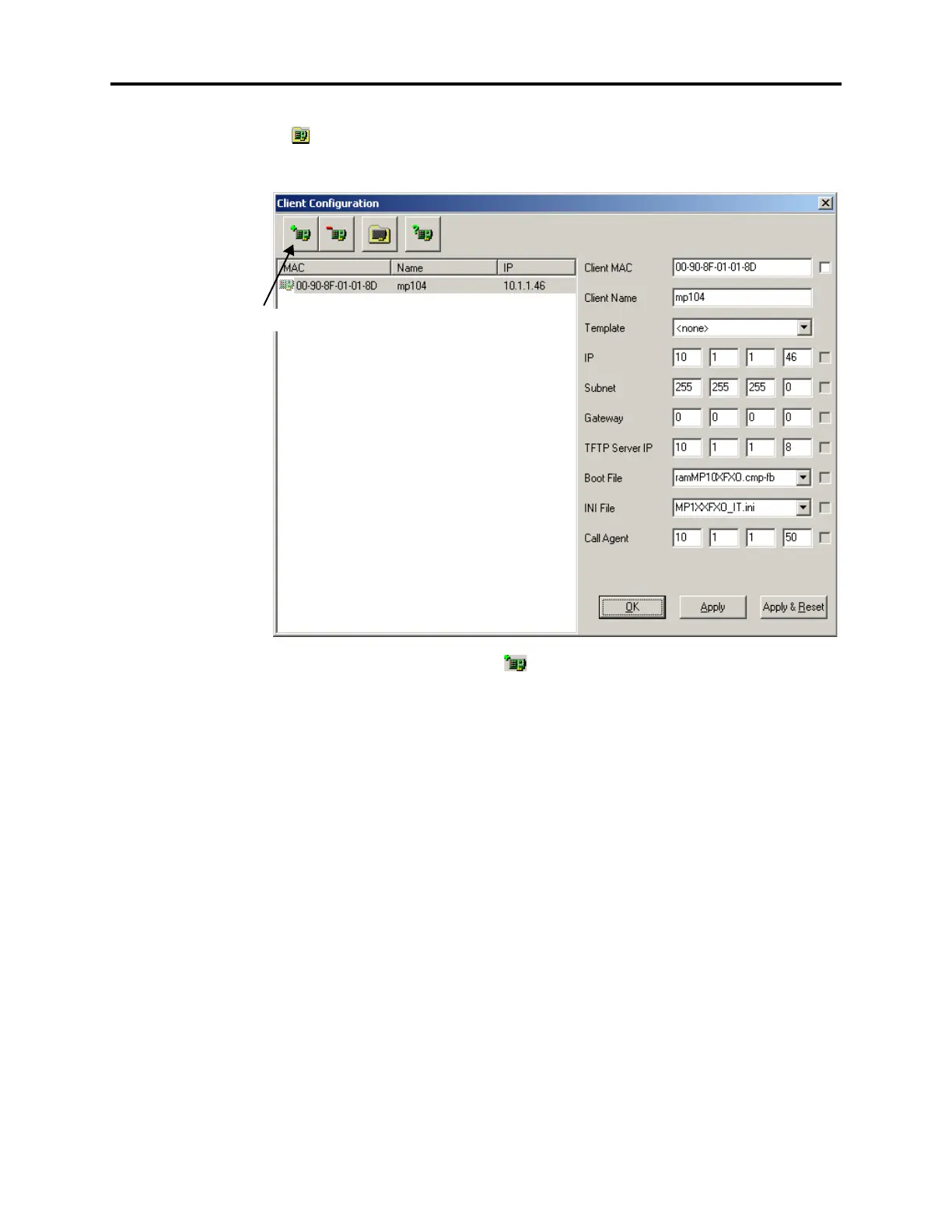
10. In the main BootP/TFTP Server screen, select Clients from the Services menu or click
. The following dialog appears. The Client Configuration dialog allows the client
(AudioCodes MP-104 gateway) to connect to the server application for code and con-
figuration updates.
11. Click the Add New Client icon ( ). Highlight the desired client (if you have more
than one client) in the list on the left, and configure the settings as described below.
• Client MAC: Enter the MAC address, which can be found on the bottom of the
MP-104 device.
• Client Name: Enter the desired name (e.g., mp104).
• Template: Select <none>.
• IP: Enter the IP address of the MP-104.
• Subnet: Enter the subnet mask of the MP-104.
• Gateway: Enter the gateway IP address of the MP-104.
• TFTP Server IP: Enter the TFTP Server IP address, if applicable.
• Boot File: Select ramMP10XFXO.cmp from the drop-down list. Then, add the -
fb
switch after the file name (ramMP10XFXO.cmp -fb). This switch automati-
cally burns the ram.cmp into the flash memory.
• INI File: Select MP1XXFXO_IT.ini from the drop-down list.
• Call Agent: Enter the IPRC IP address.
12. Click OK.
Add New Client Icon













 To Next Page