EasyManua.ls Logo

Audiofront eDRUMin - Preset Manager; Preset Types and Finding Presets

Default Icon
47 pages
Print Icon
To Next Page IconTo Next Page
To Previous Page IconTo Previous Page
Loading...
Preset Manager
'(L1(4(
!4(4(>$(
>>8(
Preset Types
  '  (    >  >  5
$(154&!J(B
J&B$$((4
Finding Presets
9(G4(42
( G +8   G  $    (  
G155
Loading a preset
$71    & G>       5
8!45>55B!4
5<>(5(5
What Settings Are Loaded
(       4   8 4 
 + ( $4 
(>>do
6   > ( 

eDRUMin Manual Page 24 of 47
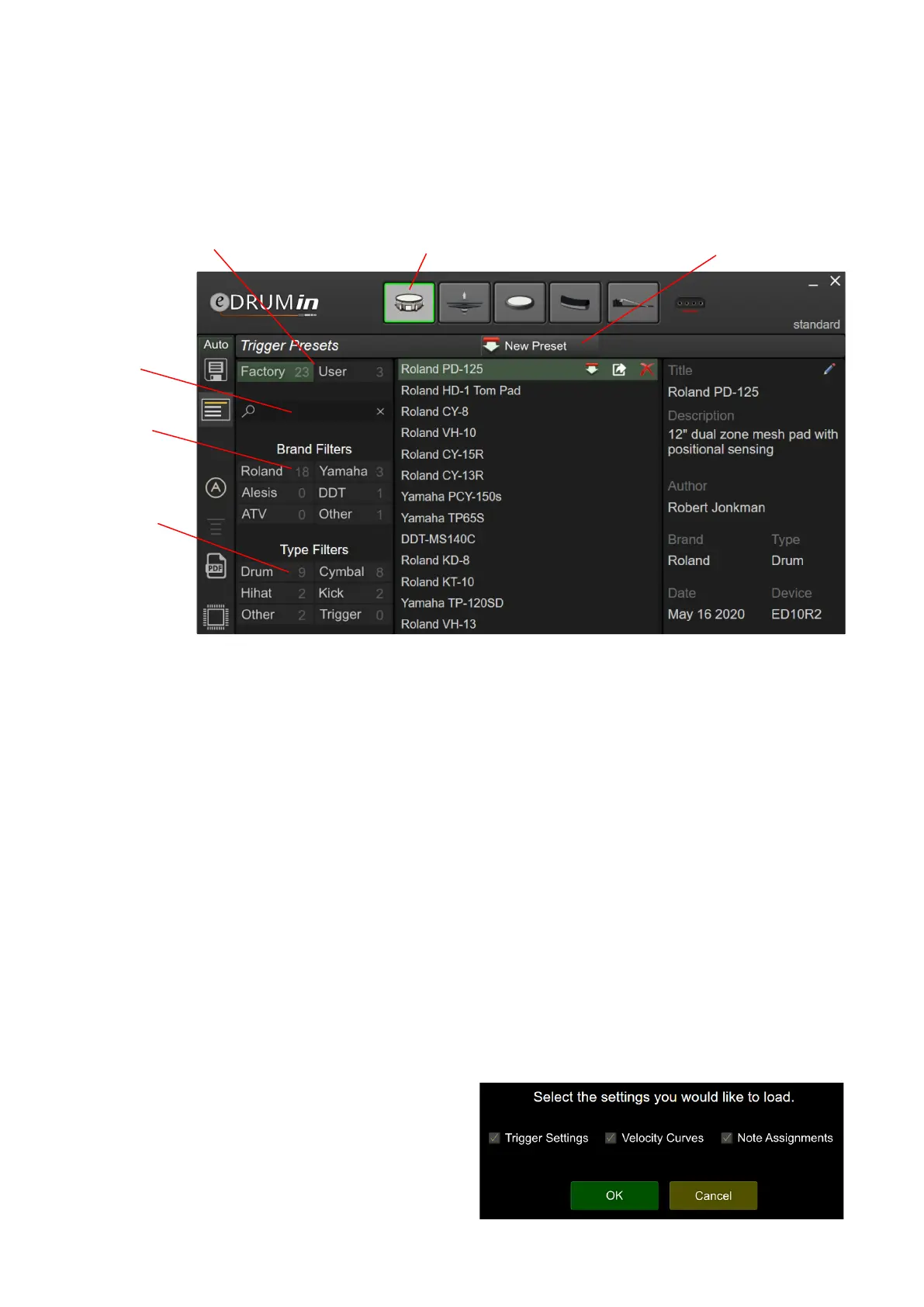
Filter presets
by brand
Filter presets
by type
Switch between Factory
and User presets
Manage presets for Trigger Inputs,
Pedal Inputs, or Device Snapshots
Create a new
preset
Search

Table of Contents

Related product manuals