DSP-2600
P.
12
ENGLISH VERSION
6.CrossoverHPFSetting:
ParameterHPF, Highpass, range: 20Hz-20KHz,
Selectable ter type: Link-Riley, Bessel, Butter-
worth. Selectable slope: 12dB, 18dB, 24dB,
48dB. Each channel has unattached highpass lter.
Example
1. PressOUT1 channel key for about 3 seconds till
the yellow light display, into EditStatusofOUT1.
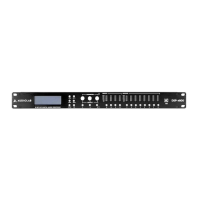
2. Press “<BACKor“NEXT>”, switch to HPF.
Displaynext:
3. Turn the rst knob of “PARA” to adjust the val-
ue. (Turn the knob clockwise, the value increses,
turn the knob withershins, the value decreases.
Turn the second knob to select lter type, turn
the third knob to select slope.
7.CrossoverLPFSetting:
Parameter LPF, Lowpass, range: 20Hz-20KHz,
Selectable ter type: Link-Riley, Bessel, Butter-
worth. Selectable slope: 12dB, 18dB, 24dB,
48dB. Each channel has unattached lowpass lter.
Example
1. PressOUT1 channel key for about 3 seconds till
the yellow light display, into EditStatusofOUT1.
2. Press “<BACKor“NEXT>”, switch to LPF.
Displaynext:
3. Turn the rst knob of “PARA” to adjust the val-
ue. (Turn the knob clockwise, the value increses,
turn the knob withershins, the value decreases.
Turn the second knob to selectltertype, turn
the third knob to select slope.



 To Next Page