128-6743
6 of 26
-6-
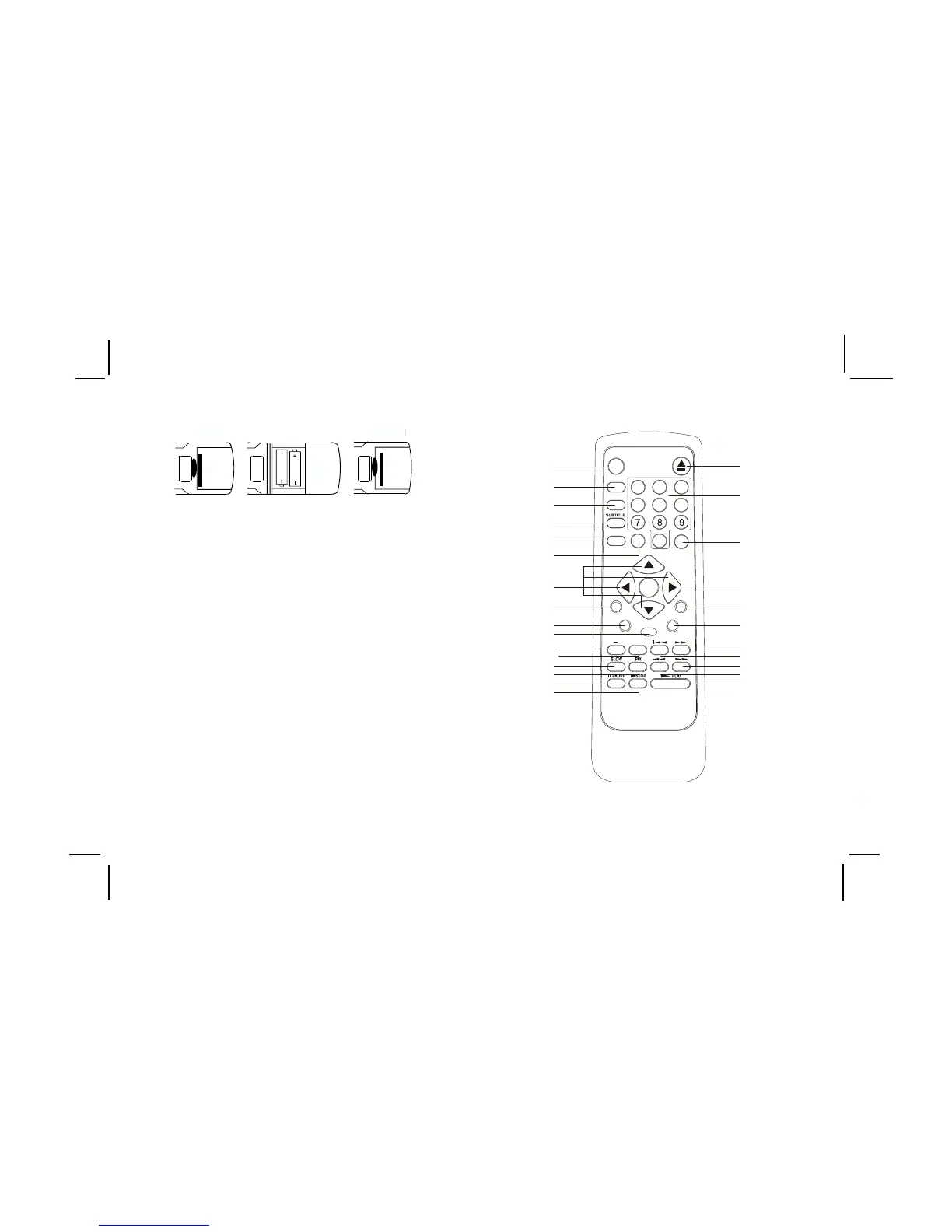
Remote Control Operation
Battery Installation
Before attempting to operate your Remote Control,
install the batteries as described below.
1) Turn the Remote Control face down. Using a
fingernail, lift the battery cover off.
2) Install two “AAA” batteries as shown. Make
sure that proper polarity (+ or -) is observed.
3) Align the cover tabs with the remote control
and press down until the cover clicks.
The remote control will operate the PROV710/
PROV710 S /PROV710 P. It is not a universal remote
control and will not control equipment from other
manufacturers
MENU
RETURN
A-B
REPEAT
SETUP
+
DVD
PO W ER
EJECT
DISPLAY
ANG LE
AUDIO
SOURCE
ZOOM
1
4
2
5
3
6
0
Enter
1
2
3
4
5
6
7
8
9
10
11a
11b
12
13
14
15
16
17
18
21
22
23
24
25
19
20
26





 To Next Page