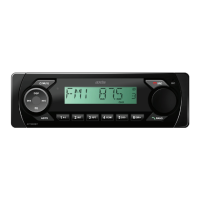
AT1900BT
12/24V WATER/DUST PROOF
AM/FM MULTIMEDIA PLAYER
SPECIFICATIONS
TUNER
- PLL Synthesized AM/FM Stereo
- Elite RDS Tuner
- FM 87.5~108 MHz; AM 531~1602 KHz
- 30 Station Presets - 18FM/12AM Memory
- Station Seek/Preset Scan/Auto Store
- Automatic or Manual Tuning
- Local/Distant Control
- Mono/Stereo
GENERAL
- Fixed Face Panel
- Mechless (without CD deck)
- IP54 Dust/Water Resistant Face & Body
- Conformal Coated PCB
- “Ultra Memory” To retain preset settings after battery
is disconnected
- Steering Wheel Control (3 Wire, 12 Function Programmable)
- Illuminated Controls (White)
- Digital Clock
- ISO DIN Mounting
- Mini DIN Chassis (96mm)
- Face Panel: 188W x 58Hmm
- Chassis: 178W x 50H x 96Dmm
- 12/24 Volt DC (10.8-32V) Negative Ground
- Max Power 40 Watts x 4 CH (24V)
BLUETOOTH
- Bluetooth in Phone Mode
- Pick-Up/End Call
- Internal/External Microphone - Selectable
- A2DP Audio Streaming
- Scrolling Song Title Display
AUDIO CONTROL
- Rotary Encoder
- Electronic Volume/Balance/Fader/
Bass/Treble
- Loud/Mute
- 4-Band DSP Settings
- Speaker Impedance 4-8 Ohm
- Tele Mute
MULTIMEDIA
- USB Input: Rear (with Charging)
- RCA AUX-IN: Rear
- 2 Ch RCA Line Out
- Intro/Repeat/Random Play/Pause
- Track Down/Up (MP3/WMA Files)
- Directory Down/Up
INCLUDED
- ISO Wiring Harness
- Installation Hardware
- 1 DIN Cradle
OPTIONAL
- Mounting U-Bracket
- External Handsfree Microphone
- DAB+ Module & Antenna
INSTRUCTION MANUAL


 To Next Page
 General