-2-
-3-
English
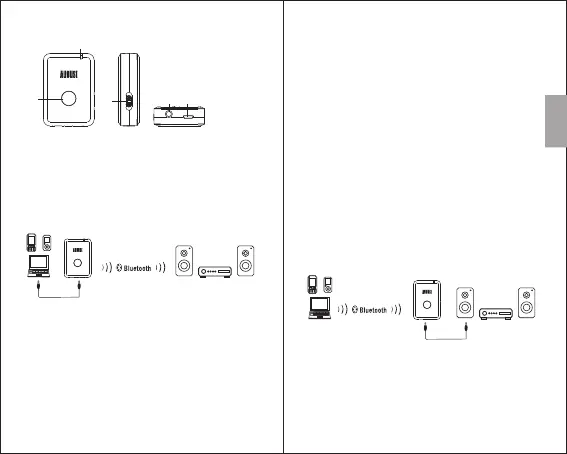
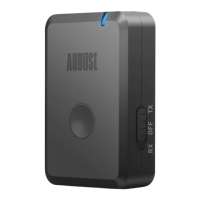
4. Part Names & Functions
1 Multi-Function Button
2) Sta tus LED
3) Receiver (RX) and Transmitter (TX) Mode Switch
4) Aux In / Out
5) Power Socket
)
5. Operations
5.1 Transmit Audio (TX Mode)
1) Select TX mode. The MR260 will enter
reconnection mode automatically and will
connect automatically to any previous known
device. To pair to a new device, press and hold
the multi-function button for 4 seconds to enter
pairing mode. In pairing mode the status LED will
flash red and blue alternately.
2) Enable Bluetooth on the receiving device
and enter pairing mode (see the device's user
manual for more information).
The MR260 will pair automatically to the receiving
device.
Once successfully paired, the status LED will light
blue constantly.
3) To pair to a new device, press and hold the multi-
function button for 4 seconds to switch the
MR260 into pairing mode again. This can be done
either when a device is already connected to the
MR260 or when the MR260 is in reconnection
mode. In pairing mode, the status LED will flash
red and blue alternately.
Note: When the receiving device is switched off,
the MR260 will enter reconnection mode. The LED
will flash blue twice per second and the MR260 will
reconnect to any previously paired device that is in
range and has Bluetooth switched on.
5.2 Receive Audio (RX Mode)
1) Select RX mode. The MR260 will enter
reconnection mode and will connect
automatically to any previous known device. If no
known device is available, the MR260 will
automatically enter pairing mode after 4 seconds
and the status LED will flash red and blue
alternately.
2) Enable Bluetooth on the source device
1
2
3
4 5


 To Next Page